25 November 2011
Trouble-
shooting
CF-4-13
FAULT CODE DESCRIPTIONS
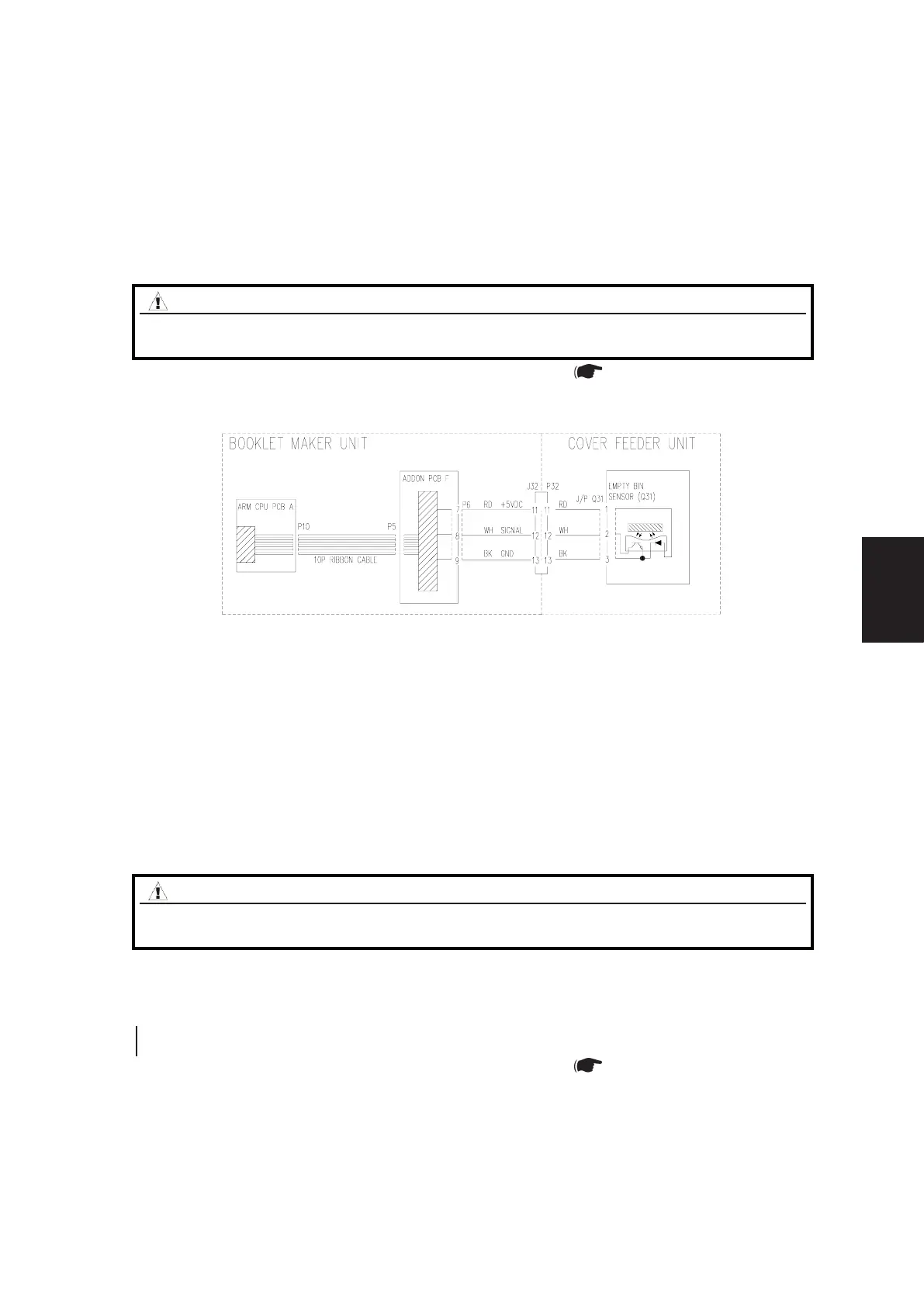
CF-201 CF-Q31 Empty Bin Sensor process
Fault Code indicates that during Run, the Empty bin sensor (Q31) became un¬blocked.
Initial Actions
• Make sure that the Empty bin sensor Q31 (PL 8.1) is installed correctly.
• Ensure that the Empty bin sensor (Q31) is clean.
Procedure
1. Inside Cover Feeder: Check Q30, Q31, Q32, Q38, M15, M16, M17 and M18 ( BK 5.1).
Check for mechanical bindings, broken, missing or loose parts.
2. Make sure that nothing interferes with the paper path in the Cover feeder.
WARNING
Switch off the Main Power Switch and disconnect the Main Power Cord
before disconnecting, removing or replacing any electrical components.
Block schematic diagram to CF-201
CF-202 CF-Q30 DSD Sensor Not activated in time
Fault Code indicates that during a run, the Paper path / DSD Sensor (Q30), was not blocked within
timeout.
Initial Actions
• Make sure that the Paper path / DSD photo transistor sensor, and the Paper path / DSD
LED sensor (Q30) is installed correctly.
• Ensure that the Paper path / DSD sensor (Q30) is clean.
Procedure
Enter the Service mode and select Paper path / DSD sensor (Q30) in check sensors. Block, then unblock, the Q30 with a
sheet of paper.
The Paper path / DSD sensor (Q30) sensor indicates :1 when the sensor is blocked and :1 when the sensor is not
blocked.
Y N
Go to CF-009
1. Inside Cover Feeder: Check Q30, Q31, Q32, Q38, M15, M16, M17 and M18 ( BK 5.1).
Check for mechanical bindings, broken, missing or loose parts.
2.MakesurethattheJamclearancebafeisinstalledcorrectly.
3. Make sure that nothing interferes with the paper path in the Cover feeder.
WARNING
Switch off the Main Power Switch and disconnect the Main Power Cord
before disconnecting, removing or replacing any electrical components.



 To Next Page