Poseidon SE7EN+ User Manual Chapter 3 Page 53
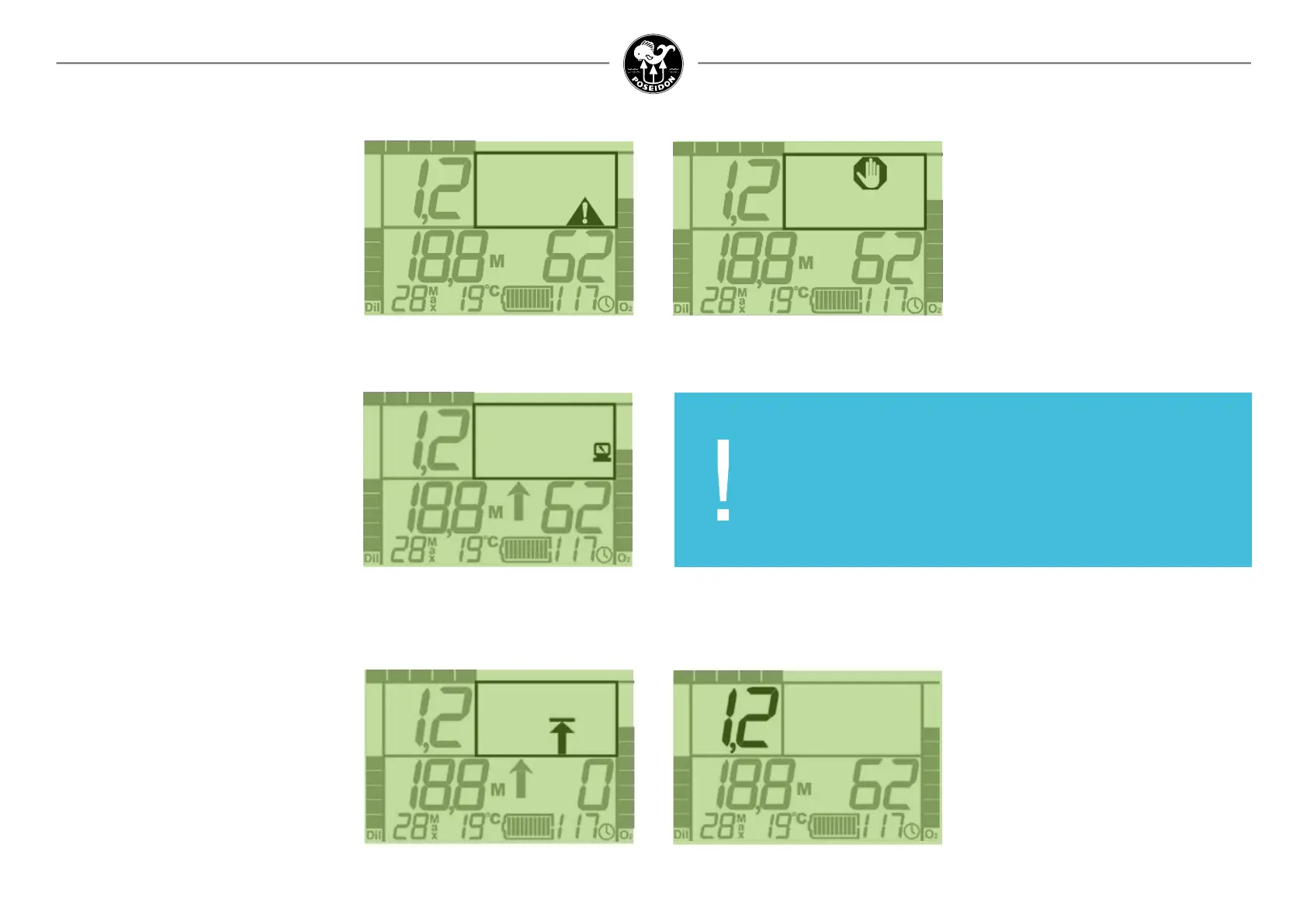
General alert
Figure 3-9. General alert.
The triangle symbol with an exclamation mark,
located in the bottom-right corner of the Alarm
Signal Area will ash in synchrony with any other
parameter(s) on the screen that is/are inappro-
priate or out of acceptable range. This signal is
intended to catch the diver’s attention, and
prompt the diver to scan the other elements on
the screen to see which value(s) is/are also
ashing. As long as one of the other displayed
values on the Primary Display is ashing, the
General Alert symbol will also ash.
Electronics alert
Figure 3-10. Electronics alert.
Located between the DO NOT DIVE symbol and
the General Alert symbol is a small icon that
resembles a personal computer with a lightning
bolt on the screen. This symbol indicates that a
problem has been detected with the electron-
ics, such as a network failure, an unexpected
system re-boot, or other detected errors. The
specic cause is recorded in the logged data. If
the Electronics alert symbol is shown during a
dive of after the completion of a Pre Dive test,
ABORT the dive or DO NOT DIVE.
Decompression ceiling alert
Figure 3 -11. Decompression ceiling alert.
In the lower center of the Alarm Signal Area is
the Decompression Ceiling Alert. This symbol
will ash when the diver has incurred a decom-
pression obligation. With the 40m recreational
battery installed the Poseidon SE7EN+ is not
intended for decompression diving, so the dive
should be terminated whenever this icon is dis-
played. The diver should ascend towards the
surface at a slow and controlled rate, watching
the Primary Display for the Stop Alert and addi-
tional decompression information (see below).
Stop alert
Figure 3-12. Stop alert.
The octagonal shape with a at palm in the
center, located between the ABORT symbol
and the DO NOT DIVE symbol in the center of
the upper half of the Alarm Signal Area, is dis-
played in one of two circumstances: either the
diver is ascending too rapidly, or the diver has
reached the decompression stop depth (“ceiling”).
In either case, the appropriate response is to
immediately stop ascending, and the diver should
maintain the current depth until the symbol
disappears.
IMPORTANT:
It is the sole responsibility of each and every Poseidon SE7EN+
diver to understand all of the alarm systems and conditions,
monitor them throughout every dive, and respond appropriately
to any alert status.
PO
2
value
Figure 3-13. PO
2
value.
The oxygen partial pressure (PO
2
) in the breath-
ing loop is displayed prominently in the upper
left corner of the Primary Display. This is perhaps
the most important number on the entire screen,
as maintaining an appropriate oxygen partial
pressure in the breathing gas is critical to ensure
safe diving. If the value departs substantially from
the current PO
2
setpoint, the value will ash. If the
value becomes dangeously high or dangerously
low, the diver will be prompted to switch to open-
circuit mode and terminate the dive. An absolute
low PO2 alarm will be triggered at 0.30 bar.
High PO2 alarm will be triggered when PO2 >
1.6 bar for more than 60 sec. or immediately
when PO2 > 1.8 bar.



 To Next Page