PreSonus StudioLive
™
24.4.2
50
Quick Start:
Level
Setting
Overview Connecting
to a
Computer
Scenes,
Presets &
System
Menu
Technical
Information
Tutorials Trouble-
shooting
& Warranty
Controls
4 Controls
50
Owner’s Manual
51
Quick Start:
Level
Setting
OverviewScenes,
Presets &
System
Menu
TutorialsTechnical
Information
Trouble-
shooting
& Warranty
Controls
Controls 4
51
Software
Universal Control,
Capture, and
Studio One Artist
Hookup
Hookup
Software
Universal Control,
Capture, and
Studio One Artist
Connecting
to a
Computer
Digital FX | Master Control 4.84.8 Digital FX | Master Control
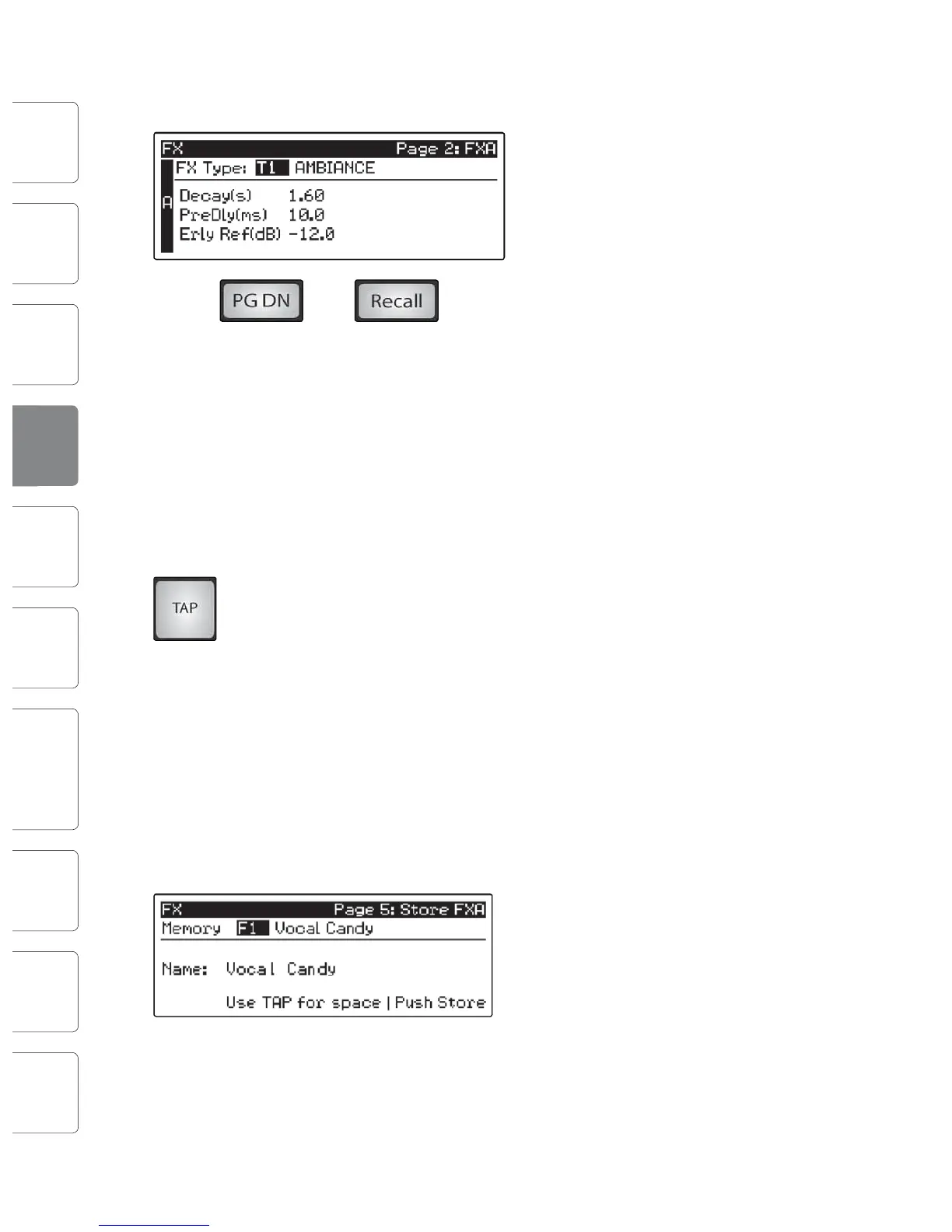
When you have arrived at your selection, press the Recall button to load it.
Press the Page Down button to move to the next page
of the FX menu. Pages 2 and 3 of the FX menu display
the rest of the parameters for FX A and FX B,
respectively. These parameters will change depending
on what type of eect you have chosen. Again, use
the Next and Prev buttons to navigate through the
screen and use the Value encoder to change the
selected parameter.
For example, if you would like to change the eect
from a Large Hall reverb to a Room Ambiance
reverb, press the Recall button to load the
eect, and then change the various parameters
to taste. Press the Page Up button again to
move to the full parameter view of FX B.
When you choose a delay algorithm, you will notice
two parameters: Time (ms) and Time X.
Time is the delay time, discussed in Section 8.6.2, which is the time
between the source sound and the echo. This can be adjusted
manually with the Value encoder, or you can use the Tap button to
enter a delay time in tempo with the music being played.
Time X is the value of the beat you are using as a reference for the tempo. The basic
unit of measure is a quarter note, so for example, if the beats you are tapping
represent quarter notes in the music, you would set Time X to 1.00. If they are
eighth notes, you would set Time X to 0.50; half notes would be 2.00, and so on. In
this way, you can precisely synchronize or syncopate the delay echoes to the music
in real time. You do not have to select the Time parameter in order to use the Tap
button. However, you have to be on the Extended Parameters page 2 for FX A,
page 3 for FX B), or you must select the Time parameter for the desired eect on
the rst screen of the FX menu. The Tap button does not function when any other
page is active.
Pages 4 and 5 allow you to store your changes for FX A and FX B, respectively, to
the same location or to a new location, and to customize the name of your creation.
Use the Value Encoder to change the library location to which you will store your
new eects preset, unless you wish to overwrite the currently selected preset
location. Press the Next button to navigate to the rst letter of the preset name.
Turn the Value Encoder clockwise or counter-
clockwise to change the letter. The StudioLive allows
you to customize the name with uppercase and
lowercase letters and a selection of numerals and
punctuation marks. Press the Tap button to quickly
insert a space.
Once you are satised with your changes, press the Store button, which will
illuminate while the eects preset is written to the StudioLive’s internal memory.
Once the preset is saved, the Store button will return to its unlit status.
4.8.2 Digital Eects Library
Your StudioLive contains a library of 50 custom Reverb and Delay
presets designed by PreSonus In addition to these presets, there are
50 free locations for you to build your own custom eects library
The Factory Presets can be altered, renamed, and overwritten.
No TYPE NAME
F1 AMBIENCE Natural
F2 Lively
F3 SMALL ROOM Closet
F4 Studio A
F5 Studio B
F6 Bedroom
F7 BRIGHT ROOM Kitchen
F8 Tile Floors
F9 Tile Bathroom
F10 Concrete Floors
F11 SMALL HALL Radio Booth
F12 Small Club
F13 Big Club
F14 BRIGHT HALL Brick House
F15 Linoleum Room
F16 Tile Room
F17 WARM HALL Log Cabin
F18 Wood Floors
F19 Brick Club
F20 High Ceilings
F21 GATED HALL GateVerb Short
F22 GateVerb Med
F23 GateVerb Long
F24 GateVerb Extreme
TYPE NAME
F25 LARGE HALL Church
F26 Cathedral
F27 Gymnasium
F28 Arena
F29 PLATE PlateVerb Shimmer
F30 PlateVerb Thick
F31 PlateVerb Drums
F32 PlateVerb Vox
F34 MONO DELAY M: Short Slap
F35 M: Long Slap
F36 M: Triplet
F37 M: Triplet
F38 FILTER DELAY Analog Slap
F39 Analog Trip
F40 Analog 8
th
F41 STEREO DELAY Slap Quick
F42 Long Slap
F43 Spacey
F44 Long Tail
F45 ST: Triplet
F46 PING-PONG DELAY Ping-pong Slap
F47 Ping-pong Delay
F48 Ping-pong Spacey
F49 Ping-pong Trip
F50 Ping-Pong Purple Rain
F50-
99
USER-CREATED
PRESETS










 To Next Page