PreSonus StudioLive
™
24.4.2
94
Quick Start:
Level
Setting
Overview Controls Scenes,
Presets &
System
Menu
Technical
Information
Tutorials Trouble-
shooting
& Warranty
Connecting
to a
Computer
Owner’s Manual
95
Quick Start:
Level
Setting
OverviewControlsScenes,
Presets &
System
Menu
TutorialsTechnical
Information
Trouble-
shooting
& Warranty
Software
Universal Control,
Capture, and
Studio One Artist
Hookup
Hookup
Software
Universal Control,
Capture, and
Studio One Artist
Connecting
to a
Computer
SOFTWARE: Universal Control, Capture, and Studio One Artist 7
Capture 7.37.3 Capture
7 SOFTWARE: Universal Control, Capture, and Studio One Artist
Capture Audio I/O Setup
There is no need for audio inputs and outputs to be set up in
Capture, as it automotically detects which type of StudioLive
mixer (16.4.2 or 24.4.2) is connected and self-configures. Each
input from your StudioLive mixer is represented with a mono
input track in the Track column of the Session, and each input
track has a corresponding level meter in the meter bridge.
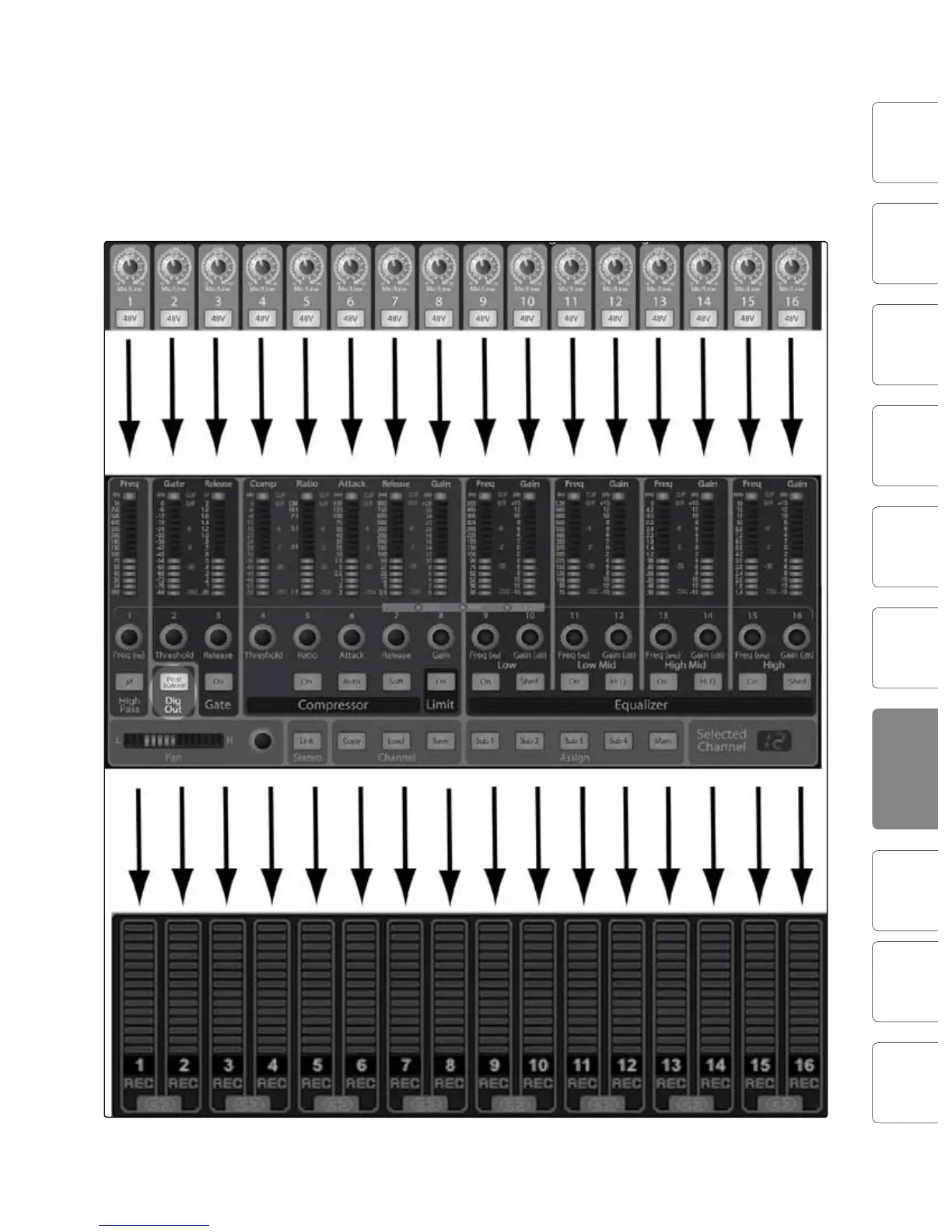
The following diagram illustrates the one-to-one relationship
of the StudioLive and Capture input channels. The input signal
into each channel on the StudioLive mixer is automatically
routed to each respective input channel in Capture.
It is possible to process each StudioLive mixer input channel with the
Fat Channel before the input signal is routed to Capture. To do this,
you will need to engage the Post button in the Dig Out section of the
Fat Channel for each channel in your StudioLive mixer. This routes
the signal post-EQ and post-dynamics processing. The following
diagram illustrates the signal ow in this scenario (below).










 To Next Page