9
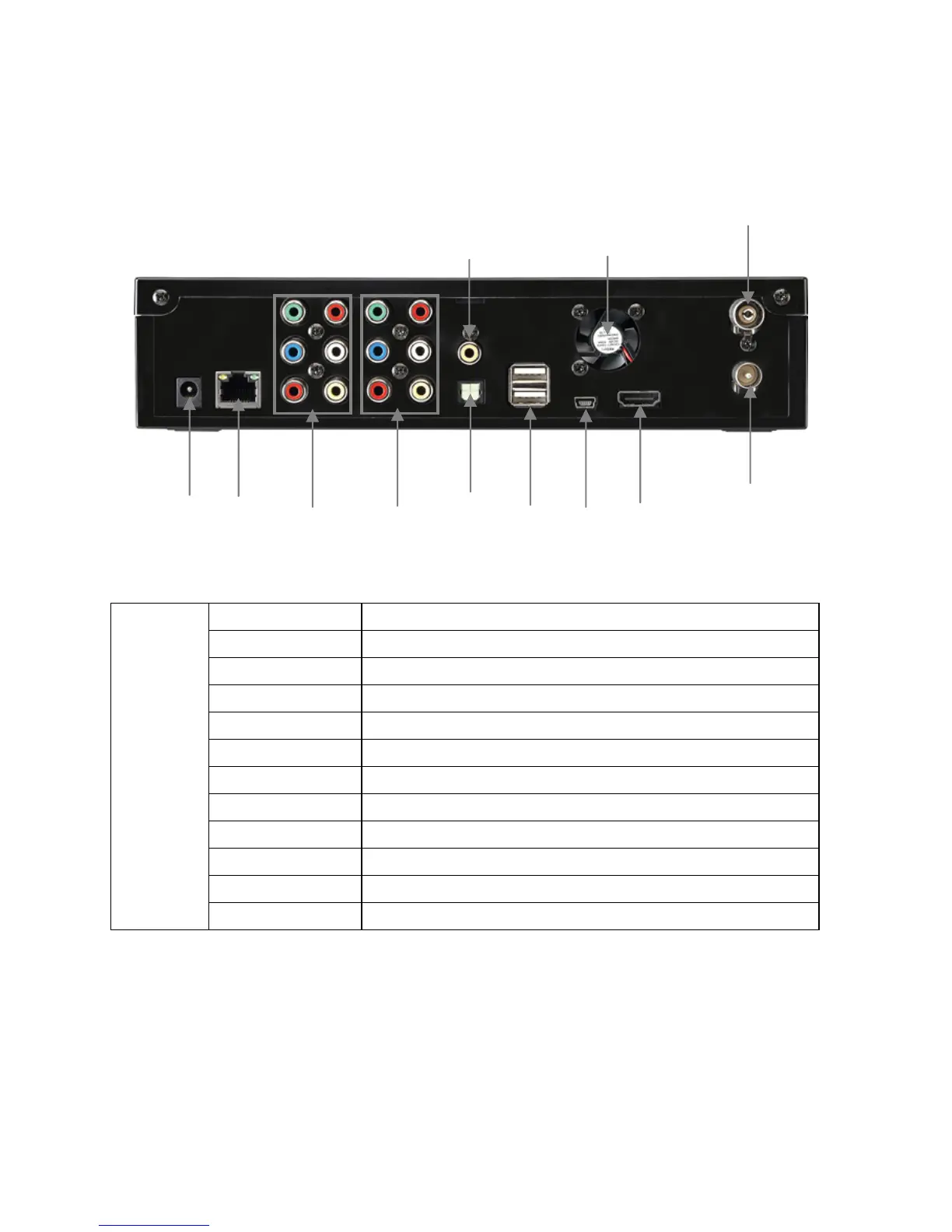
① Power Jack Connect the power adapter.
② LAN Wired LAN connection to a PC for the file streaming.
③ AV-OUT Connect Probox to TV (Composite / Component)
④ AV-IN Connect an external AV device for recording.
⑤ Coaxial Coaxial cable for 5.1 ch. Digital audio output
⑥ Optical Optical cable for 5.1 ch. Digital audio output
⑦ USB Host Connect to an external WiFi USB dongle or storage.
⑧ USB Device Connect Probox PBR-500 to a PC by USB cable.
⑨ Cooling Fan Extract the heat air to outside
⑩ HDMI Connect HDMI Cable to TV
⑪ Antenna IN Connect the antenna cable from a wall into this jack.
Back View
⑫ Antenna OUT Connect the antenna cable from the PBR-500 to TV
< Back View >
⑤
⑥
⑦
⑧
⑨
⑩
⑪
④
① ②
③
⑫



 To Next Page