68
9. Remote Web-Access & Torrent Download
[Remote Web-Access] & [Torrent Download] function is the very unique function of the PBR-500.
You can access to the Probox PBR-500 through web-browser and can
1) Download the files from the Probox PBR-500 to a local PC
2) Set up the time-scheduling recording time to the PBR-500 throurh Web-browser remotely.
3) Check the recording status at the PBR-500.
4) Download the Torrent files to the PBR-500 directly.
In order to use this function, you need to connect PBR-500 to a router and do [Port Forwarding / Port
number : 80] or [DMZ Server] at the router. For more information how to setup the [Port Forwarding], refer to
the manual of the router you are using.
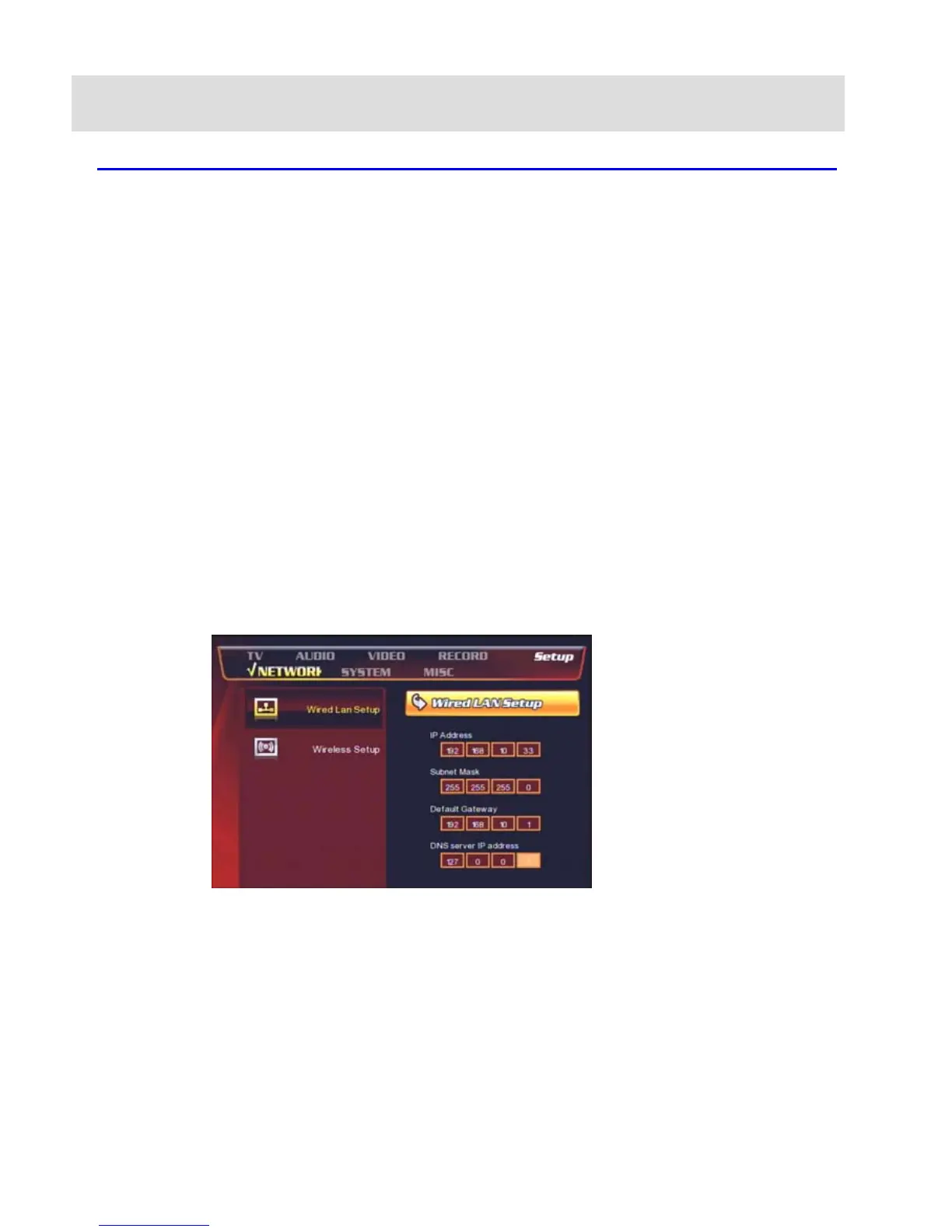
At the Probox PBR-500, you need to set up the below;
-. IP Address : set the fixed private IP address to PBR-500
-. Subnet Mask : 255.255.255.0
-. Default Gateway : set the IP address of the public IP address of the router
(If the router is using a dynamic public IP address then you need to use DDNS function of the router).
-. DNS Server IP Address : For Bittorrent Download, you need to put the DNS server IP Address.


 To Next Page