44
6. How to use the Remote Control?
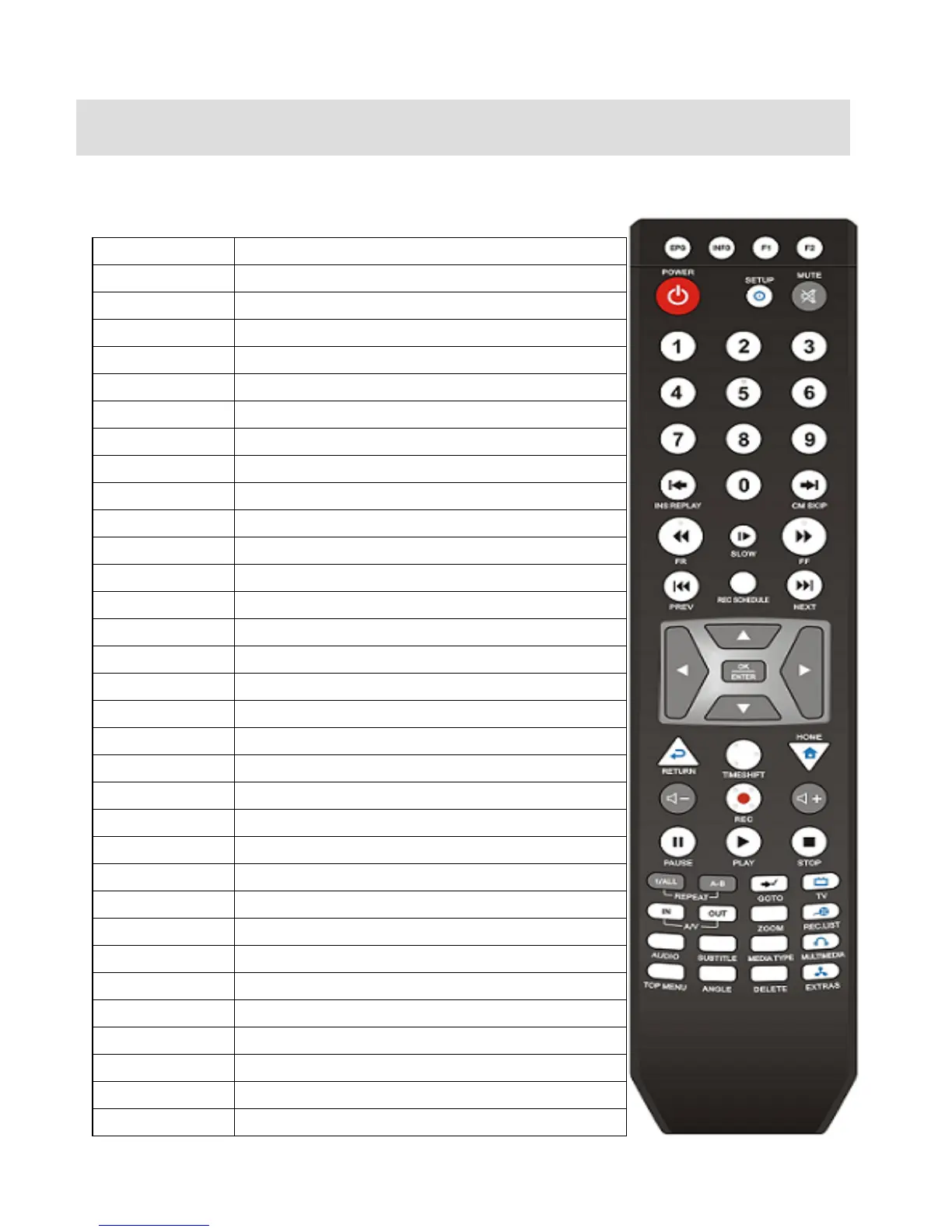
6.1 Explanations of the remote buttons.
This is the explanations of the remote buttons.
EPG Record EPG program
INFO Show the information of the content
F1 T.B.D (Add a function later)
F2 T.B.D (Add a function later)
POWER Power On / Off the unit
SETUP Set up the various configurations of the unit
MUTE Pause the audio sound
Numeric Key Insert a number
INS REPLY Backward to 10 seconds frame
CM SKIP Forward 30 seconds frame
REW Rewind
SLOW Play back in slow motion.
FF Fast Forward
PREV. Previous chapter or file
Rec Schedule Set up the Time-Scheduling Recording time
NEXT Next chapter or file.
UP Up navigation button
LEFT / REW Left navigation button / Rewind
RIGHT / FF Right navigation button / Fast Foward
DOWN Down navigation button
OK / Enter OK [Enter] button.
RETURN Return the previous screen / folder
Time Shift Time-Shift record of the live channel
HOME Go to the main first page
Vol + Volume up
REC. Direct Record button.
Vol - Volume down
PAUSE Pause the playback of a content
PLAY Play a content
STOP Stop a content playback
Repeat (1/ALL) Repeat one file or all files
Repeat (A<->B) Repeat the selected section
GOTO Jump into a specific time frame of a content



 To Next Page