28
3. Shared File Playback (Stream)
After you connect PBR-500 and a PC (PCs) by LAN or Wireless, you have to set up network configurations
of both a PC (PCs) and PBR-500 as well.
Here, there is the information how to make a folder shared and network configuration..
3.1 Windows 98SE, ME
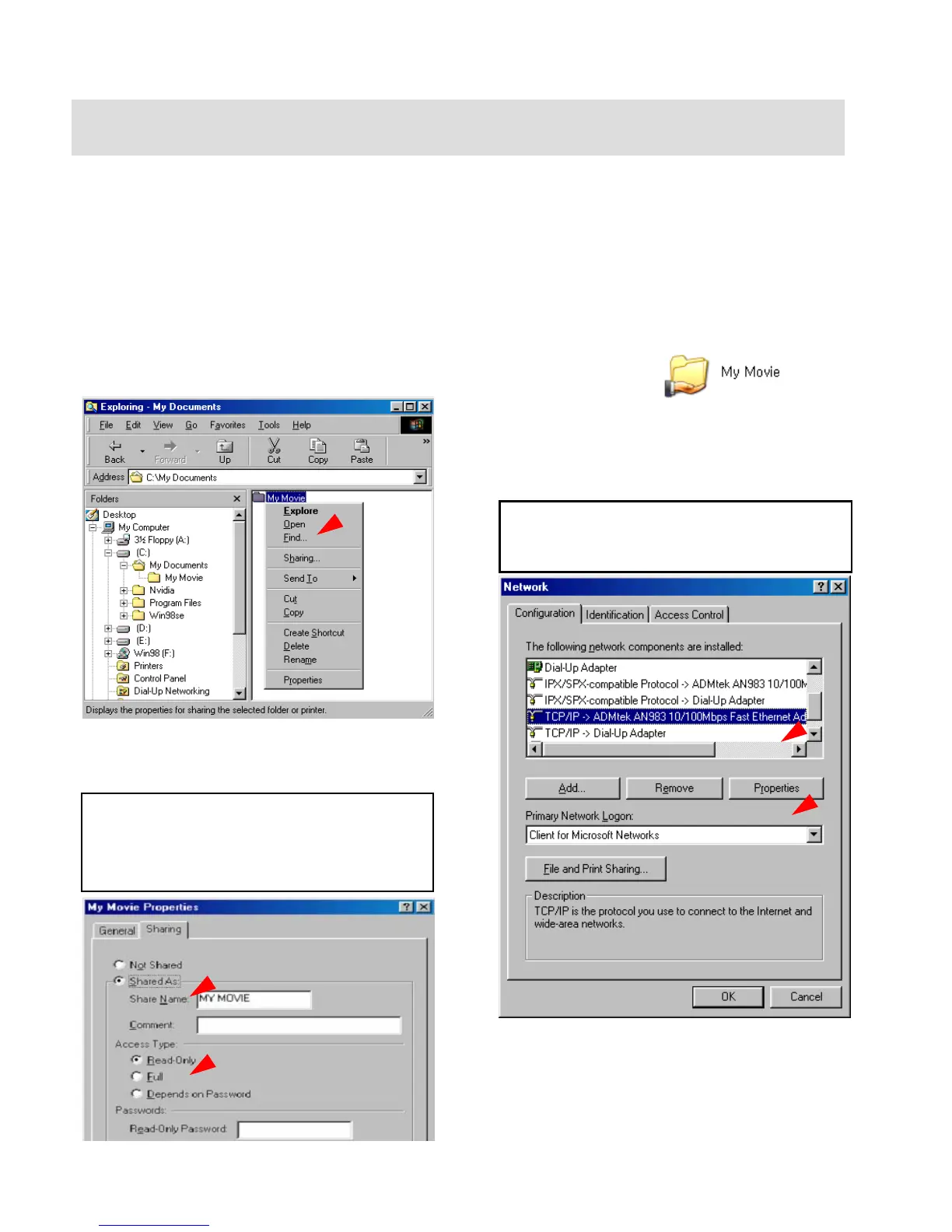
1) Select a folder which you want to share.
Right-click the folder and click [Sharing] in
pop-up menu.
2) Check ‘Shared as’ and write ‘Share Name’.
For example, “My Movie”
Make sure not to write a long ‘share name’ long in
English
Recommend to check ‘Read Only’ at ‘Access
Type’
Do not write anything at ‘Passwords’
3) After that, the shared folder will be displayed
as following picture.
4) Move to [Control panel > Network], and
double click ‘TCP/IP->LAN card’ that you
want to use on your computer.
In order to see LAN Card name, move to [Control
Panel>System>Device Manager>Network adaptors].
5) Check ‘Specify an IP address’, and write ‘IP
address’ & ‘Subnet mask’ that you want to use.
For example, IP address: 192.168.1.3 / Subnet
mask: 255.255.255.0



 To Next Page