46
7. Initial Set-up
7.1 Format HDD
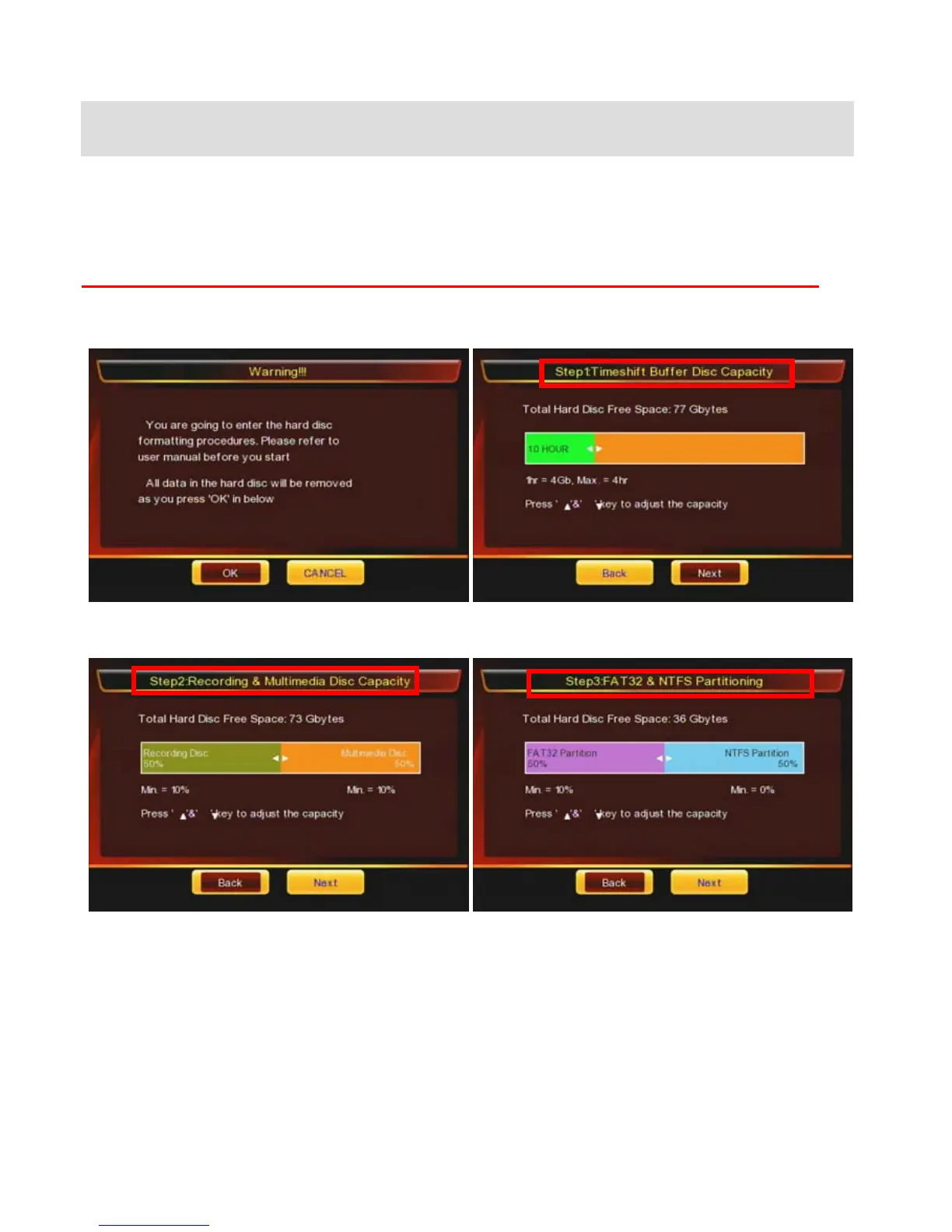
After you insert a used or new HDD into PBR-500 and then turn on PBR-500 for the first time, then you have
the HDD format page.
You should do the HDD format at PBR-500, otherwise, you can not record TV programs or AV-In.
If you want to use PVR function (Direct Record TV channels, Time-Shift, EPG), you have to do a HDD format
in the Probox PBR-500 (Not at a PC).
① Press [OK] to start a HDD format. ② Set up the capacity for [TimeShift] function.
③ Set up the capacity for [Direct Record, EPG] and
Multimedia (FAT / NTFS).
④ Multimedia has tow partitions; FAT / NTFS.
-. FAT : Read & Write
-. NTFS : Read only.
If you want to move files from a folder to Multimedia
folder or use [Remote Web-Access], then you can only
move or copy & paste the files to [FAT] partition.



 To Next Page