Beta Draft Confidential
2-14 Professional Series Network Thermostat Configuration Guide, Release 3.0
Part No. 600-01000-200, Rev. 2
CHAPTER 2: Configuring the Thermostat Using the TDI
Alarm Status Screen
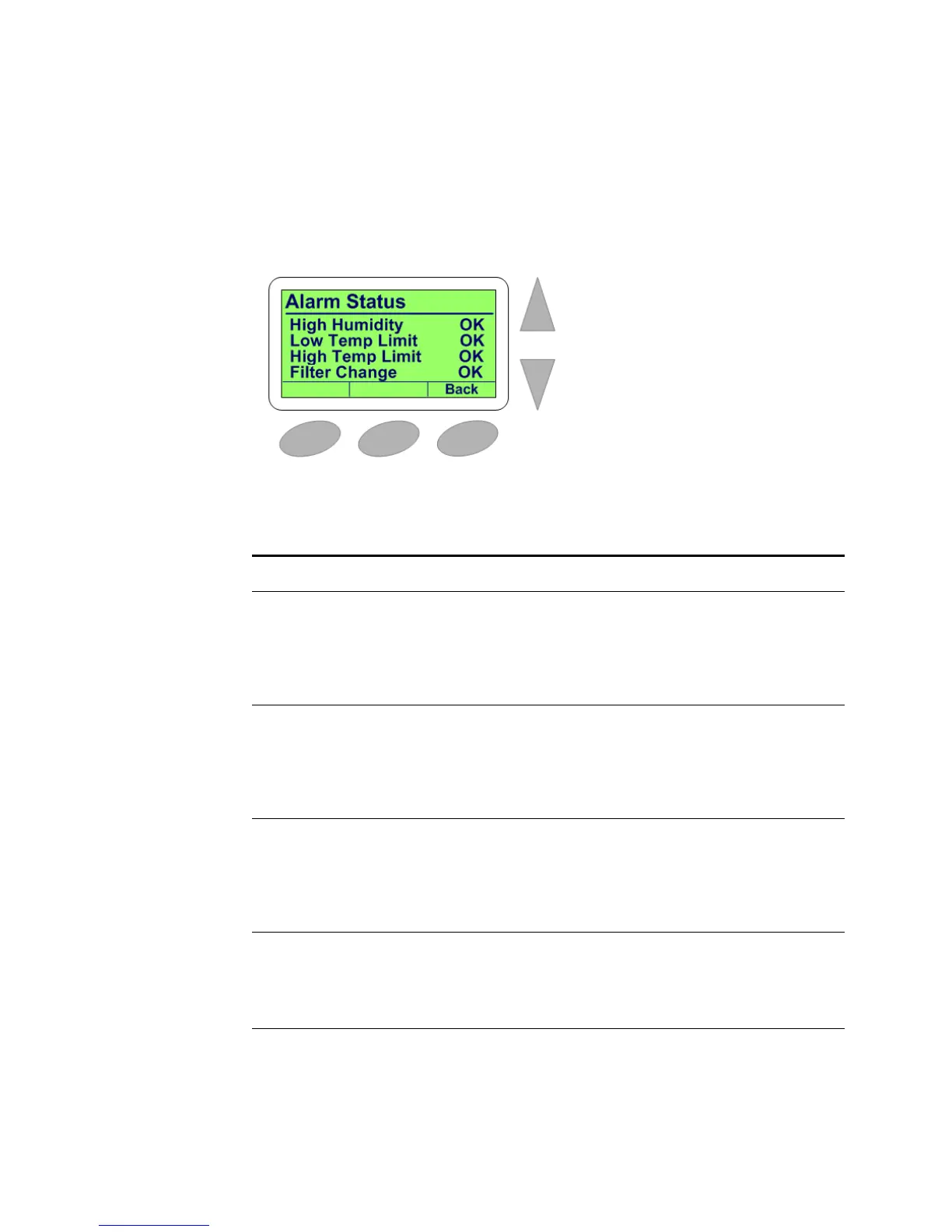
The Alarm Status screen is a sub-screen of the Status & Control Screen (page 2-10).
This screen displays the status of both the Low and High Temperature Limits alarm
and the Filter Reminder alert.
Figure 2-11 NT150e/h and NT160e/h Alarm Status Screen
Table 2-7 lists the Alarm Status screen display options.
Table 2-7 Alarm Status Screen Options
Field Displays
High Humidity
(NT150e/h and
NT160e/h only)
Relative Humidity above which an alarm indication is set by the thermostat.
OK – Relative Humidity has not dropped below the value set as the High
Humidity.
Not OK – Relative Humidity has dropped below the value set as the High
Humidity.
Low Temp
Limit
Temperature below which an alarm indication is set by the thermostat.
OK – Temperature of thermostat has not dropped below the value set as the
Low Temperature Limit.
Not OK – Temperature of thermostat has dropped below the value set as the
Low Temperature Limit.
High Temp
Limit
Temperature above which an alarm indication is set by the thermostat.
OK – Temperature of thermostat has not risen above the value set as the High
Temperature Limit.
Not OK – Temperature of thermostat has risen above the value set as the High
Temperature Limit.
Filter Change
Alert
Indicates that the HVAC system requires service or the air handler filter needs
cleaning or replacement.
OK – Maintenance is not required.
Now – Maintenance is required.


 To Next Page