Beta Draft Confidential
4-2 Professional Series Network Thermostat Configuration Guide, Release 3.0
Part No. 600-01000-200, Rev. 2
CHAPTER 4: Troubleshooting
Factory Reset
A factory reset clears the thermostat’s internal memory and returns the thermostat to
the factory-default state.
To perform a factory reset at the thermostat:
1 Remove the thermostat cover from the base which is attached to the wall. (See the
Proliphix Thermostat Installation Guide.)
2 Attach the top of the cover to the top of the base as a hinge.
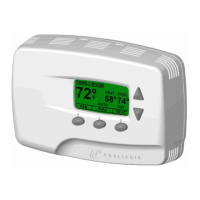
3 Press and hold the middle button of thermostat while closing the cover into the base.
Do not release the button until the LCD characters appear.
Caution
Performing a factory reset clears the setback scheduling and other programmed
parameters. These settings can not be recovered after a reset. In addition, the IP
addressing mode reverts back to DHCP, the current IP address is lost, and the
thermostat becomes unreachable (until the thermostat retrieves a new address from
the local DHCP server).



 To Next Page