Installation and setup
Operator´s Manual PiCCO
2
Page
Version 3.1 C-3
2 Functionality and user interaction
2.1 Screen elements
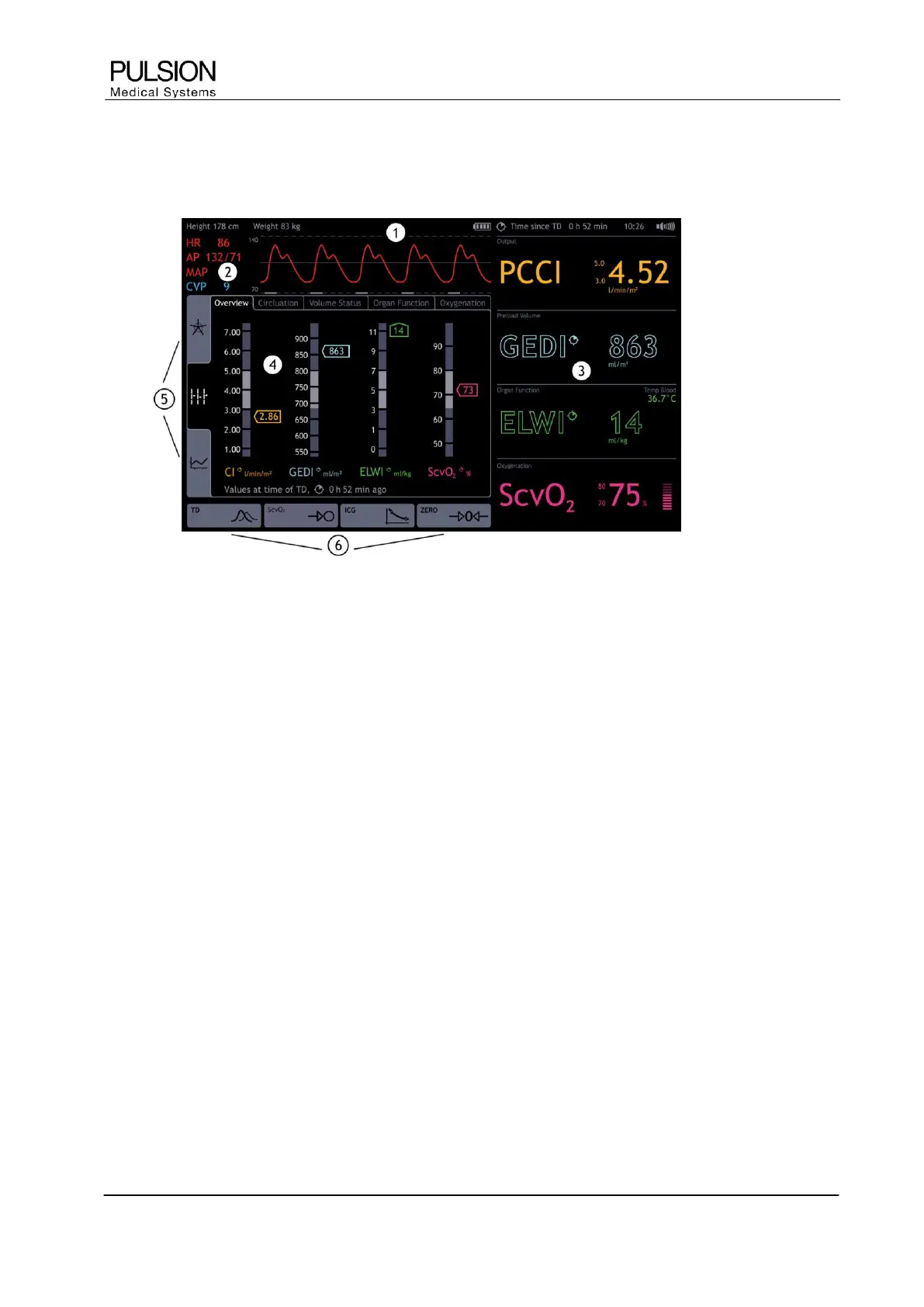
Figure 12: Screen elements
1) Information bar
Information bar for patient and measurement specific information and error messages
2) Real Time pressure curve
Permanent display of real time pressure curve of arterial pressure (AP) and central venous pressure (CVP)
3) Parameter fields
Configurable parameter fields divided into parameter groups, permanent display of the selected parameters
4) Patient screen
Function area for measurements, configuration and graphical display of parameters
5) Display options
The determined parameters can be displayed in 3 different ways. (for details see chapter C4)
6) Selection of actions
Direct access to thermodilution measurement, ScvO
2
calibration, ICG measurement and zero adjustment of
blood pressure (dependent on setting and connected module)
2.2 User interaction
The PiCCO
2
provides an intuitive user interface and can be operated by both navigation dial and touch
screen. In order to keep navigation as easy as possible, actions and settings can be done by direct activation
of the respective screen element on the screen.


 To Next Page