Installation and setup
Operator´s Manual PiCCO
2
Page
Version 3.1 C-33
5 Monitor and Display Configuration
The PiCCO
2
has a configuration level in order to arrange individual settings. By selecting the respective
function the corresponding option in the configuration menu is opened. A direct change between the single
configuration options is possible.
5.1 Patient settings
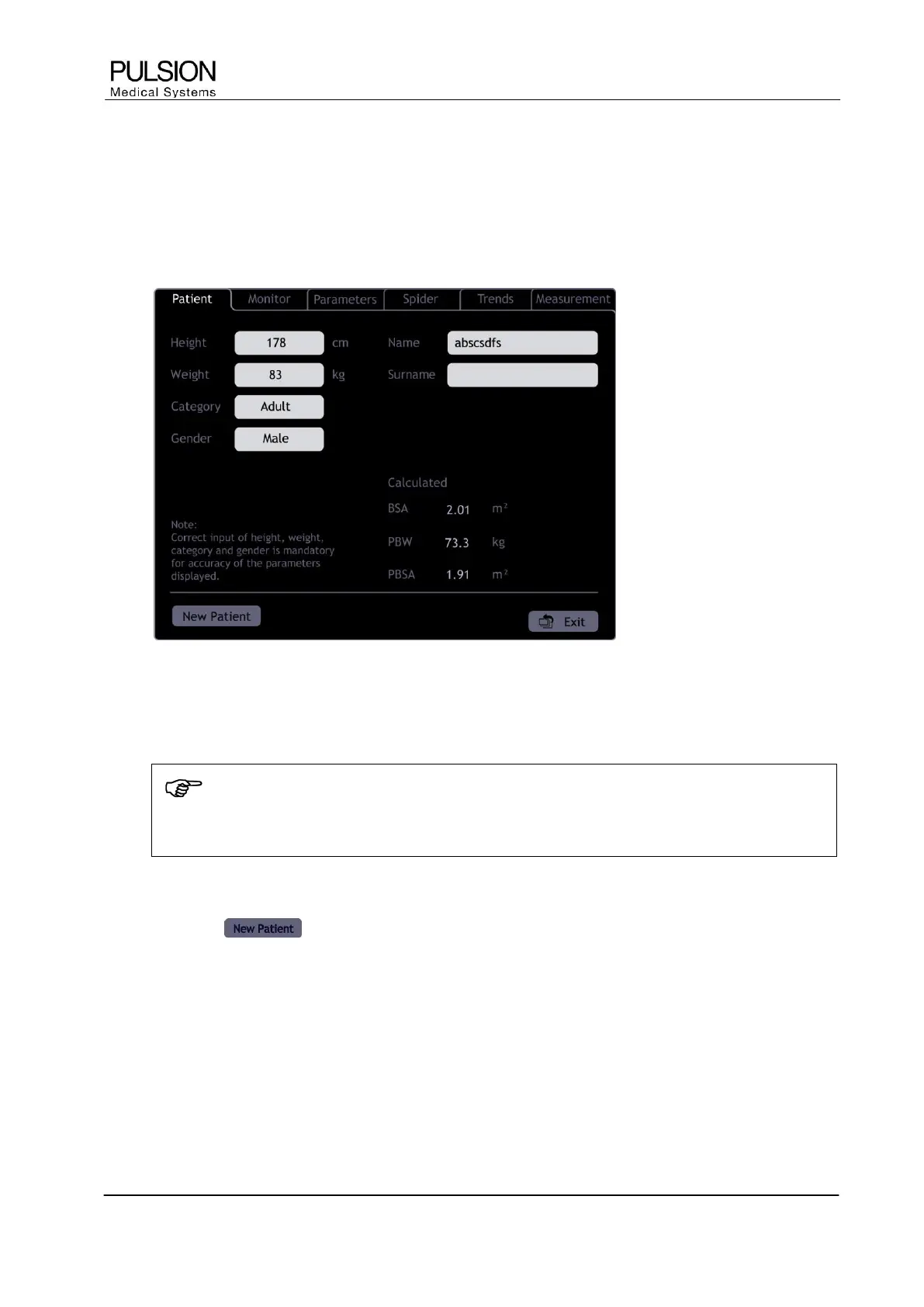
Figure 35: "Patient settings" screen
The required settings must be made before starting monitoring. When the PiCCO
2
is switched on the device
automatically displays this option.
NOTE
Correct input of height, weight, category and gender is mandatory for the correct indexing of
some parameters.
 Selection of height / weight display in the information bar at the top of the screen also opens this option.
The button allows the admission of a new patient. Existing trend information and calibrations will
be erased. The PiCCO
2
automatically goes through the next screens which are required.
5.1.1 Information input
Height, Weight 20 – 250 cm / 2 – 300 kg
Input of actual height and weight.
A short-term increase in body weight due to illness (e.g. edema) should be deducted. However, in patients
with pre-existing obesity this weight should be entered.


 To Next Page