Installation and setup
Page C-42 Operator’s Manual PiCCO
2
Version 3.1
5.7 Normal and Target Values
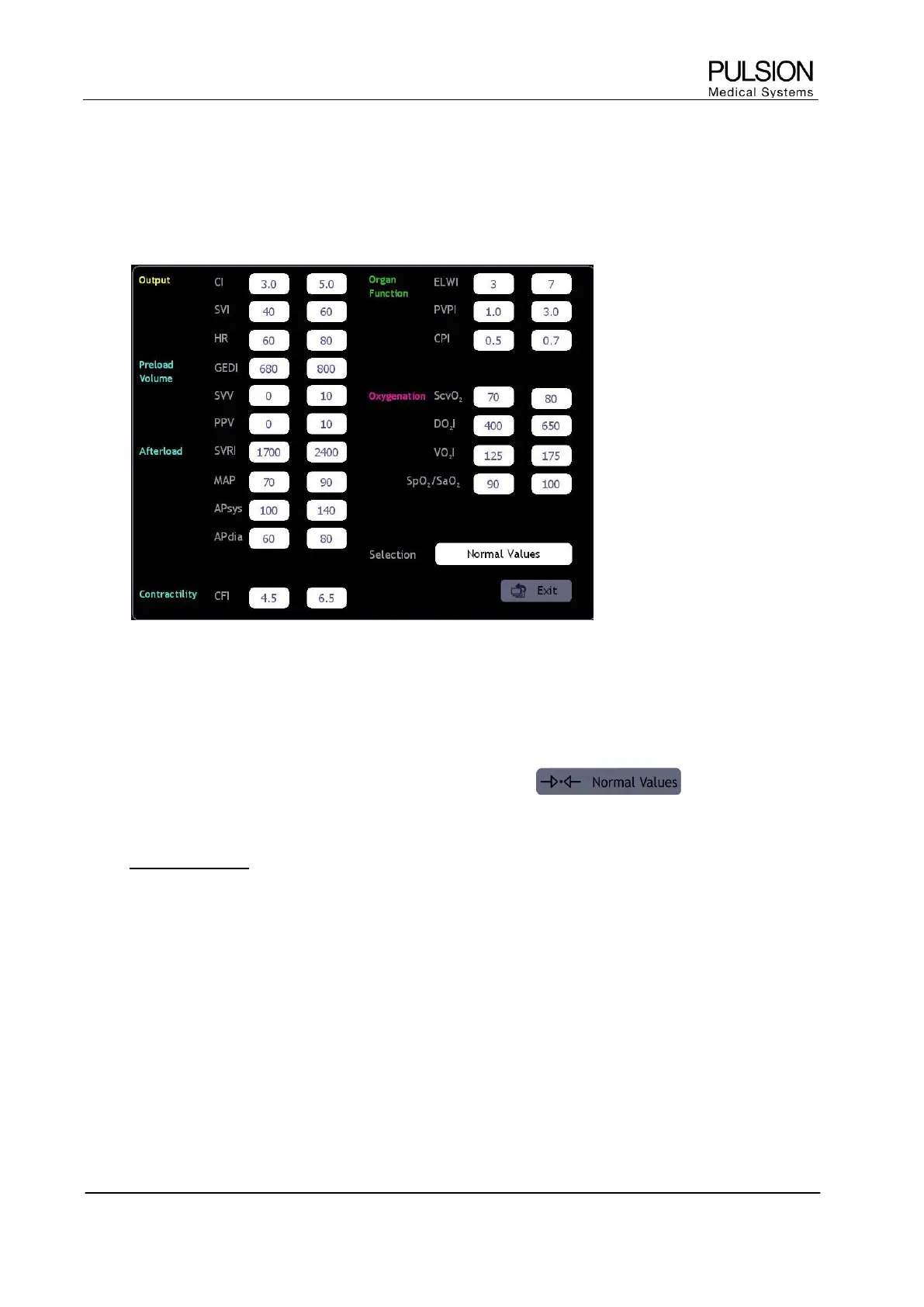
The allocation of target values is accessible via the menu "Normal values" of the help function or the
parameter configuration. When pressing the "Adjust" button, a screen opens with a list of normal parameter
values.
Figure 41: Normal- / Target value range
Adjustment of normal values to target values in the selection field is necessary in order to define target values.
The allocation of target values applies for all display screens (Spider, Trends and Profile).
In the SpiderVision diagram the target value symbol is displayed next to the respective parameter, if the target
value is activated.
In order to restore normal values in the target selection press the button. All changes
made will be cancelled and the default setting (normal values) will be restored.
When admitting a new patient normal values are automatically used.
L New in version 3.1: The buttons “SVV” and “PPV” are both available for selection.
L Depending on the selection in the “Parameters” configuration tab, either the “GEF” or the “CFI” button is
displayed, respectively. If neither of the buttons is selected, the “GEF” button is displayed.


 To Next Page