Installation and setup
Operator´s Manual PiCCO
2
Page
Version 3.1 C-39
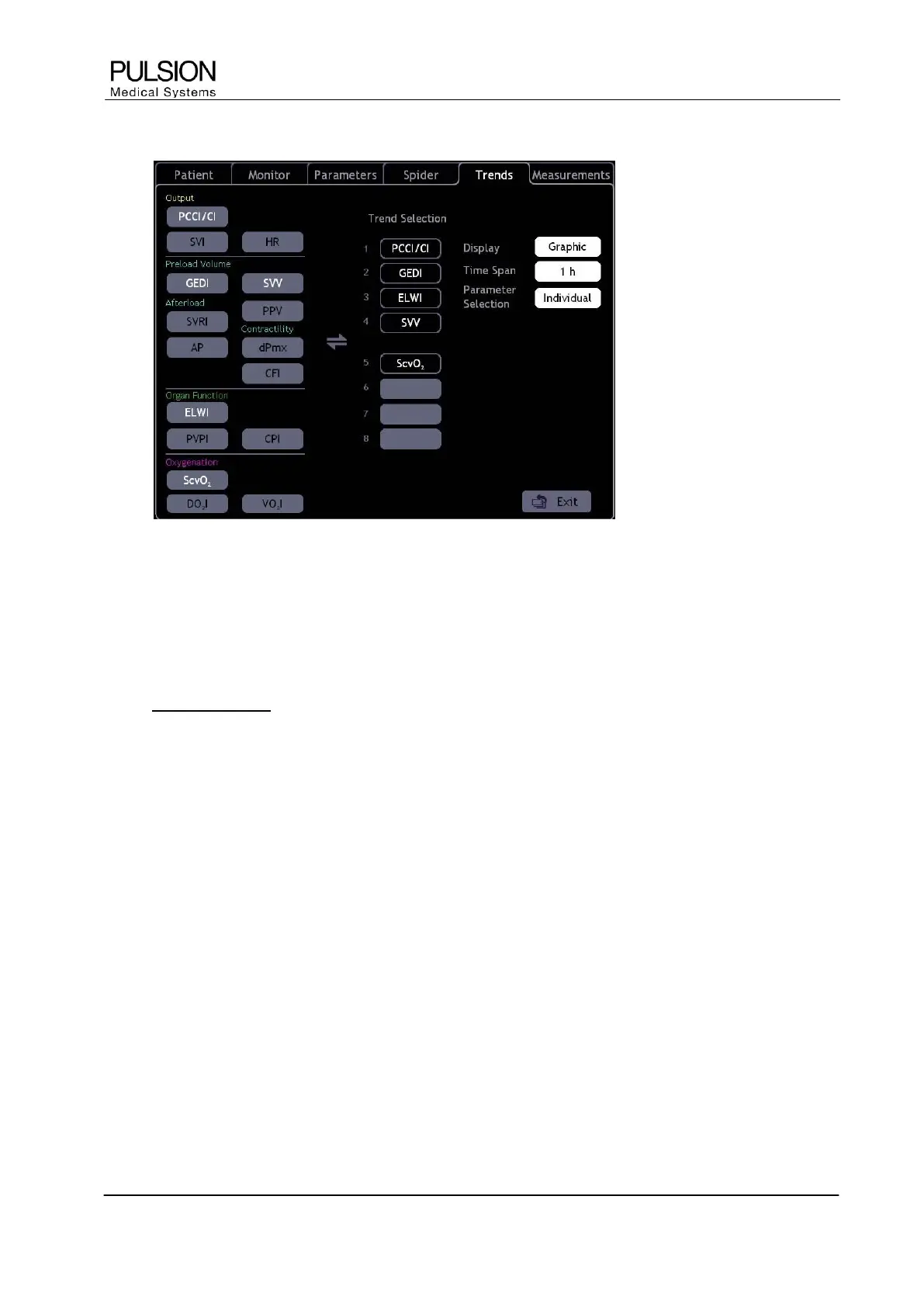
5.5 Trend configuration
Figure 39: "Trend configuration" screen
The trend display can be configured individually. A maximum of 8 parameter trends can be displayed.
x Select the parameter which should be displayed as a trend.
x Select the position where the parameter trend should be displayed.
 The trend configuration is opened by direct selection of the trend diagram.
L New in version 3.1: The buttons “SVV” and “PPV” are both available for selection.
L Depending on the selection in the “Parameters” configuration tab, either the “GEF” or the “CFI” button is
displayed, respectively. If neither of the buttons is selected, the “GEF” button is displayed.
Display Graphic / Numeric
The trend display of individual parameters can be graphic or numeric.
Time span 10min / 1h / 6h / 24h / 2d / 6d / 12d
Time span of trend display.
Parameter selection Basic / Individual
The "Basic" setting uses the default setting of the device which can be recalled at any time.


 To Next Page