s
erver
r
Iser
1 a
ssembly
Installing the Riser 1 Assembly
Prerequisite:
♦ Remove the top cover. See Opening the Top Cover on page 1-6.
♦ Remove the air duct. See Removing the Air Duct on page 1-7.
♦ Install the riser 1 boards. See Installing a Riser 2 Board on page 1-33.
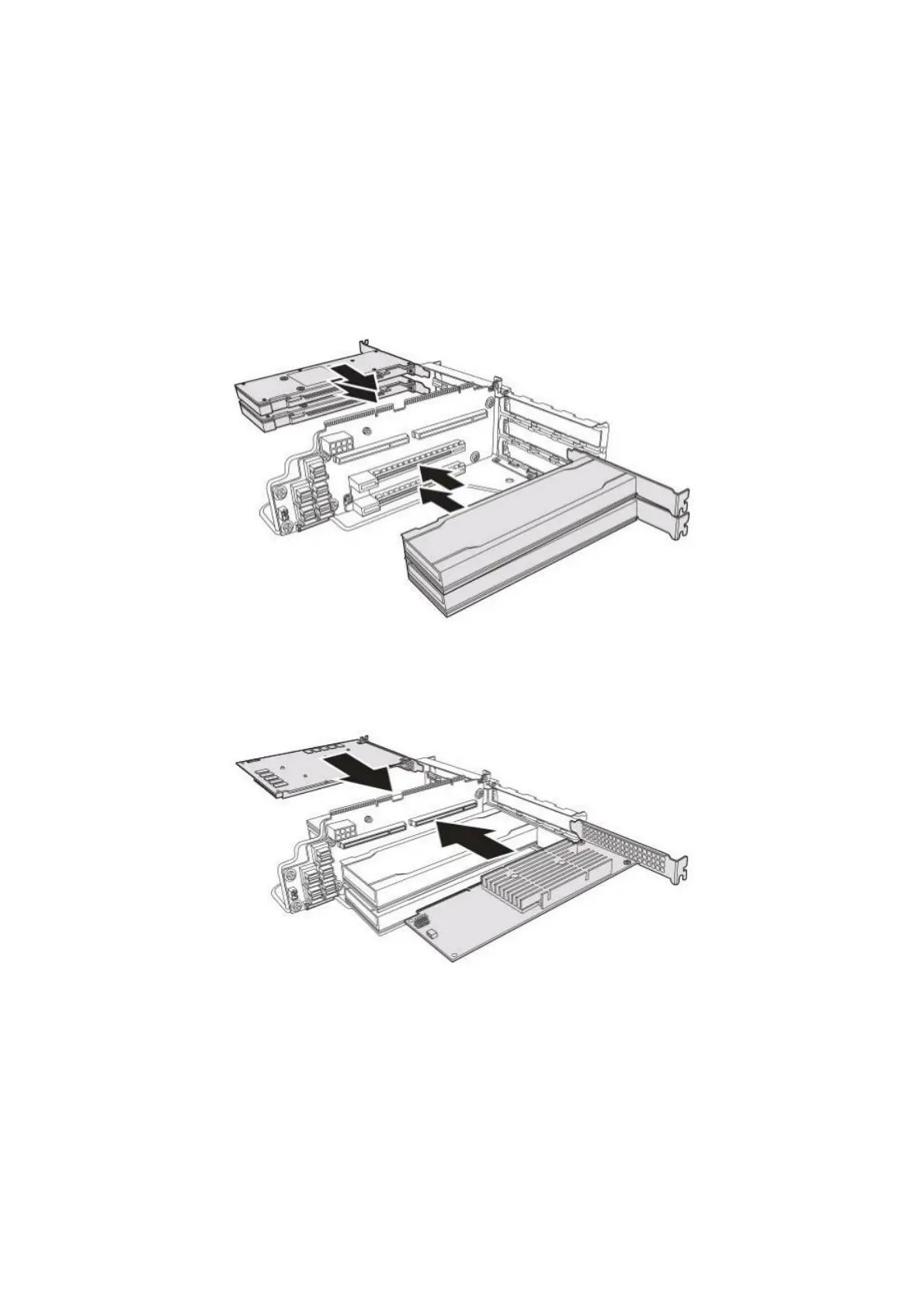
1. Align the Tesla T4 card with the riser 1 board connector and slide in place. The
bracket on the Tesla T4 card is flush with the riser 1 bracket if the Tesla T4 card is
seated correctly. Repeat the same steps to install the remaining Tesla T4 cards.
Figure 1-36: Installing the Tesla T4 Cards
2. Align the K2T-QB card with the riser 1 board connector and slide in place. The
bracket on the K2T-QB card is flush with the riser 1 bracket if the K2T-QB card is
seated correctly. Repeat the same steps to install the K2C-AB card.
Figure 1-37: Installing the K2T-QB and K2C-AB Cards
1-24



 To Next Page