QM-7 SERIES SERVICE MANUAL
PAGE 8.1
JANUARY 2012SUNRISE MEDICAL
Section 8
ASAP II Seating 16” - 20” wide is shown.
The ASAP II seating system is fully adjustable
to allow changes from 16” to 20” or 18” – 22”.
This requires a frame weldment and seat pan
plates adjust for seat growth. The picture shown
in (figure 8.1.1) has a seat width of 20” . This
detail shows how easy it is to change back to
16” wide.
To make seating width adjustments follow the
following steps:
1. Have 3mm – 4mm – and 5mm Hex keys
available for the adjustments.
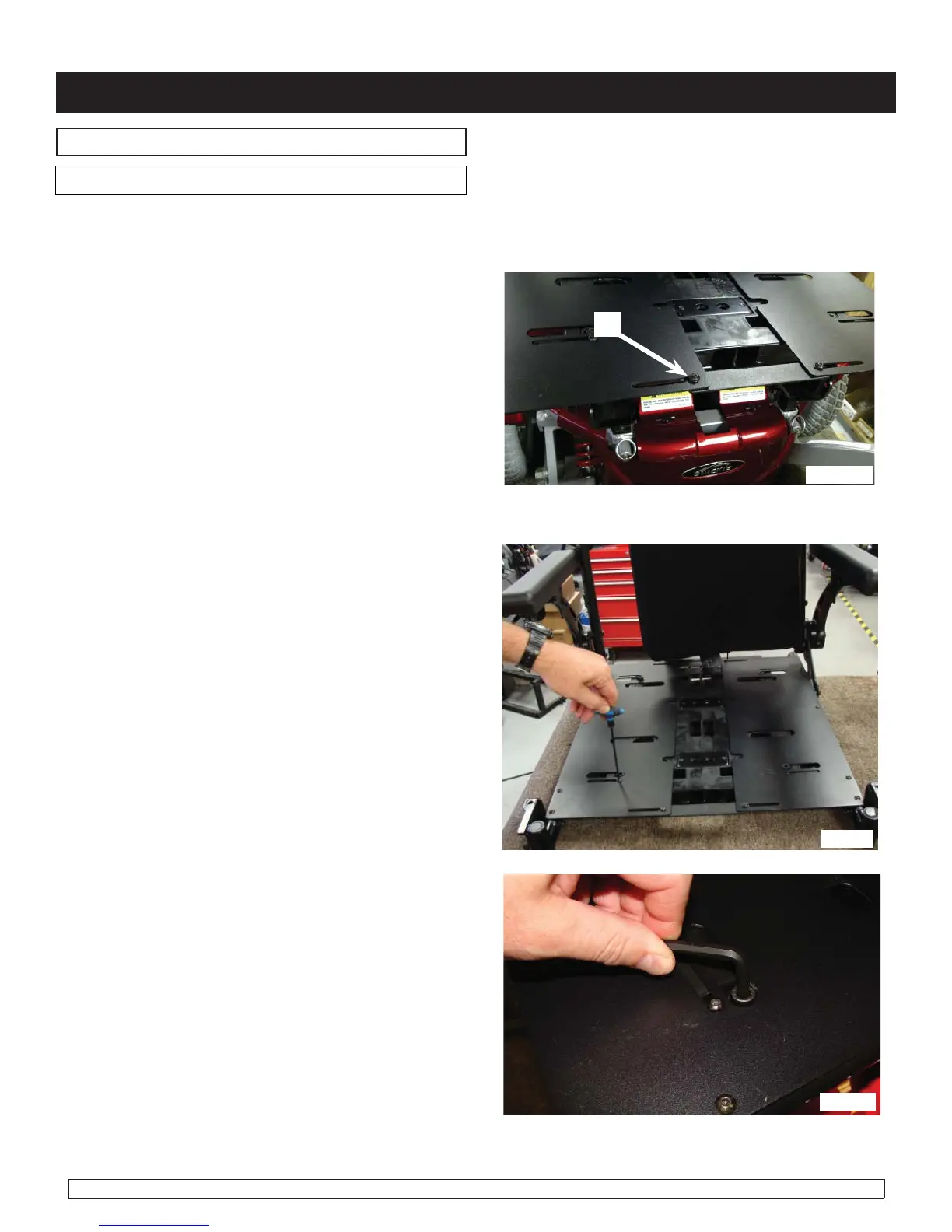
2. Loosen (do not remove) all of the M5 Button
Head Cap bolts (A) (figure 8.1.1). with a 4mm
Hex key, or a T-handle Hex key so that the
plates can slide for adjustment.
3. Using a 5mm Hex key, remove the socket
head cap screws (figure 8.1.2) that attach the
left and right wings to the seat frame.
4. Remove the 5mm socket head bolts with a
Hex key that are used to hold the bottom of the
seat pan in place (figure 8.1.3) – totally remove
from its position so that seat pan plates can slide
for adjustment.
Adjustment procedures
fig. 8.1.1
fig. 8.1.2
fig. 8.1.3
A
Seat/Back Width adjustment
Note: The same procedure is used for the 18" - 22" wide seating system


 To Next Page
 Loading...