The message Devices Read Successfully should appear at the bottom of the dialog box indicating the
read was successful.
Step 2: Modifying the Configuration File
After you have updated your configuration file from the data logger, the next step is to edit the
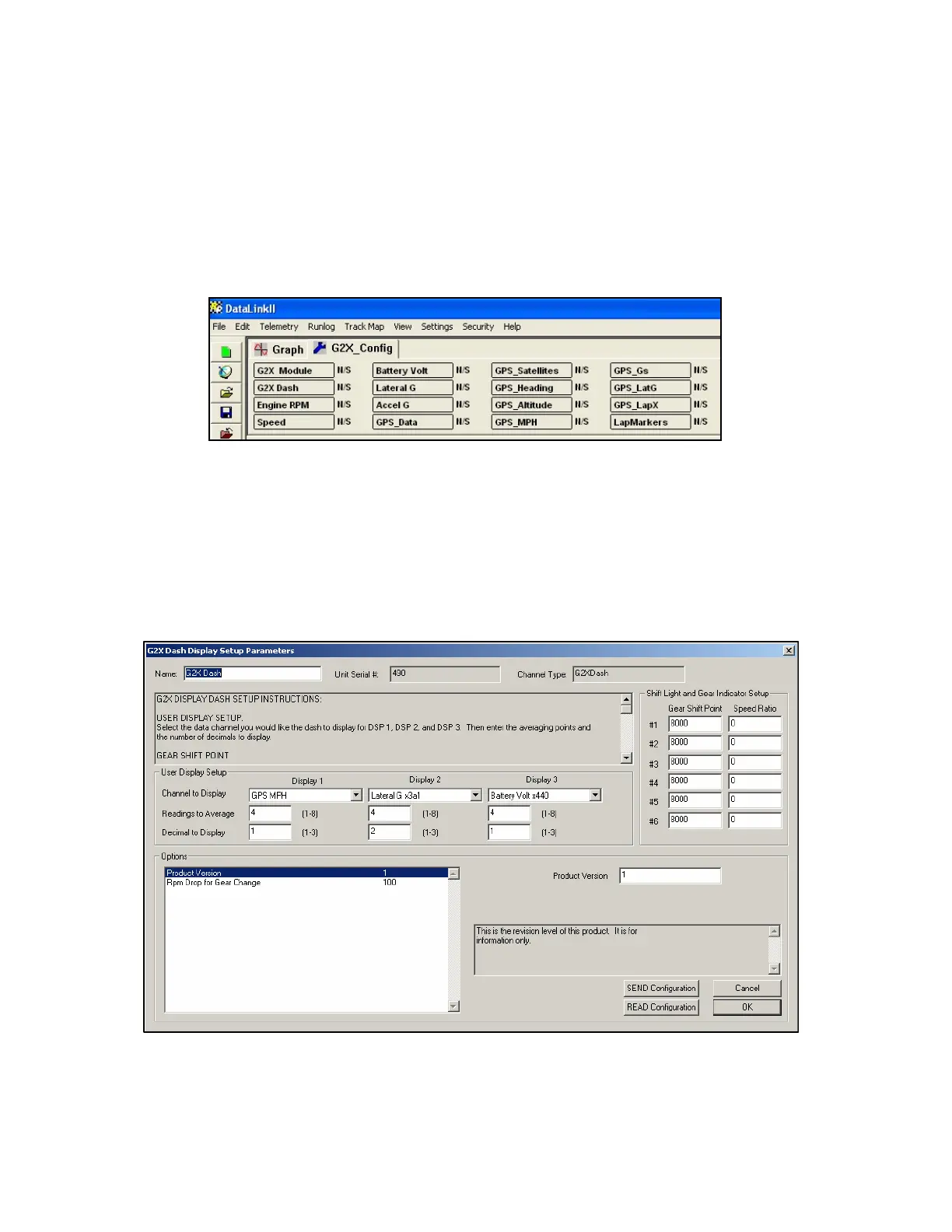
configuration file to meet your new requirements. You will notice a series of channel buttons at the top
of the data link screen when the configuration file is opened as shown below.
Each one of these channel buttons controls one of the aspects of the data logger system. For instance the
G2X_Module channel button is used to set the options such as record start channel and record threshold
used to control the main data logger system or the G2X_Dash channel button is used to set the dash
display parameters. To select one of the features to be edited, position the mouse cursor over the desired
channel button and click the Right mouse button. An easy edit dialog box for that channel button will
be opened. As an example position the mouse cursor over the G2X_Dash channel button and click the
Right mouse button. The following dialog box will be displayed.
In the upper left corner of the dialog box is the instruction box “G2X Display Dash Setup Instructions”.
The box contains the instructions for setting the various parameters on the G2X dash via the easy edit
dialog box.
42



 To Next Page