Sy
clone Portable Gamma-Ray Spectrometer, Revision 10 APPENDIX D – QUICK START – AUTOMATIC MODE
Ra
dComm – Proprietary Page 56 Revision Date: March 3, 2016
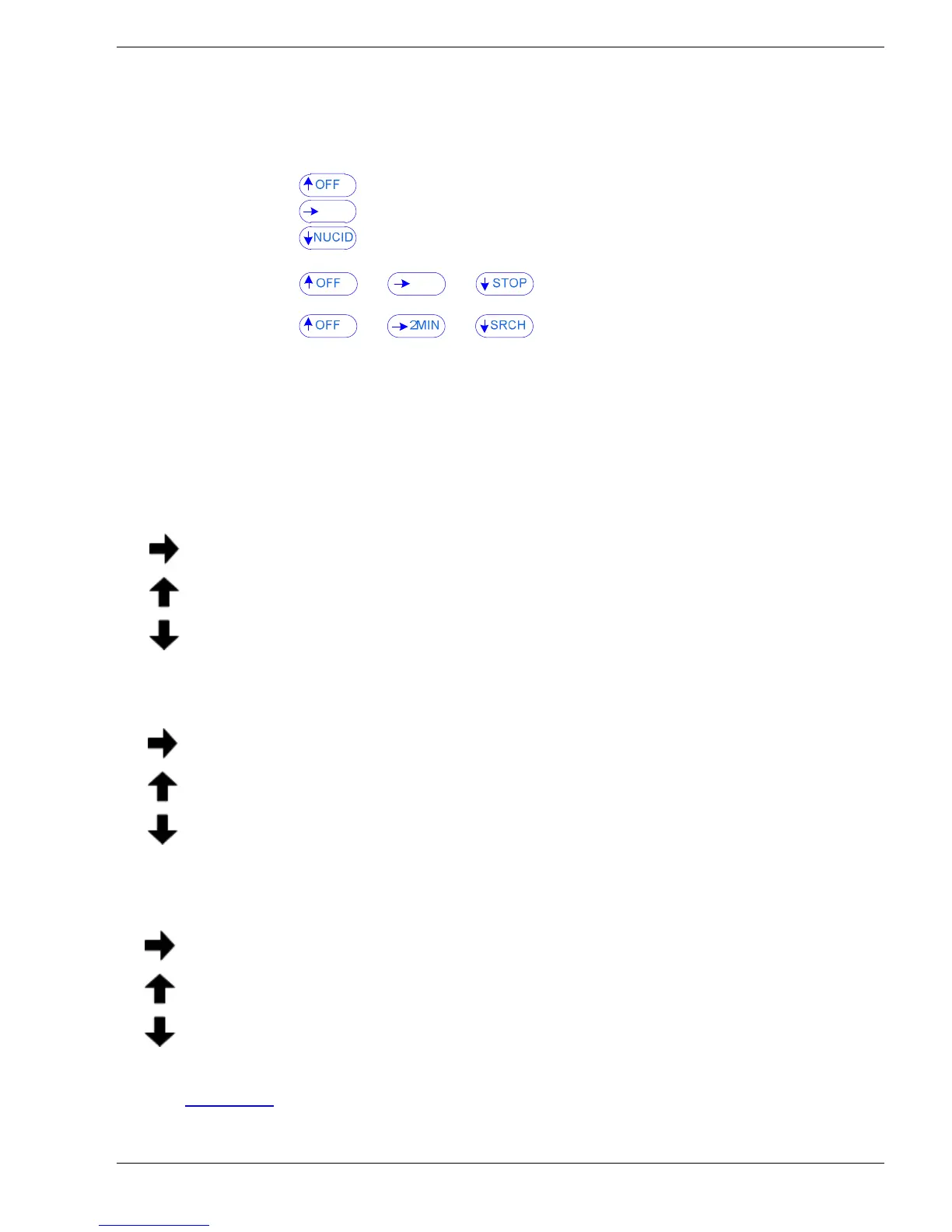
NAVIGATION MENUS
Nav
igation Menus have been embedded in the system screens (Automatic Mode only).
SEARCH:
IDENTIFY:
N
U
CLIDE IDENT:
T
he
Navigation Menus are located on the right for the SEARCH function and across the bottom of
the screens in the Identify Mode and Identify Results with the joystick functions described below:
Note: In some screens the internal computer is busy so a few seconds may pass before the
selected change occurs
SEARCH (Navigation Menu):
no action
OFF – approx. 4 secs then unit powers OFF
NUCID – switches to the IDENTIFY and Nuclide IDENTIFY
IDENTIFY (Navigation Menu):
no action
OFF – approx. 4 secs then unit powers OFF
STOP – stops the IDENTIFY sample
NUCLIDE IDENT (Navigation Menu):
2MIN – initiates an additional 2 minute count that adds to the current spectrum and at the
end of the period gives a combined analysis
OFF – approx. 4 secs then unit powers OFF
SRCH – switches to SEARCH
Refer to Chapter 3.0
for a detailed explanation of all the screens and menus.


 To Next Page