MultiRAE User’s Guide
44
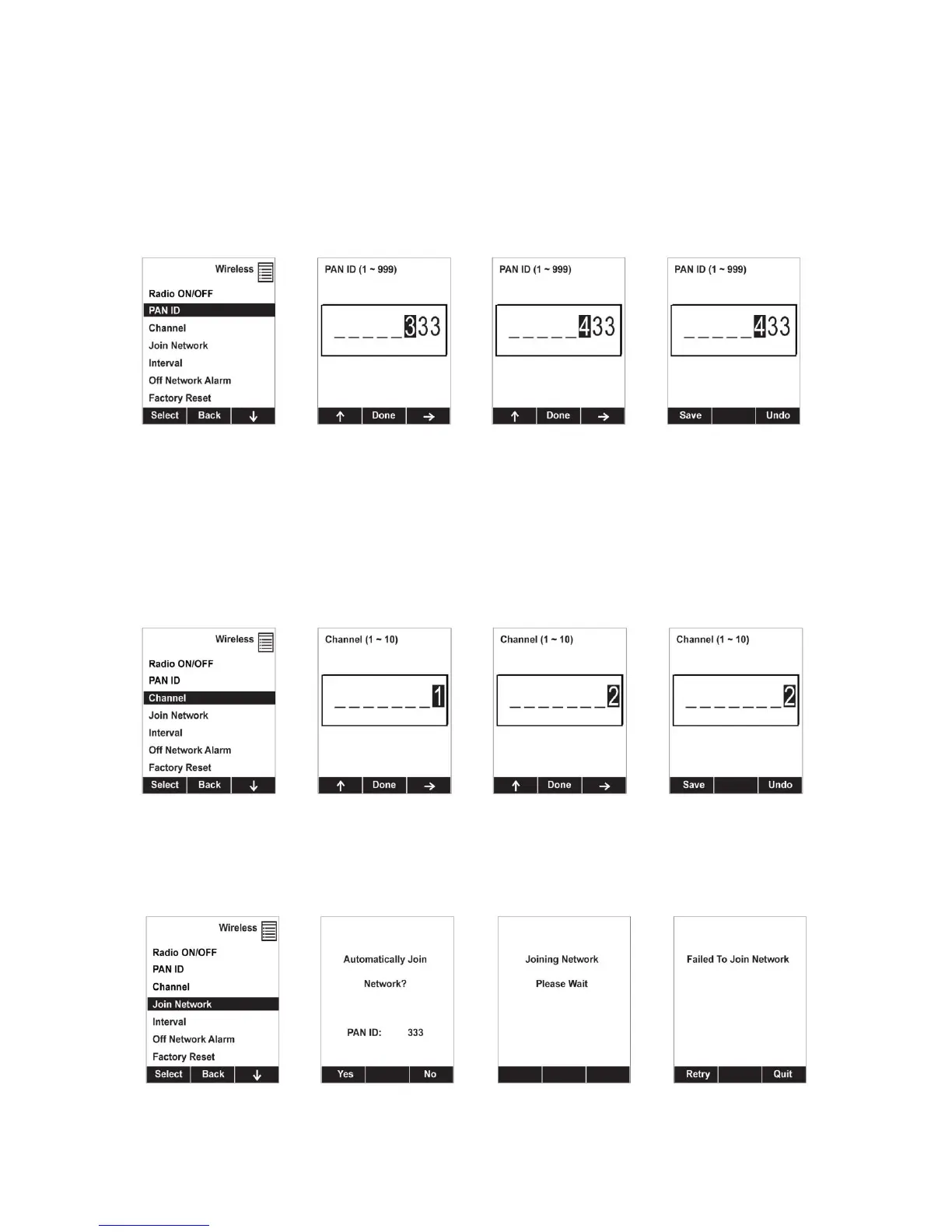
8.3.6.2 PAN ID
The MultiRAE and any other devices that you want to interconnect wirelessly must have the same PAN
ID.
1. Press [Y/+] to increase the number and [N/-] to advance to the next digit.
2. After moving to the last digit and making changes, press [MODE].
Press [Y/+] to save the change.
Press [N/-] to undo the change.
8.3.6.3 Channel
The MultiRAE and any other devices that you want to interconnect wirelessly must be operating on the
same channel.
1. Press [Y/+] to increase the number and [N/-] to advance to the next digit.
2. After moving to the last digit and making changes, press [MODE].
Press [Y/+] to save the change.
Press [N/-] to undo the change.
8.3.6.4 Join Network
You can tell the MultiRAE to automatically join a network with a certain PAN ID without having to
specify the communications channel. The PAN ID is shown for reference (if it is incorrect, you can
change it, as described above). Press [Y/+] to join.



 To Next Page