MultiRAE User’s Guide
17
4 Wireless Control And Submenus
When you step through the main menu, as shown in the previous three diagrams, there are two
screens for wireless communication.
Note: These are only present if the MultiRAE is equipped with a wireless module.
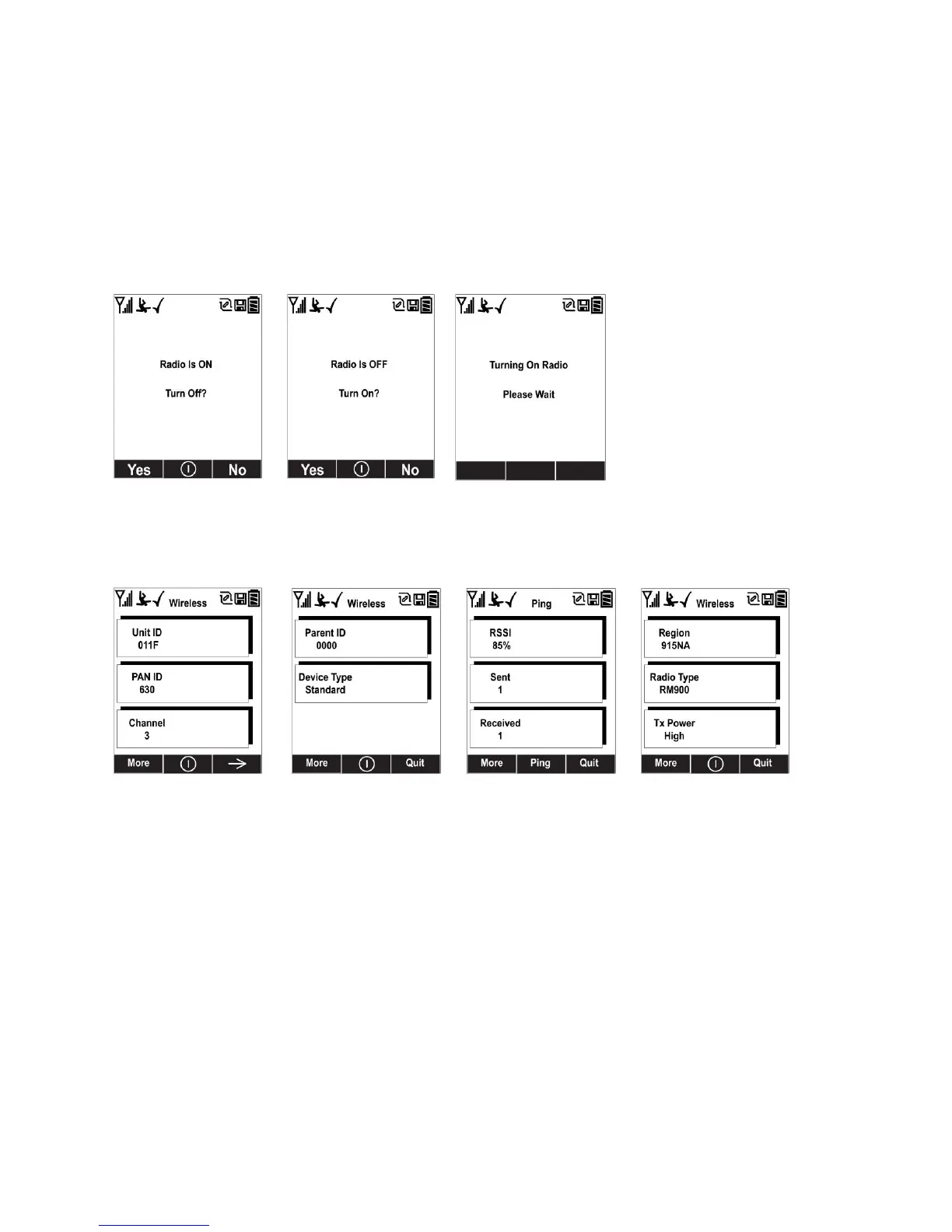
At the Radio On/Off screen, you can turn the radio on or off, if the MultiRAE is in Advanced User
Mode. The radio turns off instantly, but turning on the radio takes a few seconds, so you see a screen
that indicates the radio is being turned on. If the instrument is in Basic User Mode, the option for
turning the radio on or off does not appear (you can turn it on or off in Programming Mode).
At the Wireless screen, you can check communication with other wireless devices and get other
useful information about the wireless settings. The Wireless menu is divided into a sequence of
four “pages,” each presenting different information. As you press [Y/+] on each of the “pages,”
you advance to the next one.
Unit ID (unique identifier of the instrument’s radio), Pan ID, and Channel are read-only
parameters that help you to check whether the instrument’s wireless settings are correct (very
helpful for troubleshooting).
The next “page,” Parent ID and Device Type are also read-only. The Parent ID (the ID of the
“Parent” wireless device to which the monitor is connected) is not changeable. The device type
tells you that it is “Standard,” meaning it transmits and receives.
The third “page” is labeled “Ping,” where you can check the signal strength via RSSI (received
signal strength indication) and “ping” the network to confirm an active two-way communication
network. Each time you press [MODE] to “ping” the network, a number of sends is included
under “Sent.” If the network receives the signal and sends one back, which is in turn received by
the MultiRAE, then a number is added under “Received.”
The fourth “page” includes the type of transmitter (Region), Radio Type (model), and Tx Power
(transmission power). These are primarily for diagnostics and troubleshooting.
When you reach the fourth “page,” you can wrap around to the first one by pressing [Y/+].
Otherwise, you can press [N/-] to quit, which advances to the next screen.



 To Next Page