MultiRAE User’s Guide
32
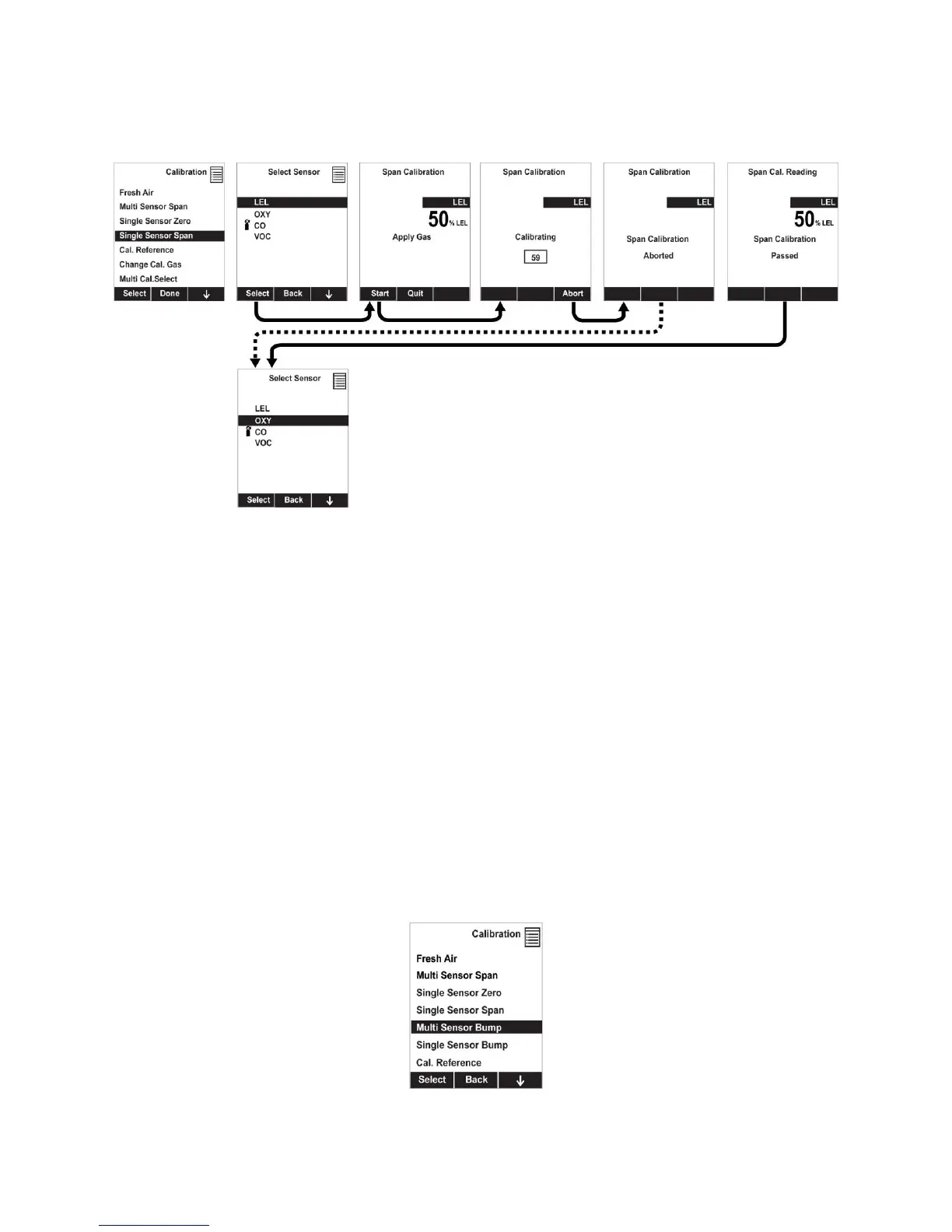
7. A countdown screen appears. You can abort the calibration at any time during the countdown by
pressing [N/-].
8. If the calibration is not aborted, the display shows the sensor names and tells you whether the
calibration passed or failed, followed by the sensor readings.
Note: The gamma radiation sensor comes pre-calibrated from the factory and does not require routine
calibration. However, you can check it by placing a check-source on the rear of the MultiRAE equipped
with a gamma sensor to check the readings. There is a raised dot on the rubber boot that marks where the
sensor is located inside the instrument.
8.3.2.5 Multi Sensor Bump
Depending on the configuration of your MultiRAE and span gas you have, you can perform a bump test
simultaneously on multiple sensors. Which sensors are bump tested simultaneously is defined in the Multi
Cal Select menu. Refer to section 8.3.2.9 for more information.
In case all sensors in the instrument cannot be calibrated with the same gas, the MultiRAE will
intelligently split the span calibration process into several steps and will provide menu prompts
accordingly.
1. At the Calibration Menu, select “Multi Sensor Bump.”
2. Install the calibration adapter and connect it to a source of calibration gas.
Note: Dotted line indicates automatic progression.



 To Next Page