MultiRAE User’s Guide
70
Exiting Gas-Only Measurement Mode
To exit gas-only mode and either switch back to multi-threat mode (where both gamma radiation and
gaseous threats) are measured or to gamma-only mode:
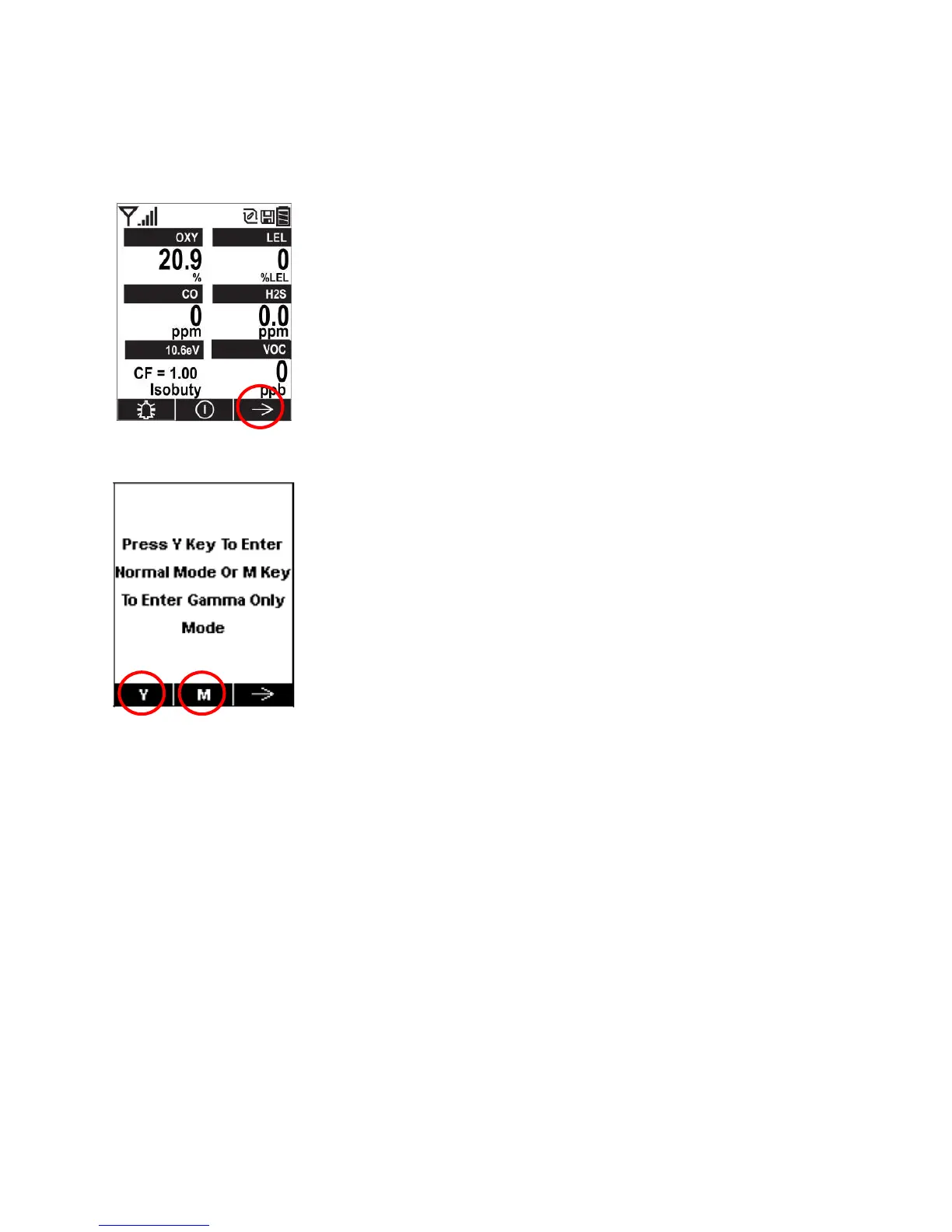
1. Press [N/-] when the instrument is running in gas-only mode:
2. The following screen appears:
Press [Y/+] to enter normal (multi-threat) mode.
Press [MODE] to enter gamma-only mode.
Notes:
The gamma radiation sensor is always disabled when the MultiRAE Pro is used in Search Mode.
Radiation dose is not calculated for the gamma sensor.
If the monitor runs in gamma-only mode for over 20 minutes, TWA is not calculated for gas sensors.
STEL is reset for gas sensors when the instrument exits gamma-only mode.
PID sensor auto-cleaning is only performed in multi-threat mode and is not available in either
gamma-only or gas-only mode (PID auto-cleaning is done automatically for any MultiRAE with
a PID sensor when the monitor is turned off and docked in the desktop charging cradle.)



 To Next Page