8.13.1 Viewing the number of waveform bars inside the current laser
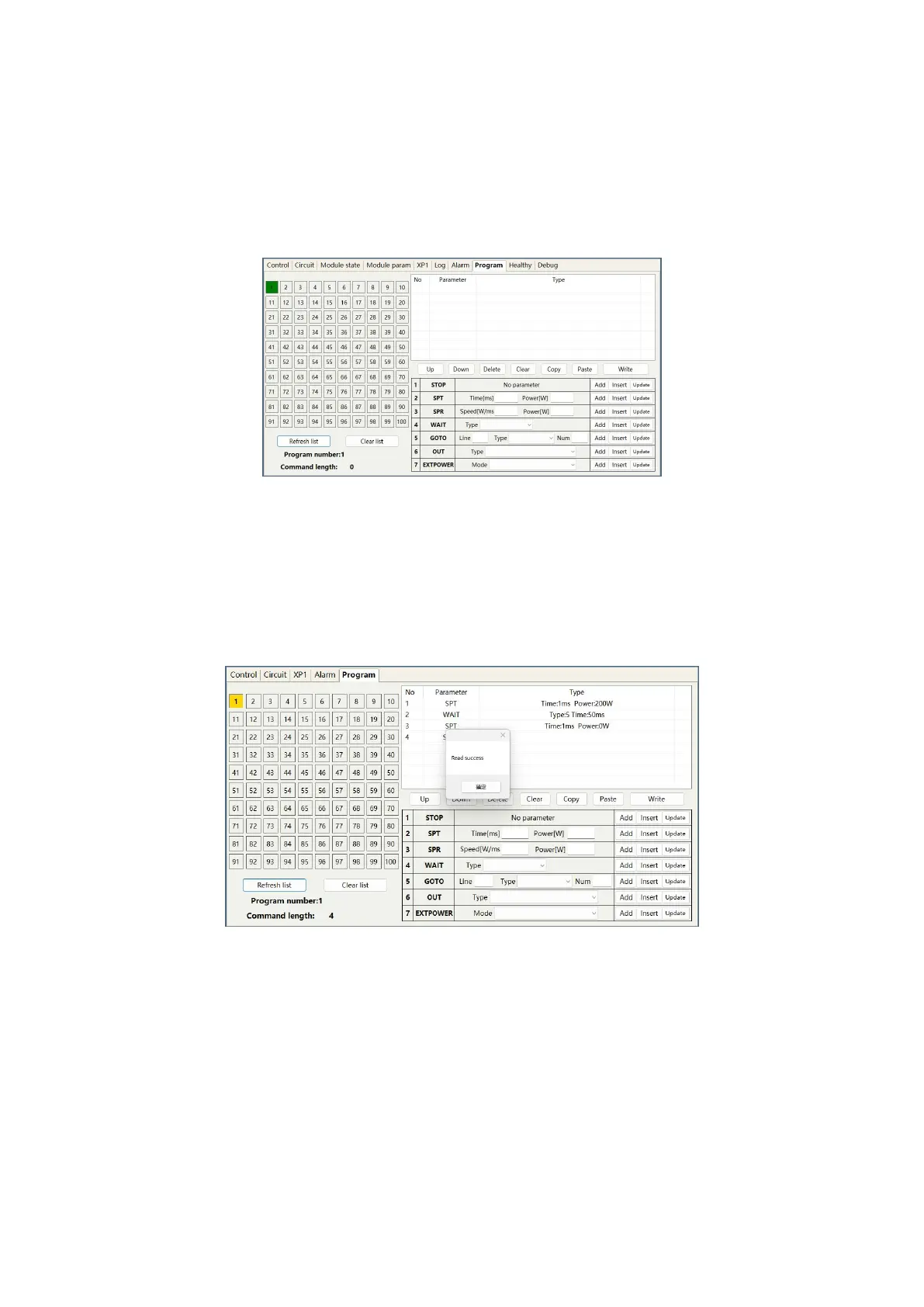
The operation menu for viewing the number of waveform bars stored inside the current laser is shown in
Figure 46. Click the "Refresh Program List" button, and the software will automatically list the number of
saved waveform bars. Green indicates that this bar already has programs, and white indicates that this bar
is empty.
Figure 46 Operation menu for viewing the number of waveform stored inside the current laser
8.13.2 Viewing Waveform Content
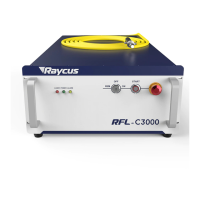
The operation menu for viewing the waveform content in the current laser waveform mode is shown in
Figure 47. With the left mouse button, click the waveform number to be read, and the program will
automatically list the original waveform list.
Figure 47 Operation menu for viewing the waveform content in the current laser waveform mode
8.13.3 Clear All Waveforms
The operation menu for clearing all waveforms stored in the current laser waveform mode is shown in
Figure 48. Click "Clear Program List" and the software will clear all waveforms stored inside the current
laser.


 To Next Page