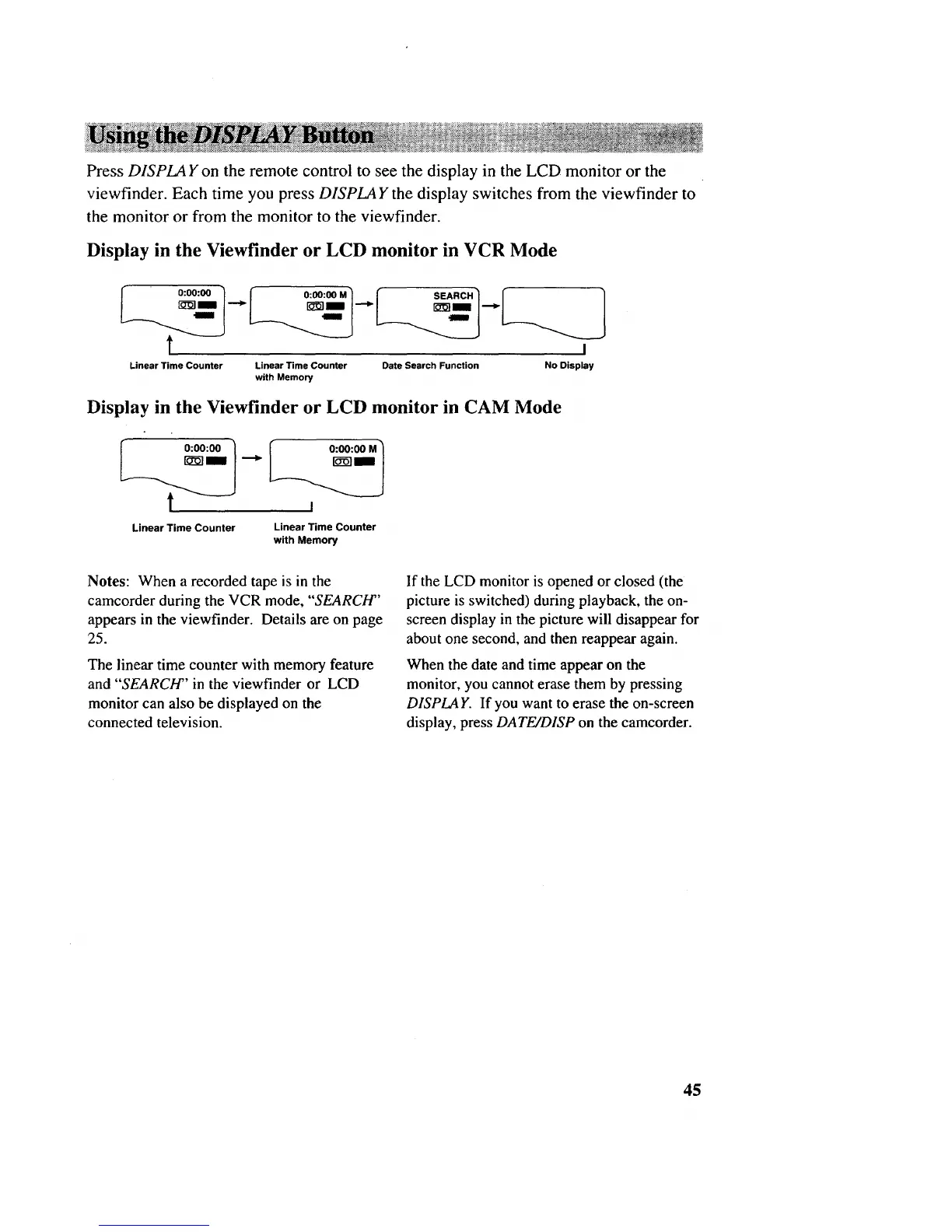
Press DISPLAY on the remote control to see the display in the LCD monitor or the
viewfinder. Each time you press DISPLAY the display switches from the viewfinder to
the monitor or from the monitor to the viewfinder.
Display in the Viewfinder or LCD monitor in VCR Mode
_" 0:00:00 '_ _ O:O0:OOM_ _ ____
I "_I'-'_I t_l| l'_
t i
Linear Time Counter Linear Time Counter Date Search Function No Display
with Memory
Display in the Viewfinder or LCD monitor in CAM Mode
_._r__l 0:00:00 _ .-_
"l f o:oo:oo
Linear Time Counter
Linear Time Counter
with Memory
Notes: When a recorded tape is in the
camcorder during the VCR mode, "SEARCH"
appears in the viewfinder. Details are on page
25.
The linear time counter with memory feature
and "SEARCH'' in the viewfinder or LCD
monitor can also be displayed on the
connected television.
If the LCD monitor is opened or closed (the
picture is switched) during playback, the on-
screen display in the picture will disappear for
about one second, and then reappear again.
When the date and time appear on the
monitor, you cannot erase them by pressing
DISPLAY. If you want to erase the on-screen
display, press DATE/DISP on the camcorder.
45



 To Next Page