22
Recording a Program
Recording Features
Recording Speeds
SP and SLP speeds are used when recording a program. The speed you select
appears on the TV screen and in the VCR’s display panel. The VCR automatically
selects the speed for playback. Although this VCR does not record in LP, it can play
LP programs recorded on other VCRs. Special effects such as pause, frame advance,
slow motion, and picture search work well in either speed.
SP (Standard Play) gives the best quality recording.
That is why most prerecorded, rental tapes are
recorded in SP. Fewer programs can be recorded on
the tape.
SLP (Super Long Play) gives three times the recording
time of tapes recorded in SP.
Pause
This feature allows you to prevent recording short passages of unwanted material.
Press PAUSE during recording to stop and start
recording. PAUSE and
D
appear in the VCR’s
display panel.
The VCR will automatically switch from pause to stop
after a few minutes.
Recording Options
This section explains the recording features and options, including the following:
Basic Recording
Watching One TV Channel While Recording
Another Channel
Timer Recording
Recording Broadcast Stereo TV or SAP (Second
Audio Program)
Recording Audio Only
Using Two VCRs for Copying Tapes
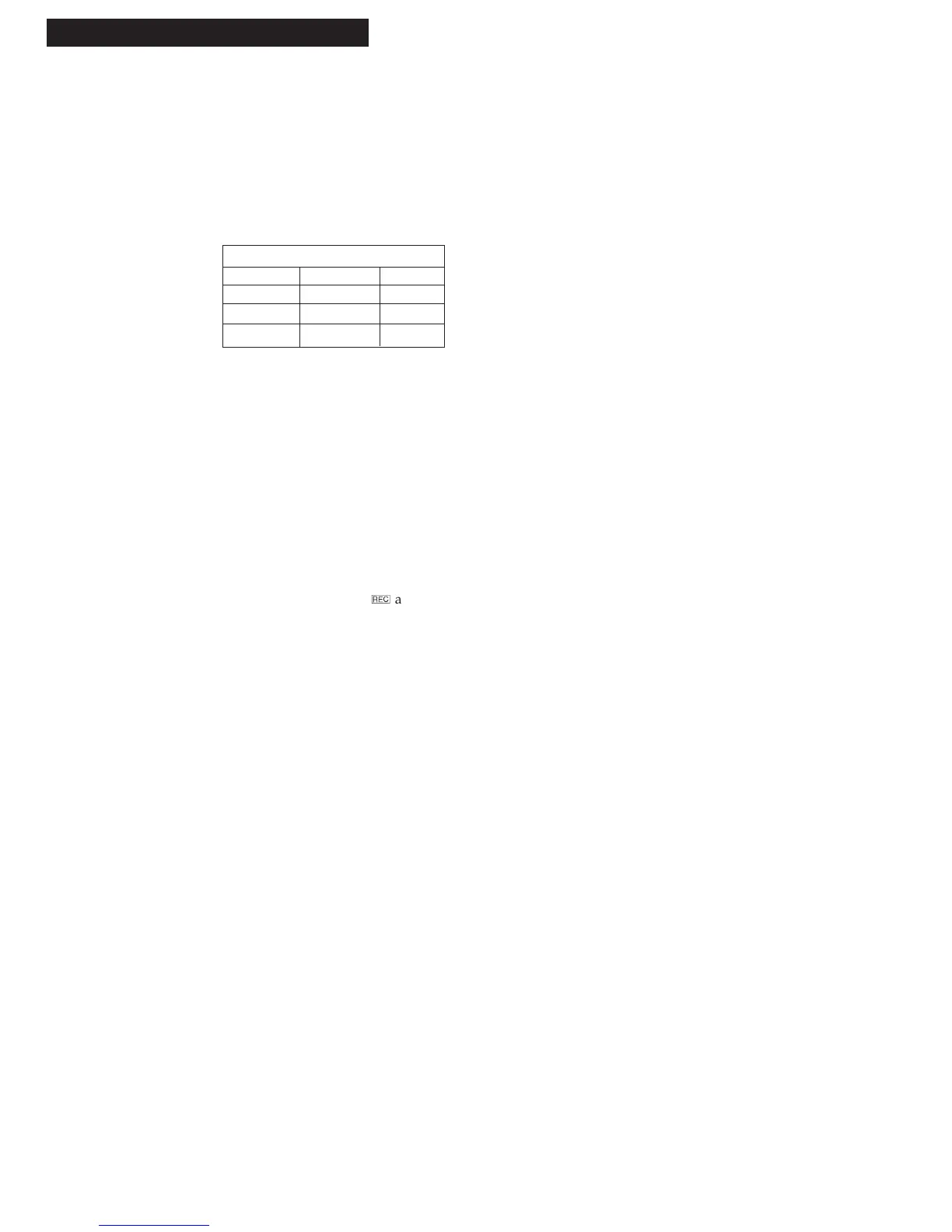
Recording Time
Cassette SP SLP
T-120 2Hrs 6Hrs
T-160 2Hrs 40Min 8Hrs
T-180 3 Hrs 9Hrs



 To Next Page