KEY LOCK/UNLOCK
Lock the keys on the DSMC2 Sidekick to prevent inadvertent button presses and menu changes.
Lock: Press A + D simultaneously.
Unlock: Press A + D simultaneously. Alternatively, press and hold ENTER while keys are locked.
DSMC2 SIDEKICK DISPLAY
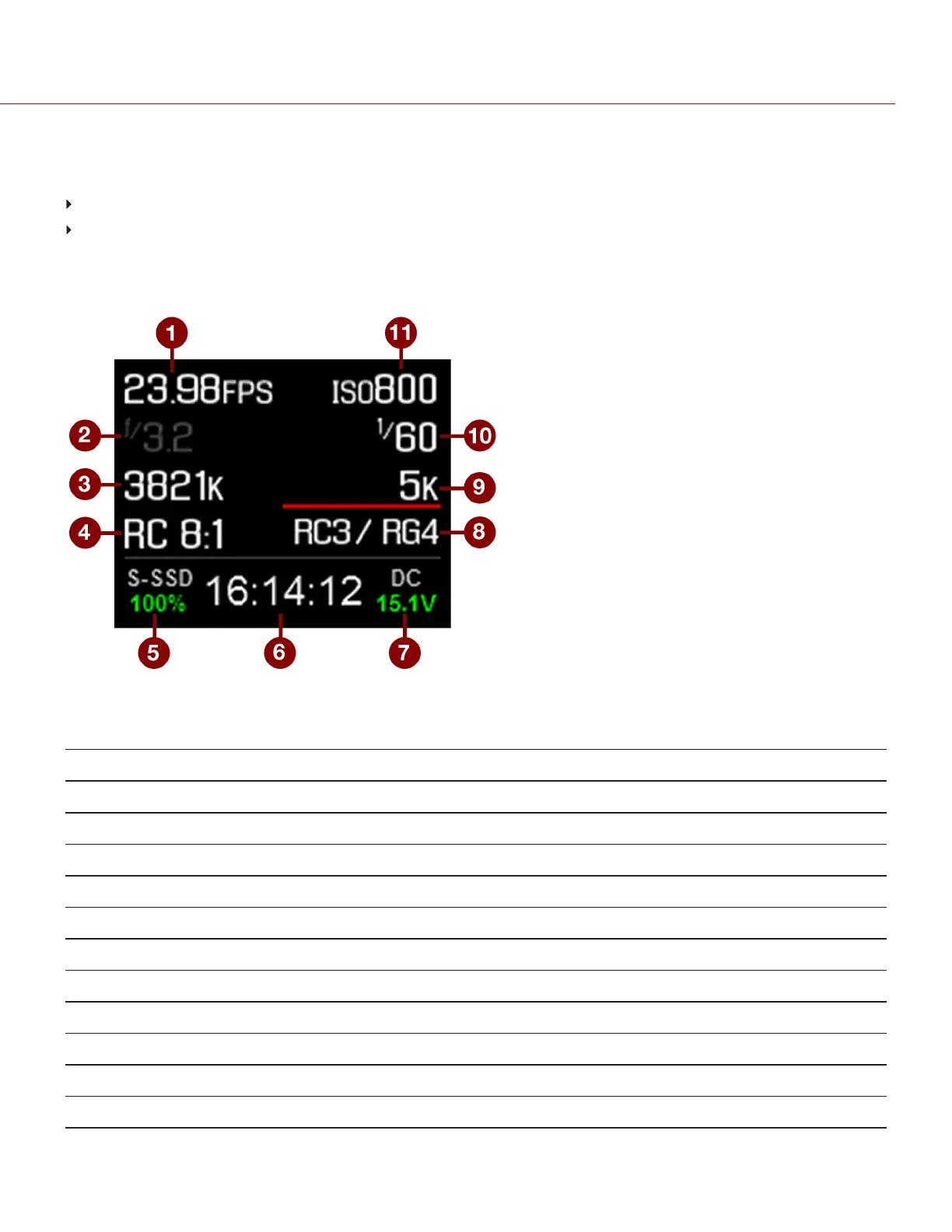
The DSMC2 Sidekick OLED display provides basic camera parameters during operation.
Figure: DSMC2 Sidekick OLED (Local Mode)
The DSMC2 Sidekick displays the following camera parameters:
# ITEM DESCRIPTION
1 Frame Rate Current Recording Frame Rate
2 Lens Information Displays aperture if a supported Canon, Nikon, or Cooke lens is attached
3 White Balance Color temperature
4 REDCODE REDCODE compression setting
5 Media Status Displays media location and remaining media capacity
6 Timecode Current timecode value
7 Power Status DC supply voltage or % of remaining battery capacity
8 Color and Gamma Space Currently selected RED color and gamma space settings
9 Resolution Recording resolution
10 Shutter Speed Integration time or shutter angle
11 ISO Camera sensor sensitivity
C OPYRI GHT © 2017 R ED.C O M , I NC 955- 01 38 _V6.3, REV-D | 72
WEAPON/EPIC-W OPERATION GUIDE



 To Next Page