VR-3800D Series Digital Video Recorder
10
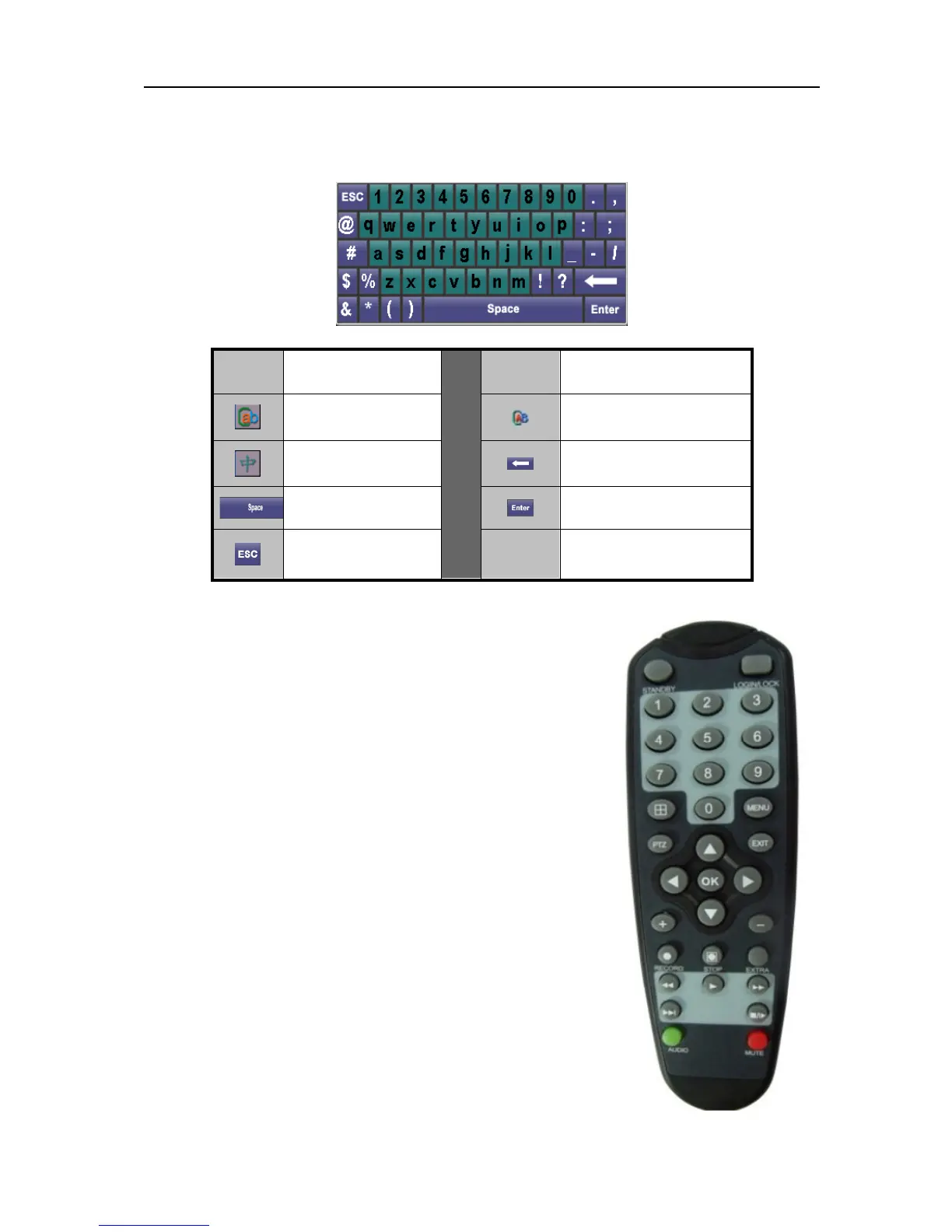
1.3. Input method.
1.4. Using Remote Control.
Remote is the minor input device of system browsing interface.
Function keys instruction:
1.STARTUP/ STANDBY:Three-second long press to enter start
up/standby
2.LOGIN/LOCK:Obtain operation authority while entering the
system. If you have enabled “SAFETY” in setup menu, you can
enter user password login interface.
3.Number key/channel button:Input 0~9 in setupinterface/Under
preview mode, press channel button to select the
corresponding channel picture to be displayed.
4.Multi-Screen:Change the view mode to four channel picture
display or multi-channel picture display.
5.MENU:Press [MENU] to display main menu under preview
mode.
6.PTZ:Call PTZ control interface.
7.EXIT:Close the menu window or return to previous menu.
8. Browsing or confirming:
Icon Description
Icon Description
Lowercase
Uppercase
Chinese input
method
Backspace
Space
Enter
Exit
UnRegistered


 To Next Page