VR-3800D Series Digital Video Recorder
15
Electronic amplification
:To enlarge the picture 2 times for each click.8 times at most.
:To shrink the enlarged picture till normal one.
:To enlarge the selected area to full screen.
:To turn the picture to normal size.
:Exit.
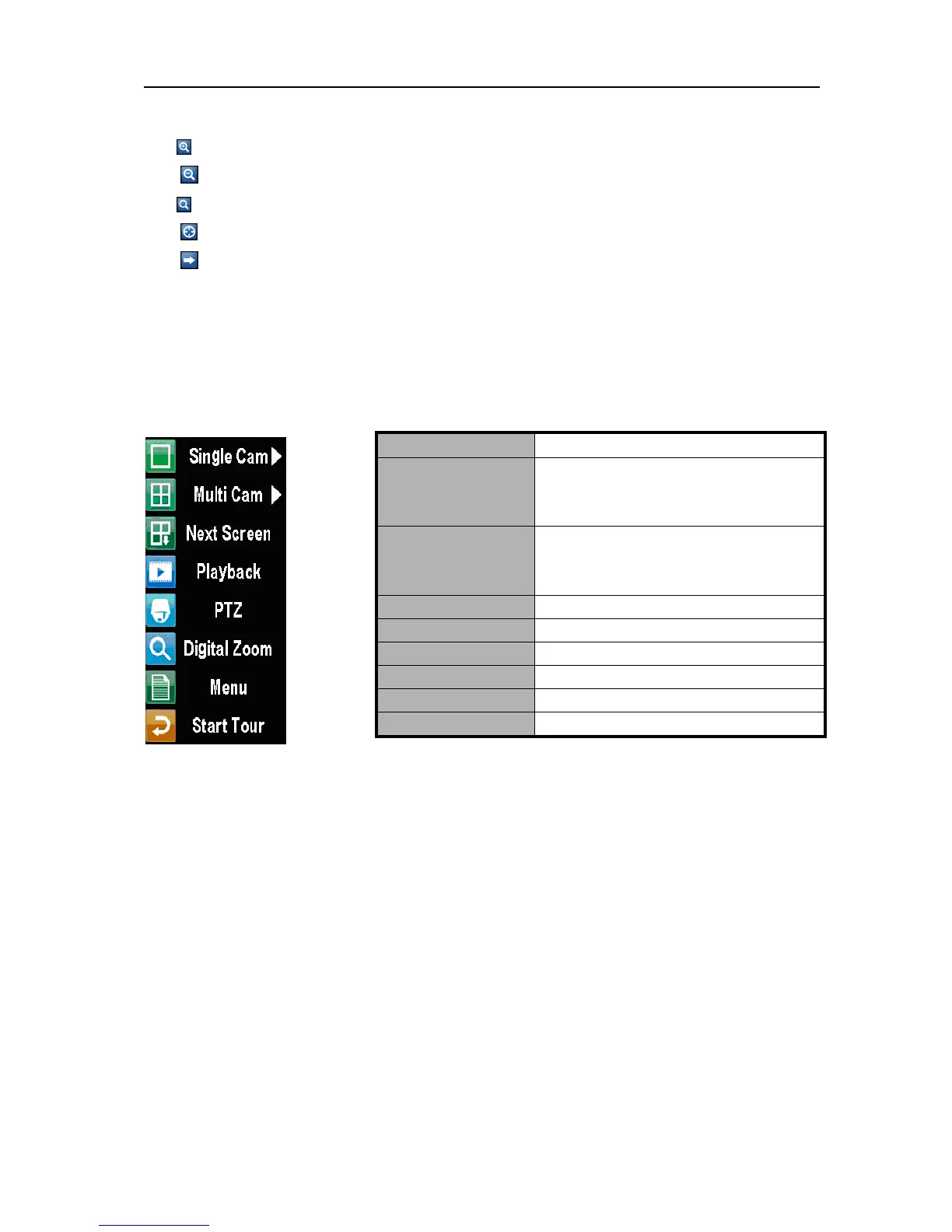
Right click menu instructions.
Under main preview mode, preview screen switching,preview mode adjustment ,play
back, PTZ control and electronic digital zoom, etc, can be achieved by means of right click
menu
Note:1. Before using “START TOUR”, please set up “dwell time”(the time between switching
of channels)in Live preview configuration.
2.3. Preview parameters setup.
Live Preview displays can be customized to your own needs. These settings can be accessed by
entering the Display Settings menu.
Name Descriptions
Single camera
Switch to a full screen display of the
selected camera. Camera can be selected
from a drop down list.
Multi camera
Switch between different displays layout
options. Options can be selected from a drop
down list.
Next screen
Switch to next screen.
Play back Enter play back mode.
PTZ Enter PTZ control mode.
Digital zoom Enter digital zoom interface.
Main menu Enter main menu.
Start tour Enable sequencing in Live Preview mode
UnRegistered


 To Next Page