VR-3800D Series Digital Video Recorder
48
8. PTZ Controls
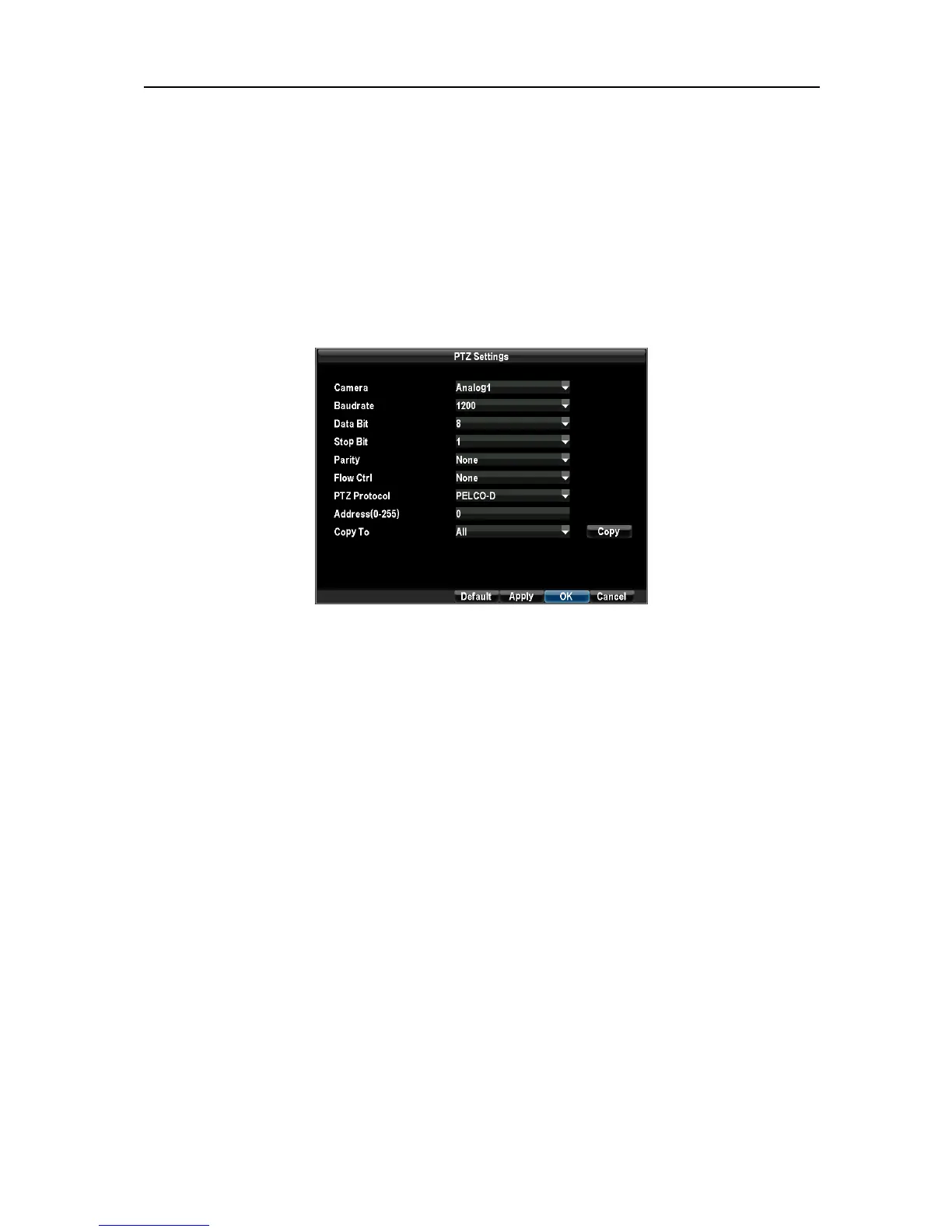
8.1 Configuring PTZ Settings.
Note: Settings for a PTZ camera must be configured before it can be used. Before proceeding, verify that the
PTZ and RS-485 of the DVR are connected properly and configure PTZ decoder settings.
To configure PTZ settings:
Enter the PTZ Settings menu by clicking Menu →Configuration →PTZ Settings.
For quick access to certain PTZ settings, right clicking with the mouse in a display while in
PTZ control mode will bring up the PTZ settings menu.
Note: All the settings including Baud rate, Data Bit, Stop Bit, Parity, Flow Ctrl, PTZ Protocol
and address should be in accordance with that of PTZ decoder.
8.2 Setting up and calling PTZ Presets, Patrols & Patterns.
Note: Configure presets, patrols and patterns in PTZ Control interface, and check whether your
PTZ decoder supports these functions before configuring.
Setting up and calling Presets.
To setup and use PTZ presets:
1. Enter the PTZ Control interface.
Select the Preset button or select Preset in right click menu to enter the Preset Management
menu.
UnRegistered



 To Next Page