VR-3800D Series Digital Video Recorder
19
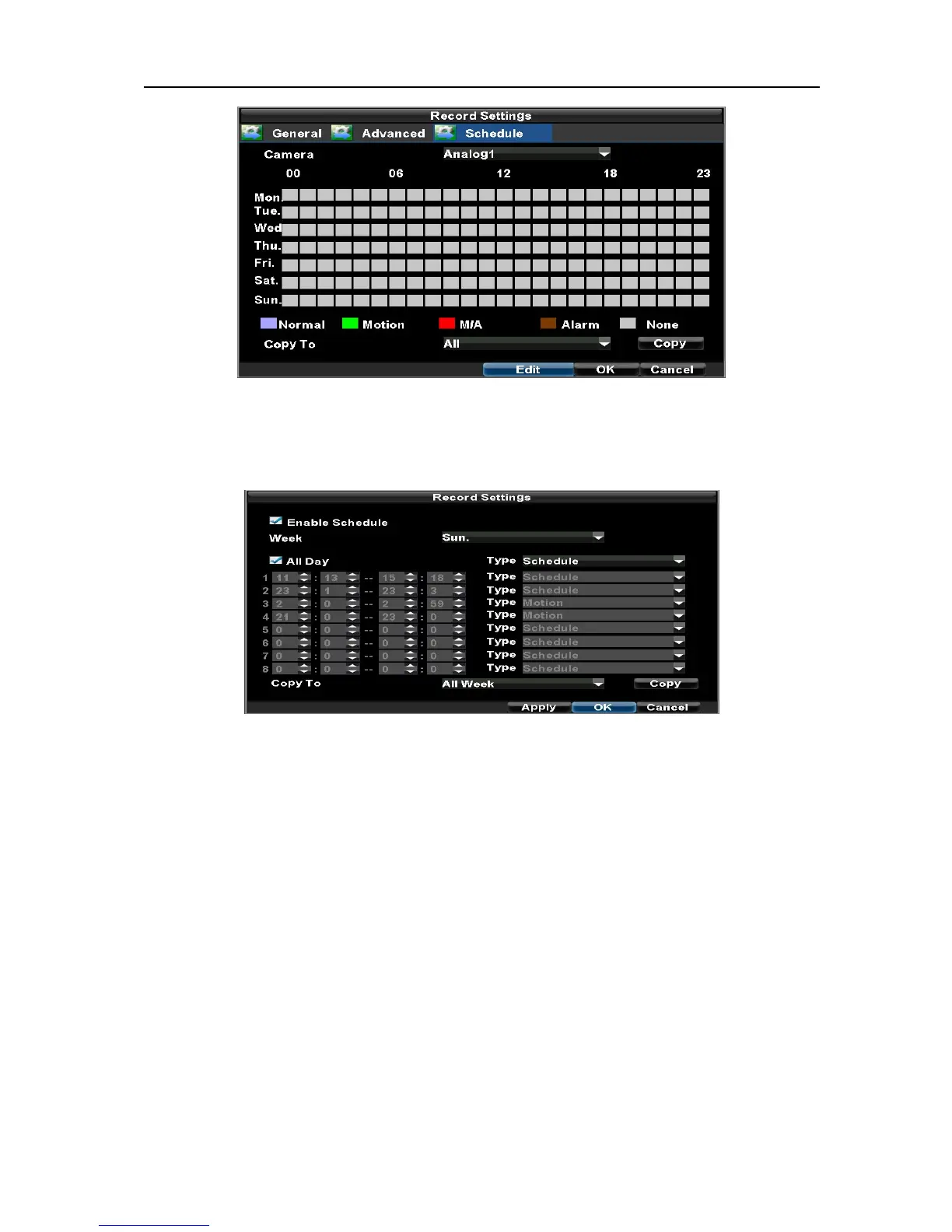
3. Select Camera to edit schedule for.
4. Click the Edit button.
5. Click and check Enable Schedule
6. Select the day you would like to setup the schedule for or select All Week to record the entire week.
7. Select to record the entire day by clicking All Day or at different time periods. Up to 8 time periods
can be scheduled. It is important to note that time periods cannot be overlapped.
8. Select recording Type. Recording type can be based on time and triggered by schedule, motion detection,
motion or alarm and alarm. Motion detected and alarm triggered recordings are further explained in
Configuring Alarms.
9. Click the OK button to finish configuration.
10. Repeat steps 3-9 for other cameras or copy settings from one schedule to the next under the Copy To
section.
11. Click OK to finish and save the schedule settings.
12. If all the cameras recording settings are the same, please select All under Copy To section as shown:
UnRegistered



 To Next Page