EasyManua.ls Logo

Retsch MM 400 - Page 56

Retsch MM 400
85 pages
Print Icon
To Next Page IconTo Next Page
To Previous Page IconTo Previous Page
Loading...
Device control
56
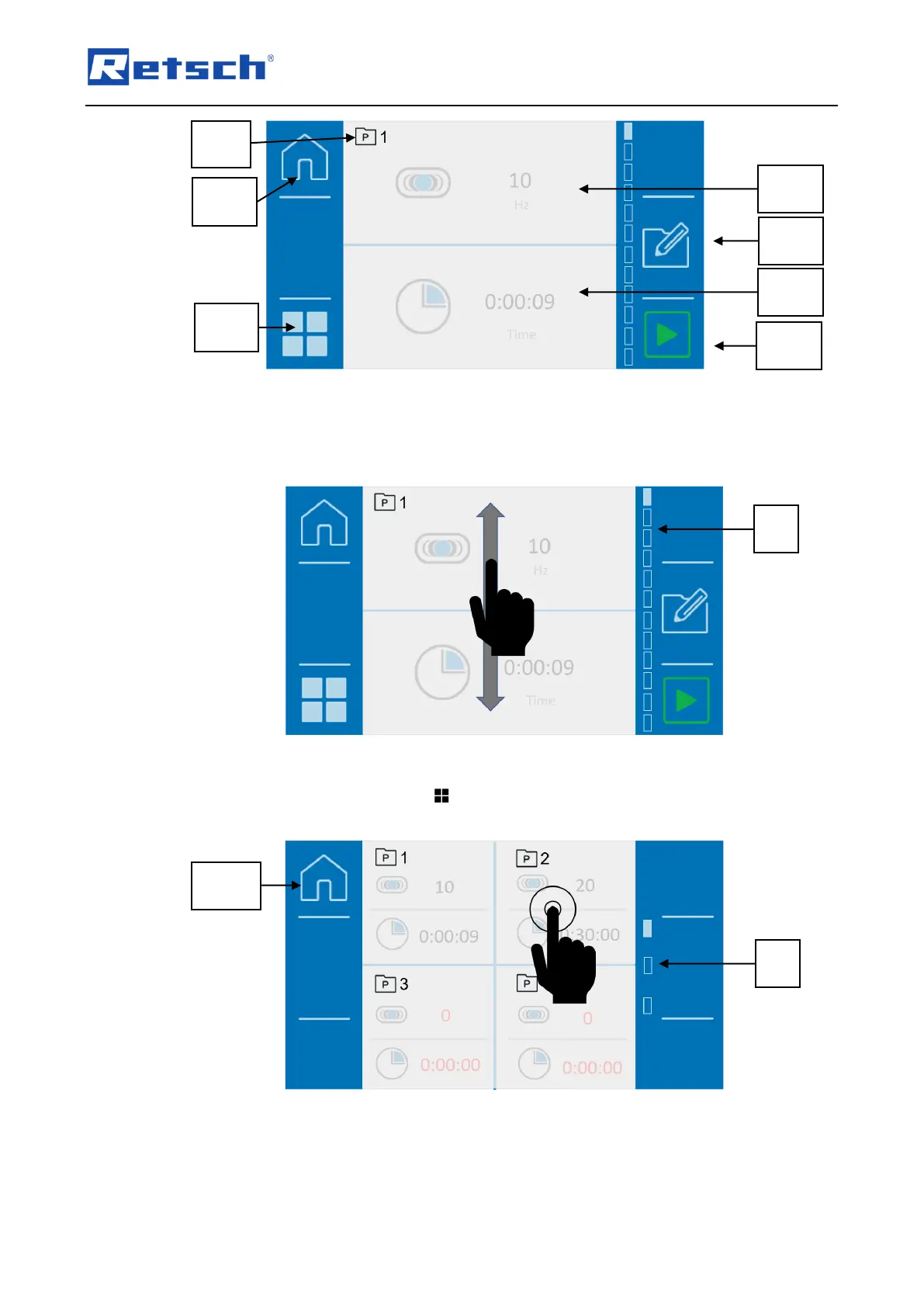
Fig. 28: Programme mode
You can change the programme by swiping up or down on the touch display. The scroll bar
(B) gives a visual overview of the position within the programmes.
Fig. 29: Programme view
Alternatively, you can use the button (N3.2) to switch to the gallery view. Now four
programmes will always be displayed with the set parameters.
Fig. 30: Gallery view
Swipe across the display to switch between programme groups 1 to 4, 5 to 8 and 9 to
12. The scroll bar (B) gives you a visual overview of your position within the gallery
view.
N1.2
P1.1
S4
S3.1
P1N
N1.2
S2.2
N3.2
.2
P2.1
S4
B
B

Table of Contents

Related product manuals