Displays the number of the current cycle programme
A cycle is divided into parameter sets A and B
Displays the parameters of the active cycle (vibration
frequency or grinding time)
Displays the number of times the configured cycle is
repeated until the grinding process is complete
Indicator for the position of the cycle programme
Total cycle programme
time
Shows the total duration of the cycle programme until the
grinding process is completed (the total duration consists of
the two parameter sets (A/B) and the repetitions).
The total duration of a cycle programme is limited to 99
hours.
Opens the editor of the cycle programme
Starts the grinding process or the cycle programme
Swipe from right to left or from left to right across the display to navigate through the cycle
programmes. The position of the cycle programme is shown in the scrollbar.
Press to start the selected cycle programme and grinding process.
To exit the cycle programme mode and return to the main menu, press .
7.7.2 Editing the cycle programme
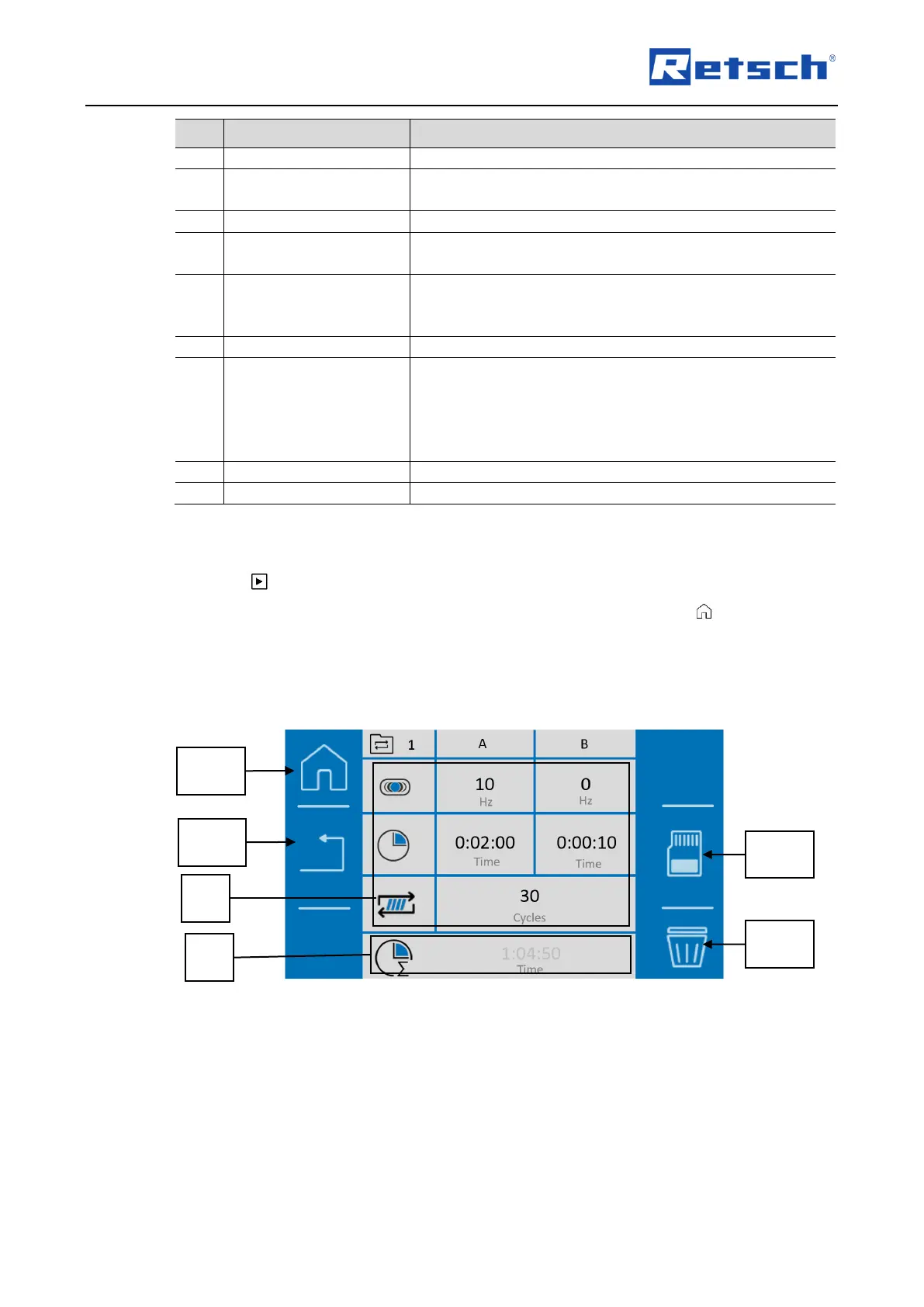
Cycle programmes can be created, edited, saved and deleted in the cycle programme editor.
Fig. 35: Editor for the cycle programme


 To Next Page