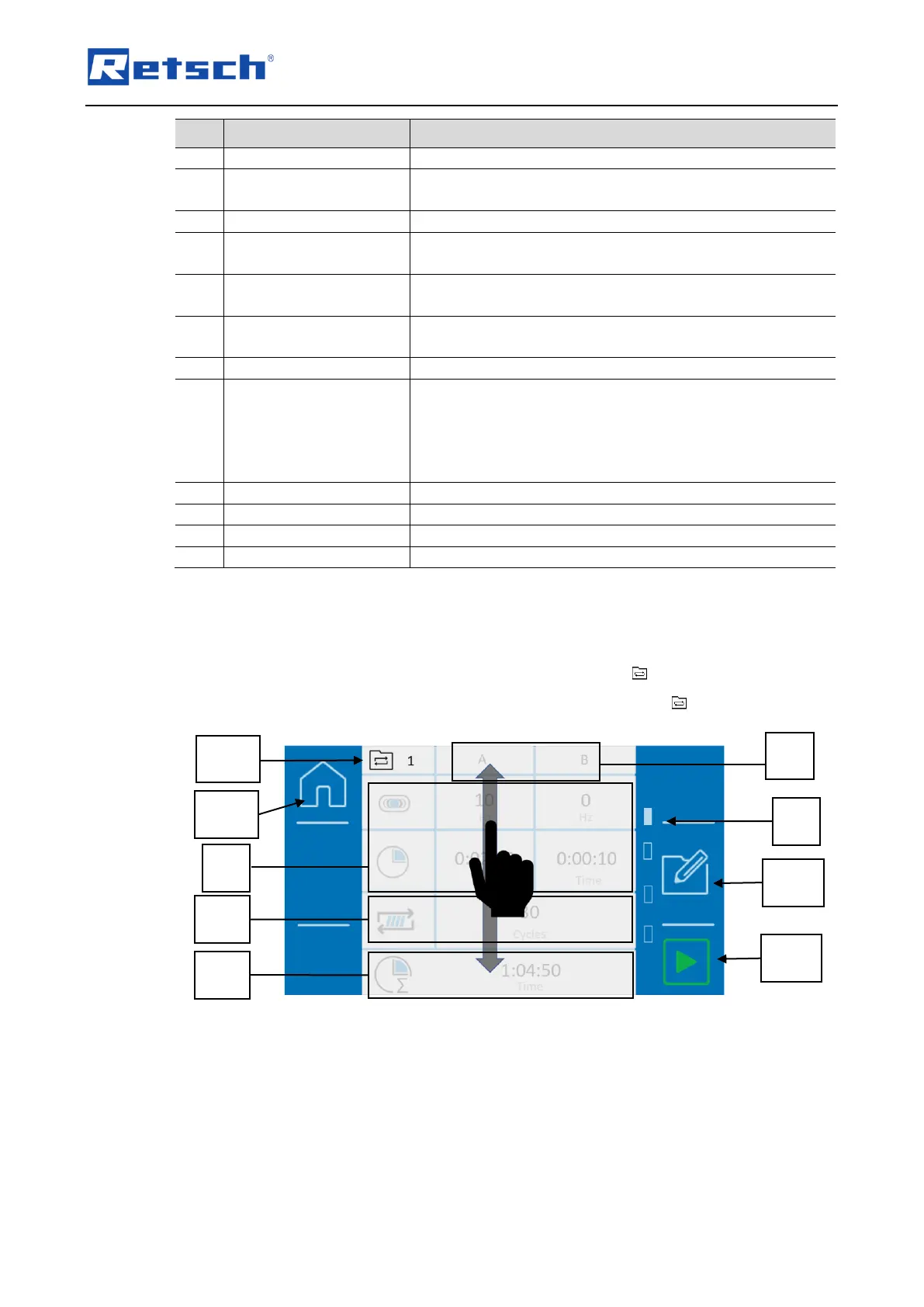
Displays the number of the current cycle programme.
A cycle is divided into parameter sets A and B.
Displays the parameters of the active cycle (vibration
frequency or grinding time)
Displays the number of times the configured cycle is
repeated until the grinding process is complete.
Repetitions cycle current
After the grinding process has started, the current cycle
status is displayed here
Indicates the cycle position
Total cycle programme
time
Shows the total duration of the cycle programme until the
grinding process is completed (the total duration consists of
the two parameter sets (A/B) and the repetitions).
The total duration of a cycle programme is limited to 99
hours.
This pauses the current cycle programme.
Opens the editor for cycle programmes.
Starts the grinding process or the cycle programme
Stops the current cycle programme
7.7.1 Selecting the cycle programme
In the cycle programme mode, cycle programmes with preset parameters for the grinding
process can be selected. To select a cycle programme, press the button on the main menu.
The respective number of the cycle programme is displayed next to the symbol.
Fig. 34: Selecting a cycle


 To Next Page