8/44
Bosch Rexroth Canada ı May.2018 ı Revision 7.0
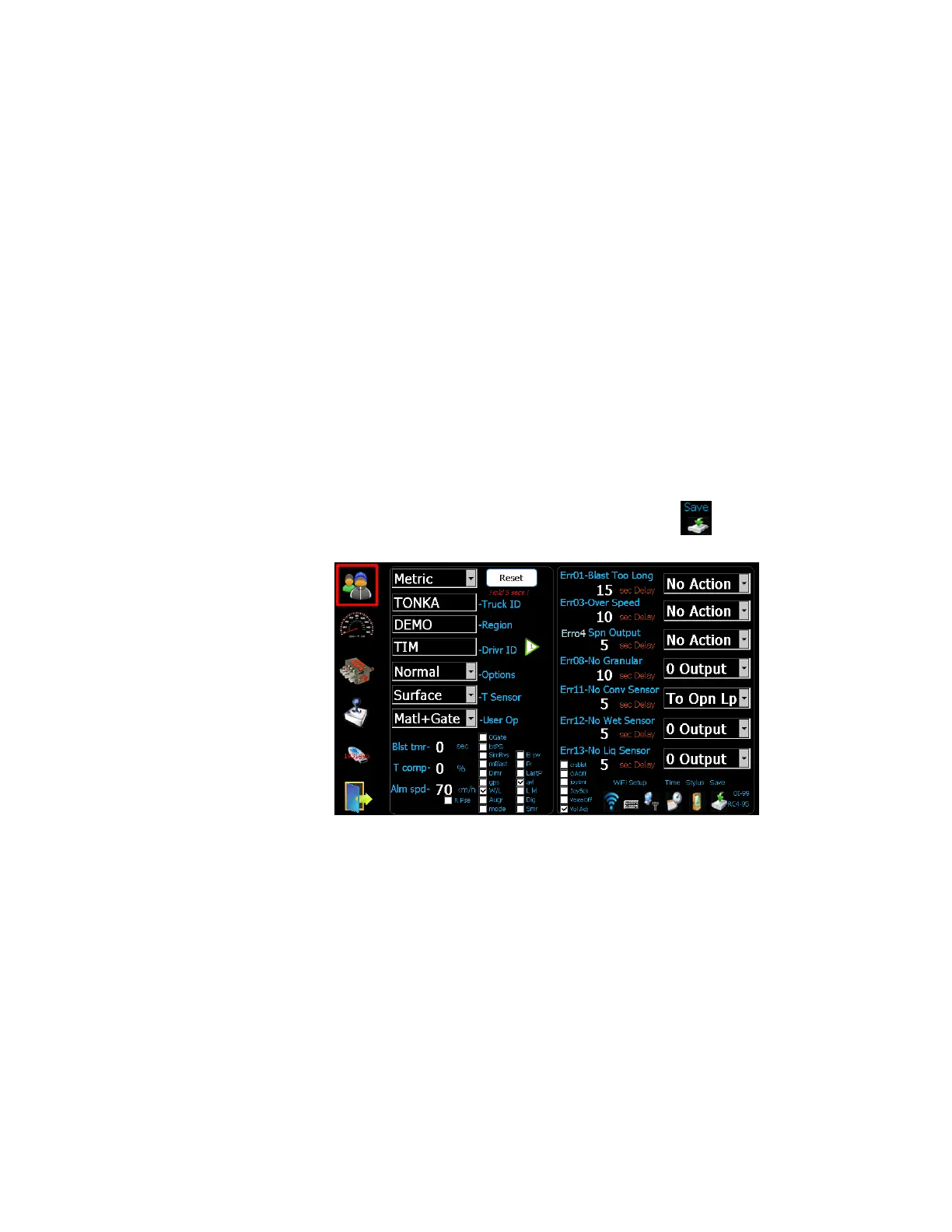
5 Initial Set-up
1. Set the units to imperial (LBS/Mile) or metric (Kg/Km).
2. Set the TRUCK ID.
3. Set the REGION NAME.
4. Set the DRIVER ID (optional), 4 driver IDs allowed.
Note: Configuring 4
th
driver ID to ‘USER” enables operators to enter user defined driver
ID on operator screen.
5. Set the type of Temperature Sensor (optional).
6. Set the Options – see Advanced Features on page 14 (optional).
7. Set the items that the user has access to (optional).
8. Set Blast Timer, 0-timer disabled (optional). This should be set less than Err01 delay.
9. Set Percentage of Temp. compensation when there is a 3 degree change (optional).
10. Set the vehicle speed alarm (optional).
11. Select AVL or GPS tracking (optional).
12. Set WIFI/TIME/STYLUS (if required). Note: Save only applies to changes to
Date/Time/WiFi/Stylus.
The default error configuration values will work well for most applications, no changes
required.



 To Next Page