Settings You Can Change with the User Tools
305
6
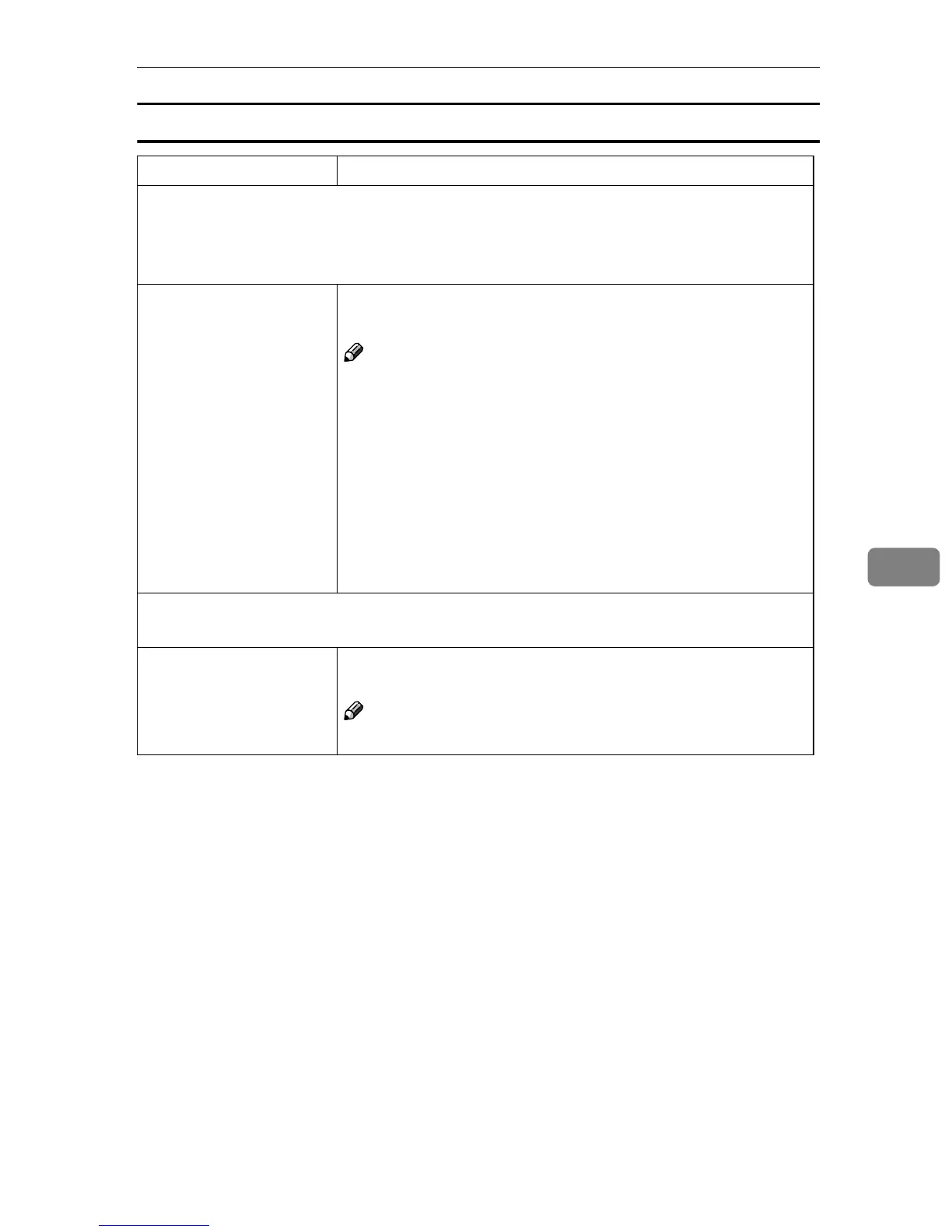
User Stamp
Menu Description
Program/Delete Stamp
You can register up to 4 custom stamps with your favorite design. You can regis-
ter/change/delete your favorite design as a user stamp.
How to Program/Delete Stamp, see ⇒ p.193 “Program/Delete User Stamp”.
Stamp position You can set the position at which the stamp is printed.
Press the arrow keys to adjust the position.
Note
❒ Default:
• Metric version:
• Position: Top Right
• Top/Bottom Margin: 24 mm
• Left/Right Margin: 24 mm
• Inch version:
• Position: Top Right
• Top/Bottom Margin: 0.9"
• Left/Right Margin: 0.9"
Stamp condition
You can adjust the print page for User Stamp 1 to 4 you registered.
Print Page You can select whether the stamp is printed on the first page or all
pages.
Note
❒ Default: All Pages


 To Next Page
 Loading...