4.System Maintenance
131
replaced and is currently empty.
If more than one customized backup files are included in the USB flash drive, the newer one
will be restored.
The following procedure is applicable only if the backup was created on a USB flash drive with
the “Create bootable image” option selected.
1. Perform the shut down procedure from the copier operation panel [Link to Shutting Down the E-
25C Only].
2. When the E-25C power is down (that is when the diagnostic LEDs are off), turn the main power
switch of the E-25C to OFF.
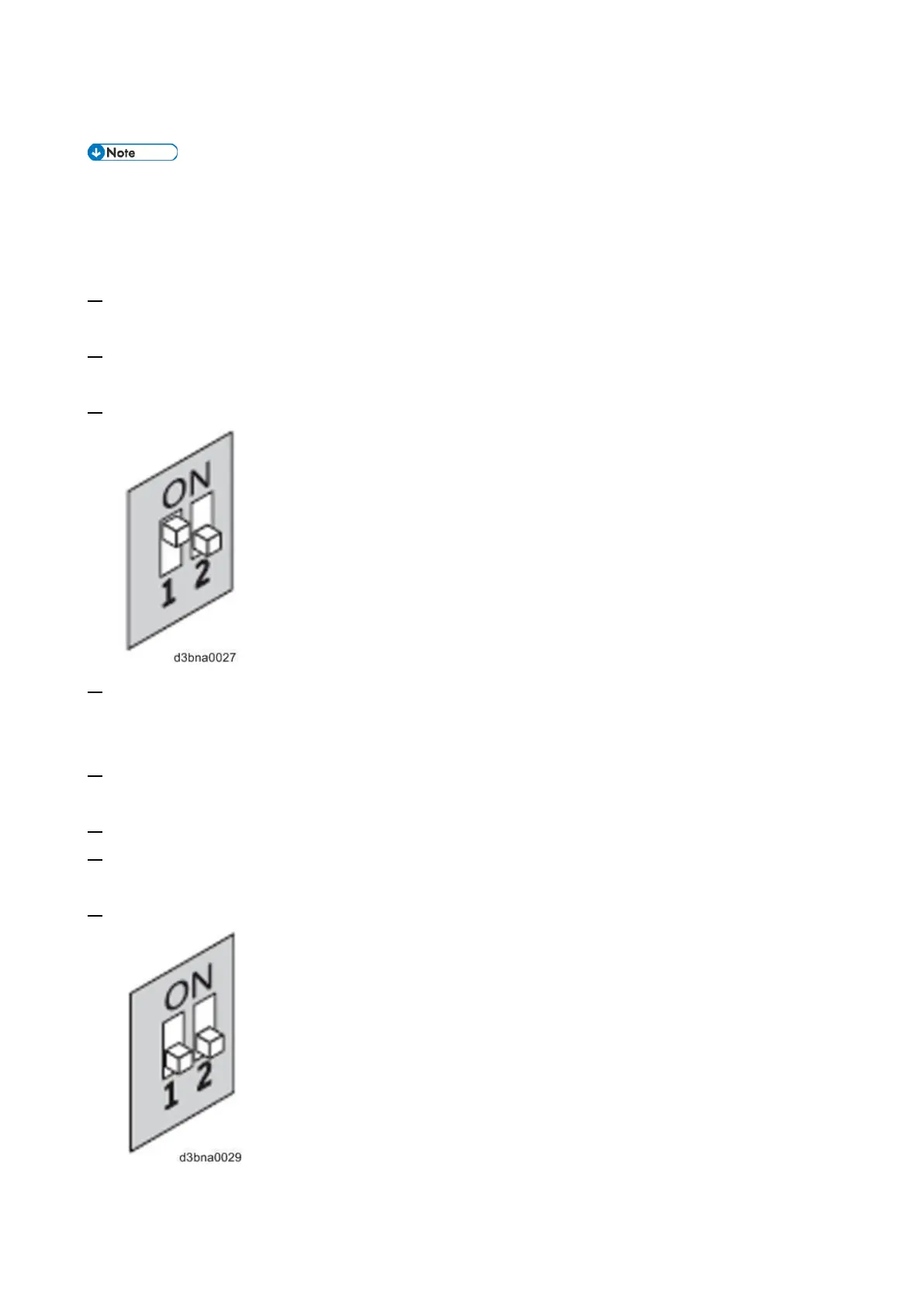
3. Set the E-25C service switches as shown below. (“1” ON, “2” OFF)
4. Connect the USB device to a port on the E-25C.
For the fastest restoration, use a USB 3.0 flash drive. Make sure to connect the flash drive to the
USB 3.0 port at the rear side of the E-25C.
5. Turn the main power switch of the E-25C to ON, then press and release the soft power push button
on the front of the E-25C.
6. Allow the E-25C to boot from the USB device.
7. Wait until the diagnostic LEDs on the rear panel of the E-25C flash “AA” then “00” repeatedly to
indicate ready status.
8. Set the service switches to the following position. ( “1”OFF, “2” OFF)
The diagnostic LEDs display "C0" to indicate that the E-25C is ready to be restored.



 To Next Page