1.Installation
9
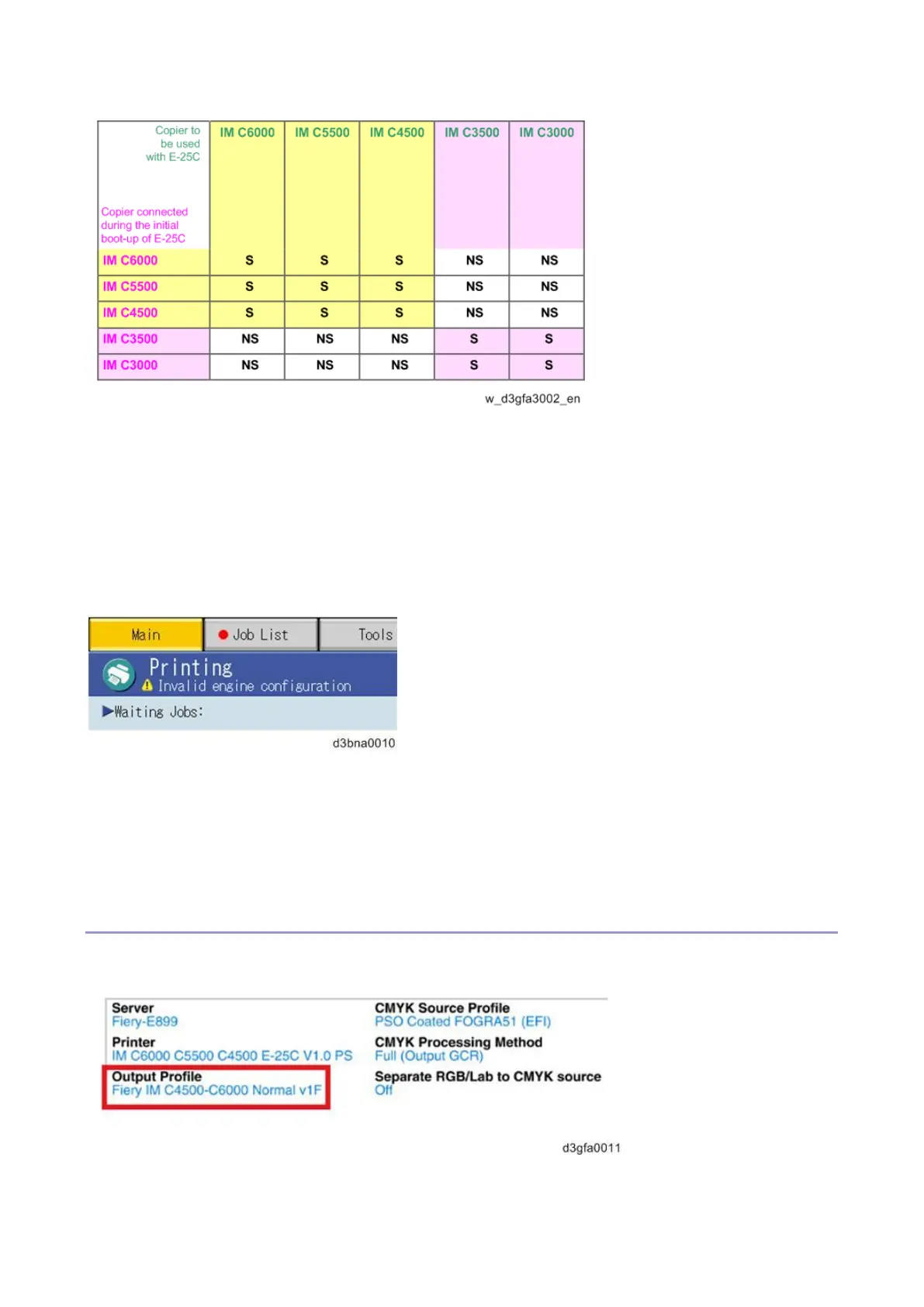
Refer to the above compatibility table, if you plan to pre-install and pre-configure the E-25C before
customer site installation, or if the copier model in use with the E-25C is to be changed.
For example, if the copier in use by the customer is C5500, E-25C needs to be pre-installed and pre-
configured with C5500 or C6000 or C4500.
If the configured E-25C is connected to an incompatible copier model (= NS in the above table) at a
later time, "Invalid engine configuration" error appears on the operation panel as shown below. Printing
is not possible at this state.
To enable printing, re-configure the E-25C with the copier in use, execute the "Factory Default"
(Restoring the E-25C to Factory Defaults) and follow the installation procedure once again.
How to Identify the Copier Model Initially Connected with the E-25C
Check the Output Profile name in the printed PS Test Page, Command WorkStation, etc.



 To Next Page