‐80‐
REMOTE MAINTENANCE BYPASS
Caution: carefully read the “Manual bypass (SWMB)” paragraph
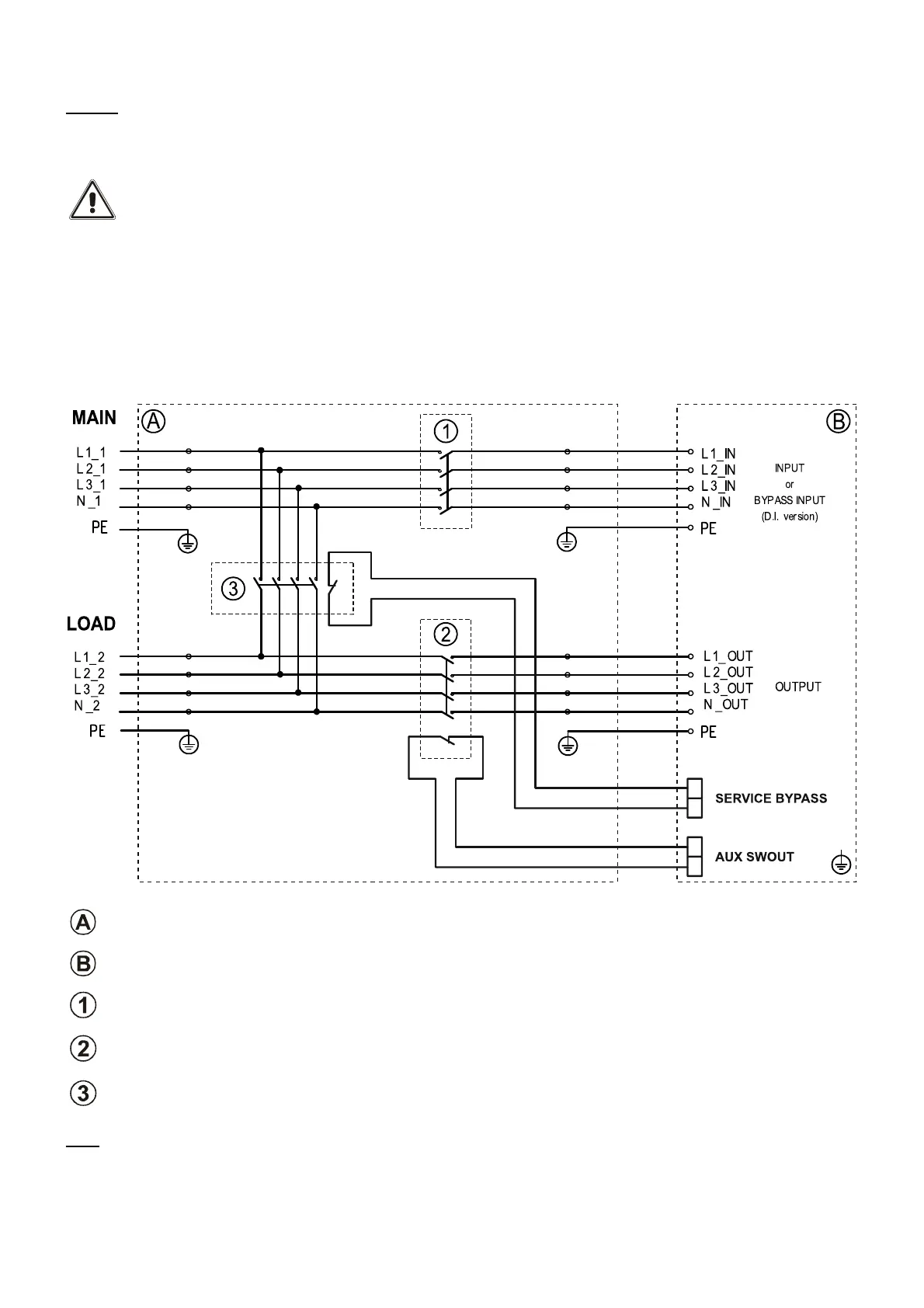
A maintenance bypass (manual bypass) can be installed additionally on a peripheral electrical board (see following diagram).
This allows, for example, UPS replacement without interrupting power to the load.
The "SERVICE BYPASS" terminal (see "Auxiliary contacts section") must be connected to the auxiliary
contact of the REMOTE MAINTENANCE BYPASS SWITCH (3). When this switch closes, an auxiliary contact
signalling insertion of the remote bypass to the UPS must open. Failure to perform this connection can
cause power cut-off to the load and UPS damage.
Use switches and power cables suitable for UPS currents.
Use a double insulation cable with a 1mm2 section for connecting "SERVICE BYPASS" and "AUX SWOUT"
terminals to relative REMOTE MAINTENANCE BYPASS (3) and OUTPUT (2) switch auxiliary contacts.
Verify compatibility between the "Remote maintenance bypass" and neutral connectivity of the system.
REMOTE MAINTENANCE BYPASS INSTALLATION DIAGRAM
Peripheral electrical board
Internal UPS connections
INPUT switch: switch compliant with the specifications given in the “Installation Instructions”
OUTPUT switch: switch compliant with the specifications given in the “Installation Instructions”, with advanced NC
auxiliary contact
SERVICE BYPASS switch: switch compliant with the specifications given in the “Installation Instructions”, with
advanced NC auxiliary contact
Note: If you wish to use the UPS with a separate bypass input, connect the INPUT switch output (1) directly to that line.





 To Next Page