RIGOL
© Copyright RIGOL Technologies, Inc. 2007. 2-33
User’s Guide for DS1000 Series
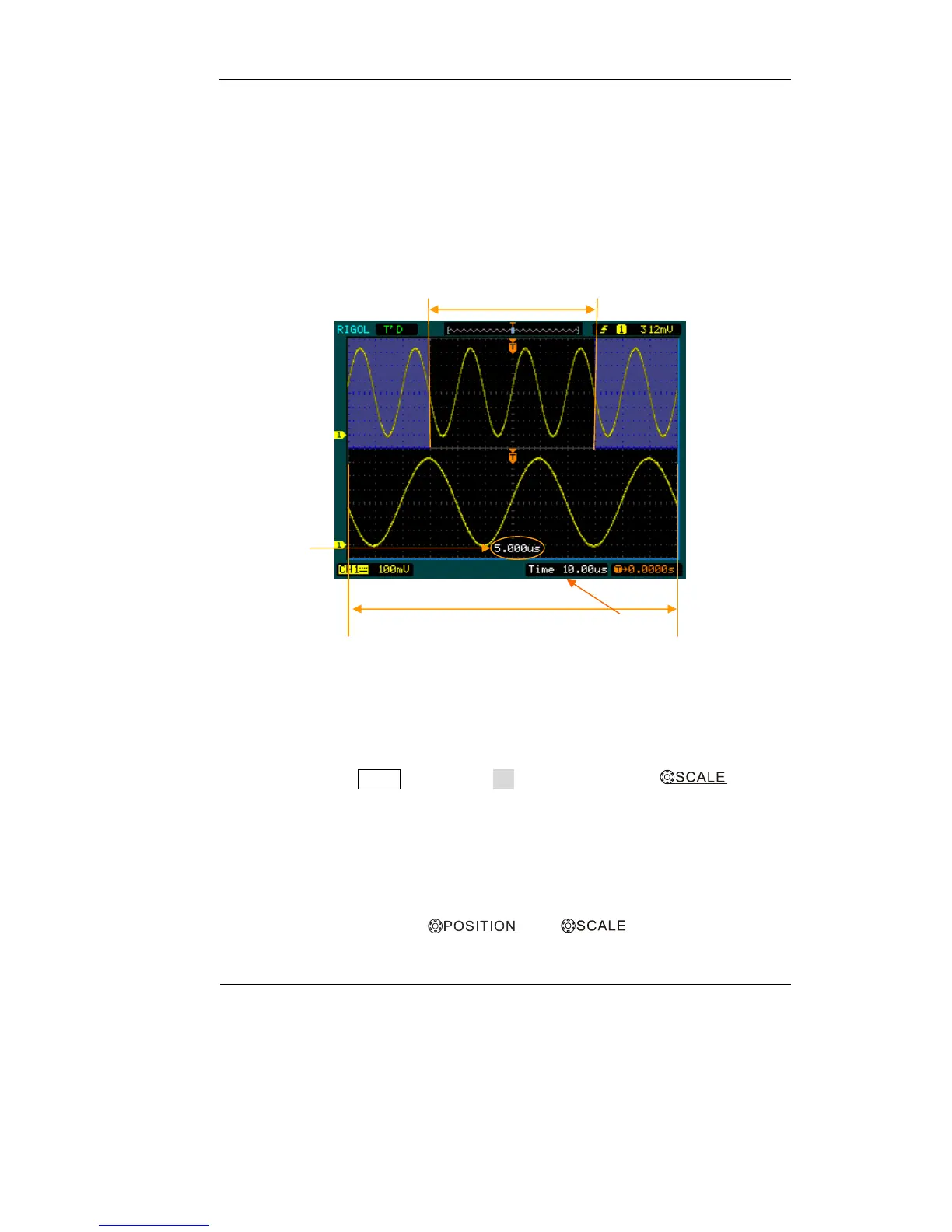
Delayed Scan:
The Delayed Scan is a magnified portion of the main waveform window. You can use
Delayed Scan to locate and horizontally expand part of the main waveform window
for a more detailed (higher horizontal resolution) analysis of signal. Use Delayed
Scan to expand a segment of a waveform to see more details. The Delayed Scan time
base setting cannot be set slower than the Main time base setting.
Figure 2-39: Delayed Scan window
The following steps show you how to use Delayed Scan.
1. Connect a signal to the oscilloscope and obtain a stable display.
2. Press horizontal MENU→Delayed→ON or press horizontal knob to
enter Delayed Scan mode.
The screen is divided into two parts. The upper half displays the main waveform
window and the lower half displays an expanded portion of the main waveform
window. This expanded portion of the main window is called the Delayed Scan
window. Two blocks shadow the upper half; the un-shadowed portion is expanded in
the lower half. The horizontal
and knobs control the size
Waveform to be horizontally expanded
Expanded waveform in horizontal
Main timebase
Time base of
Delayed Scan












 To Next Page