EasyManua.ls Logo

Robustel R3000 Quad - Network > Route

Robustel R3000 Quad
131 pages
Print Icon
To Next Page IconTo Next Page
To Previous Page IconTo Previous Page
Loading...
Robustel R3000 Quad User Guide
RT_UG_R3000 Quad_v.3.0.0 28 May, 2017 63 / 131
Confidential
3.13 Network > Route
This section allows you to set the static route. Static route is a form of routing that occurs when a router uses a
manually-configured routing entry, rather than information from a dynamic routing traffic. Route Information
Protocol (RIP) is widely used in small network with stable use rate. Open Shortest Path First (OSPF) is made router
within a single autonomous system and used in large network.
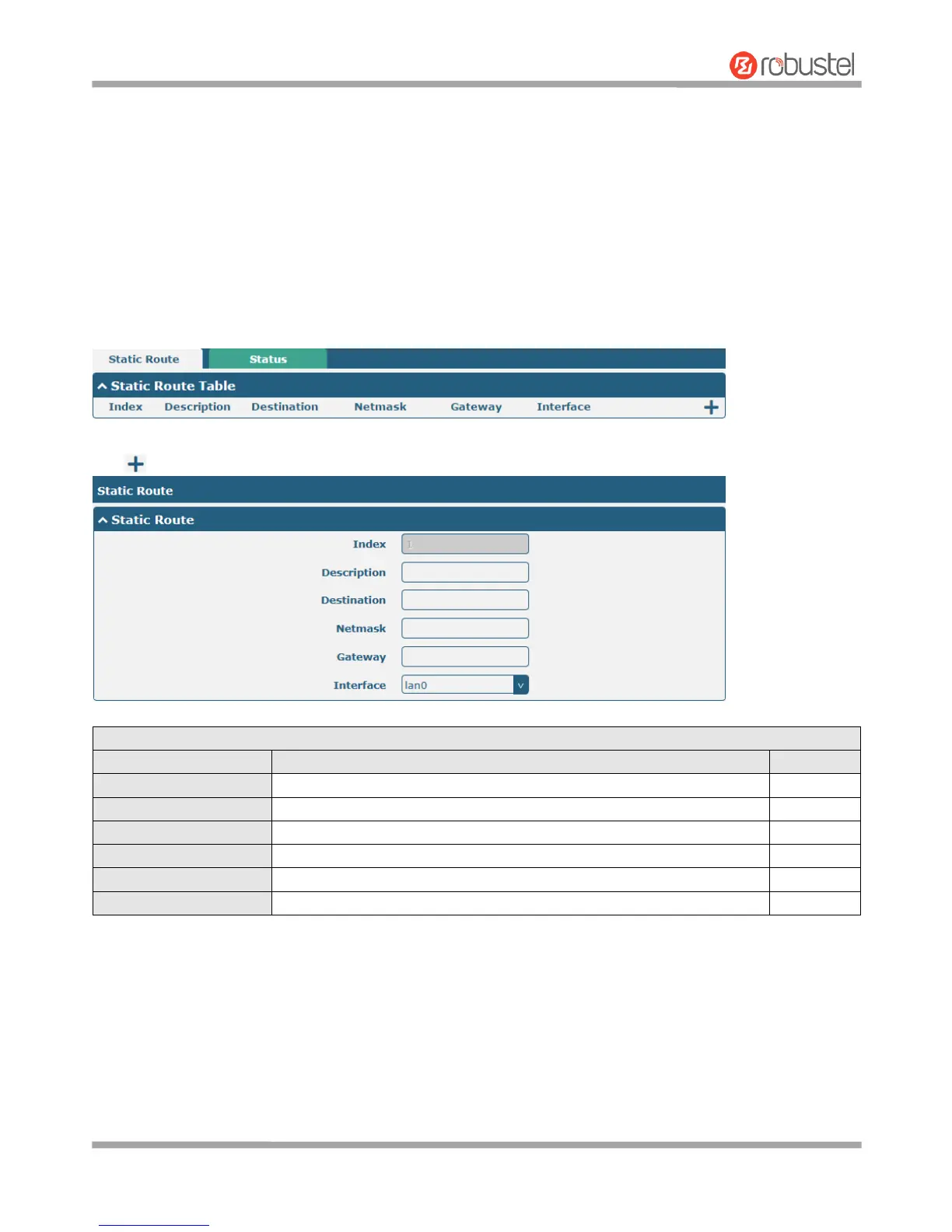
Static Route
Click to add static routes. The maximum count is 20.

Static Route
Item
Description
Default
Index
Indicate the ordinal of the list.
--
Description
Enter a description for this static route.
Null
Destination
Enter the IP address of destination host or destination network.
Null
Netmask
Enter the Netmask of destination host or destination network.
Null
Gateway
Define the gateway of the destination.
Null
Interface
Choose the corresponding port of the link that you want to configure.
wwan

Other manuals for Robustel R3000 Quad

Related product manuals