Robustel R3000 Quad User Guide
RT_UG_R3000 Quad_v.3.0.0 28 May, 2017 98 / 131
Confidential
receive from a Web client. If you configure the router with other HTTPS Port
number except 443, only adding that port number then you can login router’s
Web Server.
Note: HTTPS is more secure than HTTP. In many cases, clients may be
exchanging confidential information with a server, which needs to be secured in
order to prevent unauthorized access. For this reason, HTTP was developed by
Netscape corporation to allow authorization and secured transactions.
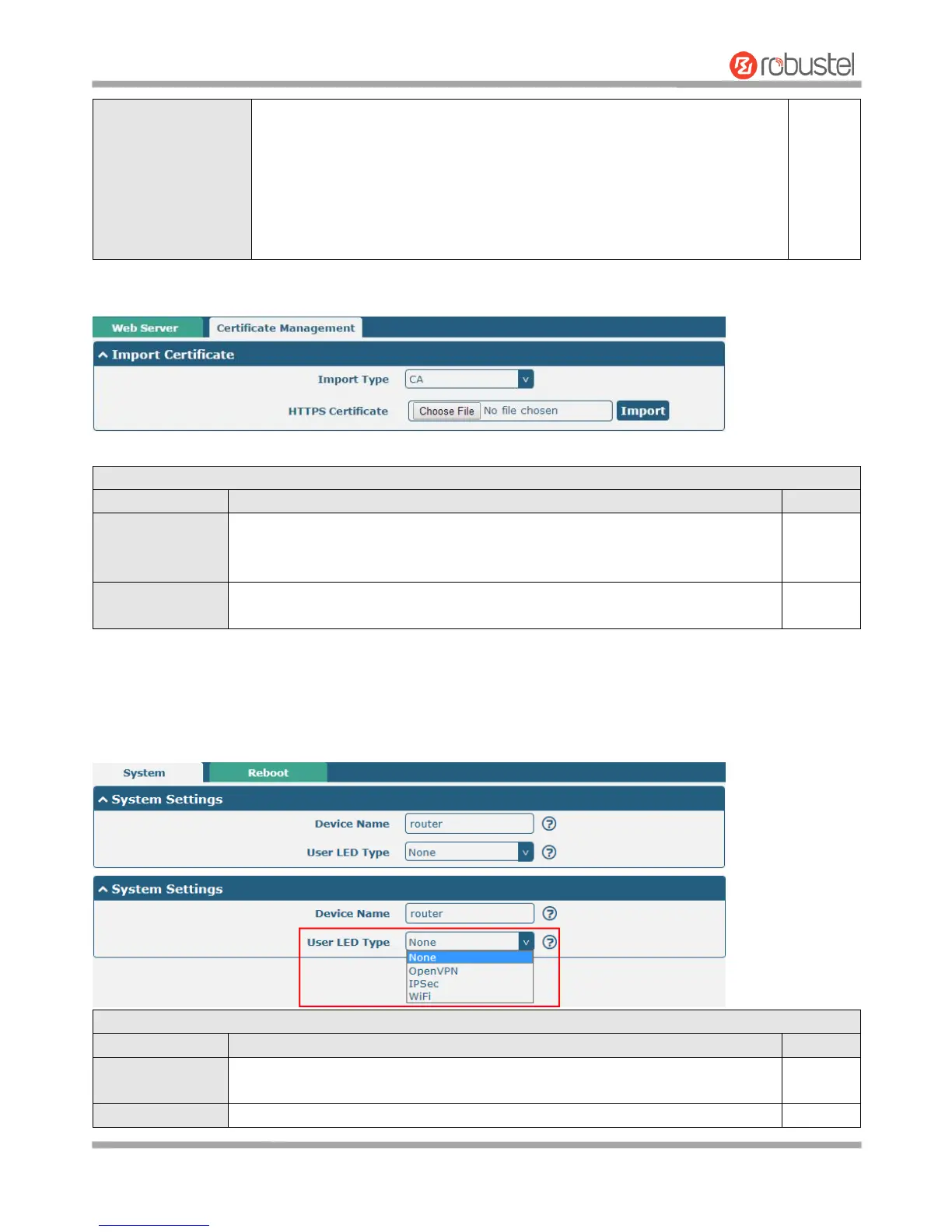
This section allows you to import the certificate file into the route.
Select from “CA” and “Private Key”.
CA: a digital certificate issued by CA center
Private Key: a private key file
Click on “Choose File” to locate the certificate file from your computer, and then
click “Import” to import this file into your router.
3.28 Services > Advanced
This section allows you to set the Advanced and parameters.
Set the device name to distinguish different devices you have installed; valid
characters are a-z, A-Z, 0-9, @, ., -, #, $, and *.
Specify the display type of your USR LED. Select from “None”, “OpenVPN”,













 To Next Page