Reference Manual
00809-0100-4738, Rev DA
May 2006
4-15
Rosemount 3095FB
Setup > Send Config…
Downloads the currently used configuration file to the transmitter.
Setup > Receive Config…
Uploads the configuration file from the transmitter to the User Interface
Software.
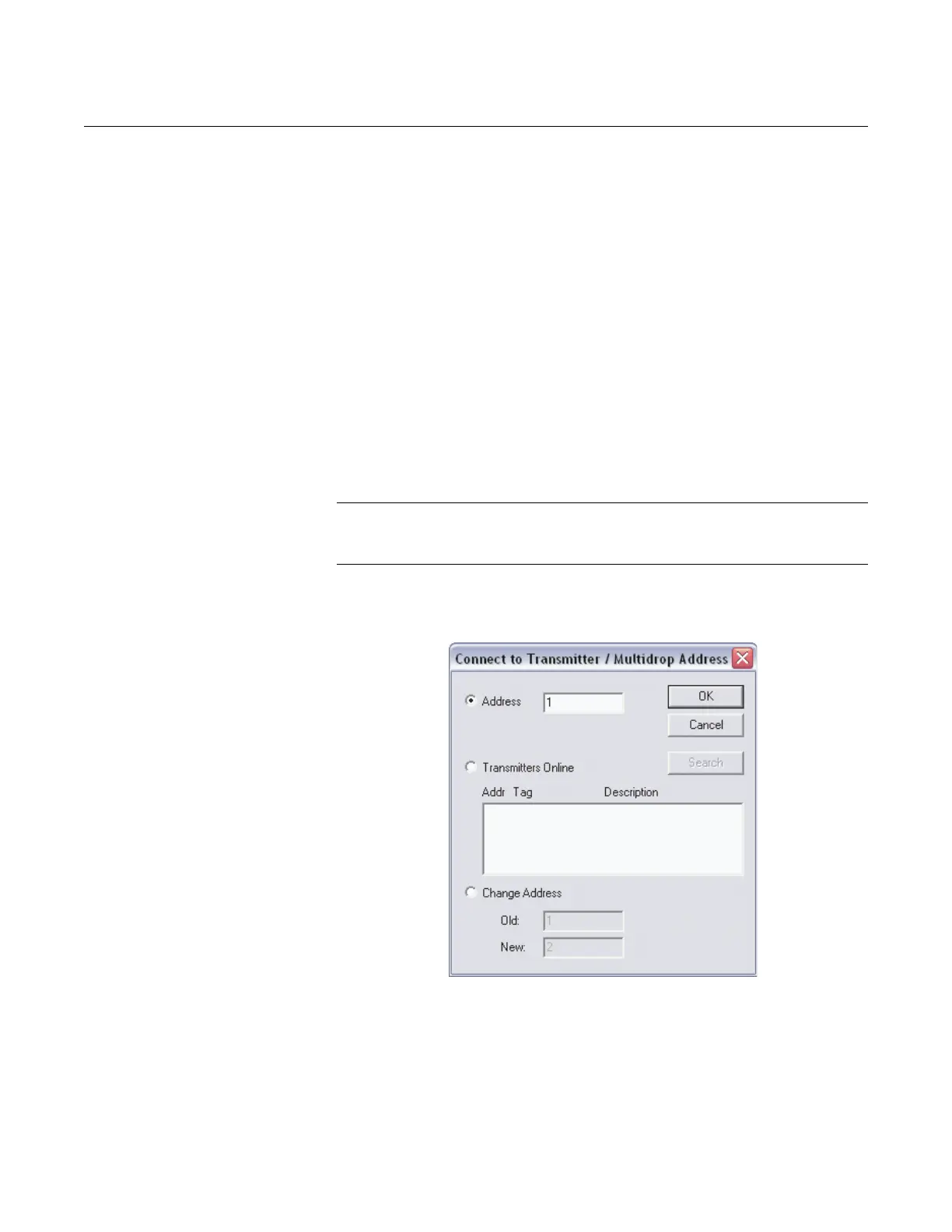
Transmitter Menu Connect…
• Address: If you know the address for the transmitter that you want the
User Interface Software to talk to, type it in and click OK to connect.
• Transmitters Online: To view all of the transmitters that are currently
on the bus, select Transmitters Online and click search. A list of
available transmitters will appear. Select the desired transmitter from
the list and click OK to connect.
• Change Address: To change the address for a particular transmitter
on the RS485 bus, select Change Address. Type in the transmitter’s
old address, and assign it a new one. Click OK to implement changes.
NOTE
In a multidrop installation, each transmitter must have a different address.
These addresses should be set before a transmitter is connected to the bus.
Figure 4-14. Connect Screen
Disconnect
If the Setup menu selections are grayed out, this indicates that the User
Interface Software is currently connected with a 3095FB transmitter. Click
Transmitter > Disconnect to disconnect the software from the transmitter,
which will then enable the Setup menu selections.











 To Next Page