EasyManua.ls Logo

Rosemount 3144P - Troubleshooting Guides

Rosemount 3144P
170 pages
Print Icon
To Next Page IconTo Next Page
To Previous Page IconTo Previous Page
Loading...
Reference Manual
00809-0100-4021, Rev FB
August 2011
4-29
Rosemount 3144P
FOUNDATION Fieldbus
TROUBLESHOOTING
GUIDES
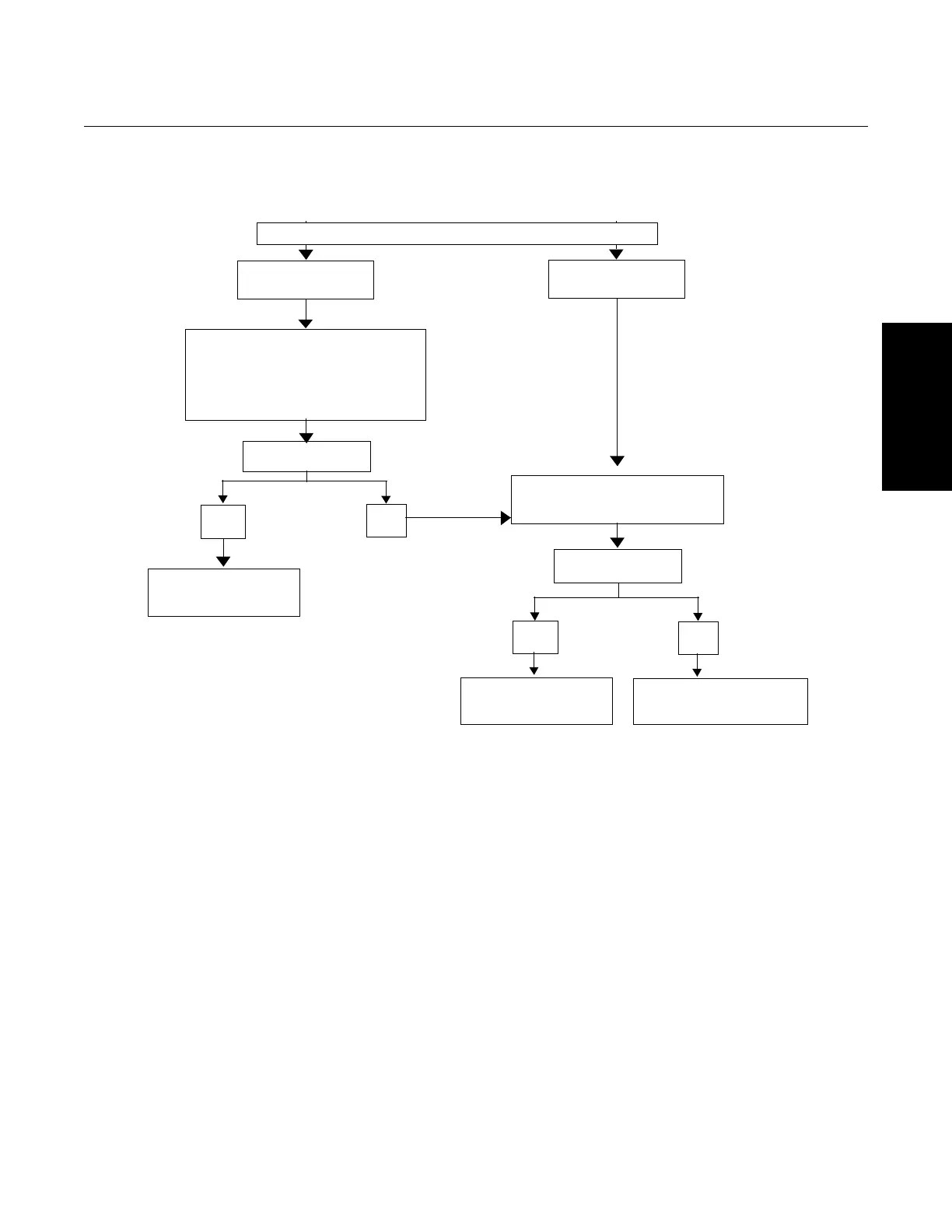
Figure 4-4. 3144P troubleshooting flowchart
Device does not
appear on segment.
Problem Identified?
Yes
No
Perform Recommended
Action, see Table 4-12.
Check Segment, see “Device
does not stay on segment” in
Table 4-12 for more information.
Problem Identified?
Yes
No
Perform Recommended
Action, see Table 4-12 on
page 4-30.
If the problem persists
contact a sales
representative.
PROBLEMS WITH COMMUNICATIONS
Device does not
stay on segment.
1. Check wiring to device.
2. Recycle power to device.
3. Electronic failure.
Refer to “Device does not show up on
segment” in Table 4-12 for more
information.
Aotewell Ltd
www.aotewell.com
Industry Automation
HongKong|UK|China
sales@aotewell.com
+86-755-8660-6182

Table of Contents

Other manuals for Rosemount 3144P

Related product manuals