R5 SOLID AIS System
OPERATION
7000 118-200, C2 Page 42
knots, otherwise 1W mode will be automatically disengaged. The Tanker 1W
mode is fully automatic and cannot be disengaged by other external control.
4.8 View Remote Ship Information
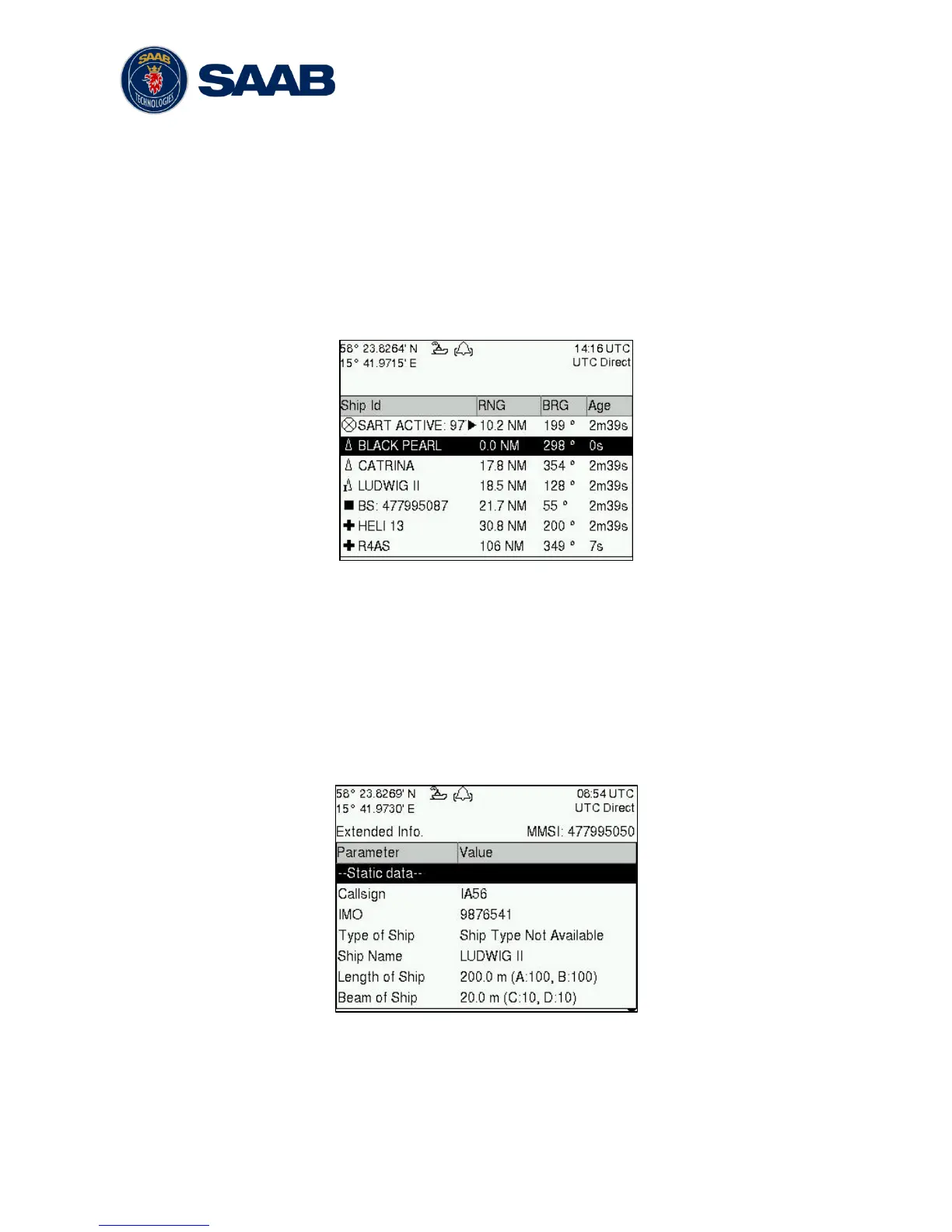
The R5 SOLID will power up in Target List view. This view, also referred to as the minimal
display, is accessed from the Main Menu view. The Main Menu view can be reached by
pressing ESC repeatedly from any other view. The Target List view displays a list of all
targets sorted by range from own ship (closest first). The list includes MMSI or ship’s
name (Ship Id), range (RNG), bearing (BRG) and time since last report was received
(Age) for each AIS target received by the system.
Figure 13 – Target List
The OPT button can be used in the Target List view to send a safety related message
(SRM) to the selected target. For more information about AIS messages, refer to section
4.12.
For extended information about a target in the list, select the ship with the ∧ ∨ key and
press ENTER.
The Extended Information view includes static, dynamic and voyage related data for the
selected target. In this view it is also possible to query for static and voyage data as well
as persons on board information by using the OPT button.
Figure 14 – Extended Info
Press ESC to return to Target List view.



 To Next Page