R5 SOLID AIS System
OPERATION
7000 118-200, C2 Page 50
4.21 GPS Status
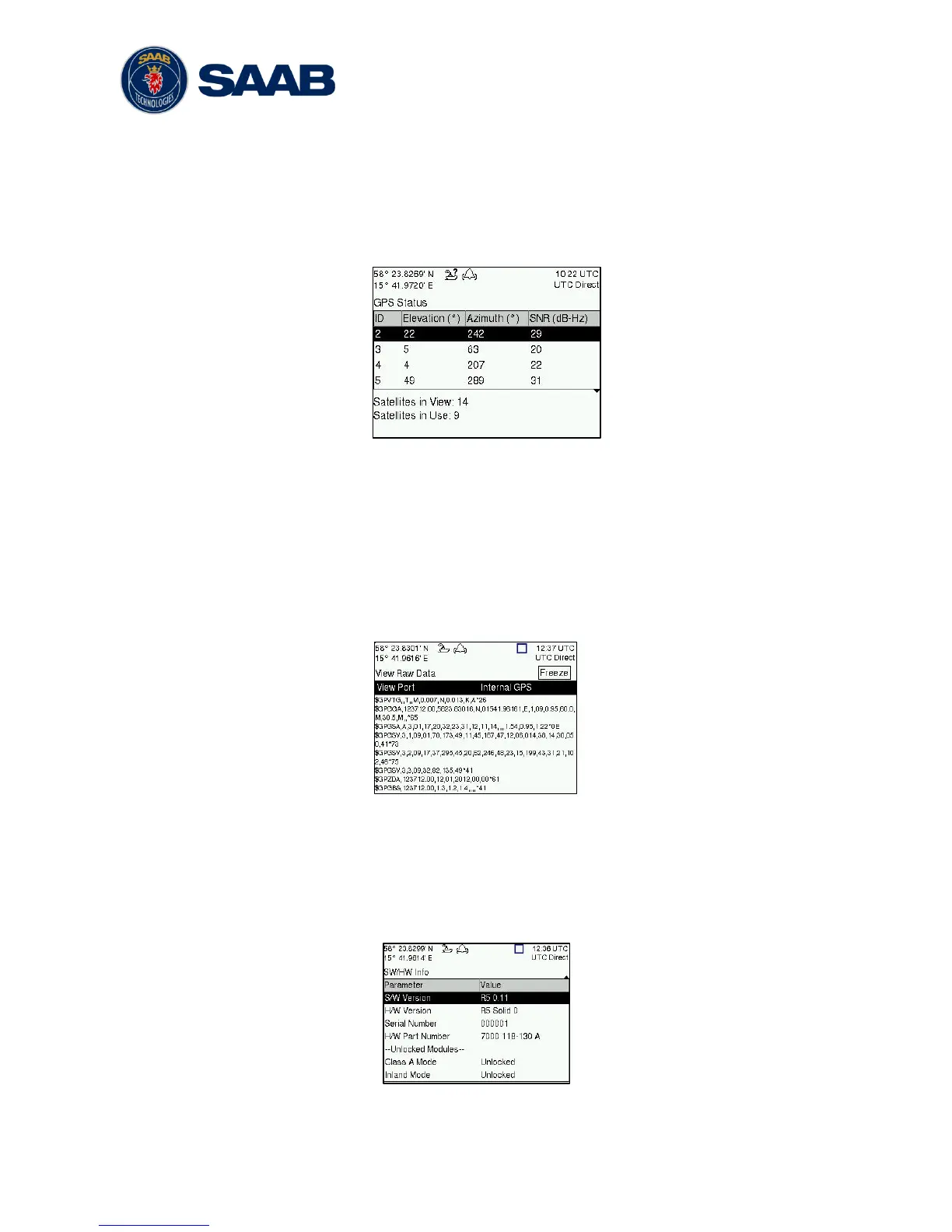
This view displays the satellites received by the R5 SOLID internal GPS receiver. The list
is sorted by the satellites ID (PRN number) and shows elevation, azimuth and signal to
noise ratio (SNR) for each satellite. The view also displays the total number of satellites in
view and the total number of satellites used in the position calculation reported by GGA
sentence.
Figure 29 – GPS Status
4.22 View Raw Data
This view displays the incoming data on the selected serial port. It is also possible to
pause the data on the screen by pressing the “Freeze” button. Use the ARROW KEYPAD
buttons ∧ ∨ to navigate to the Freeze button and press ENTER. The View Raw Data view
can be a helpful tool when trouble shooting the system to see what sensor input is actually
received on each port. The view can be accessed from Main Menu Status View Raw
Data.
Figure 30 - View Raw Data
4.23 SW/HW Info
This view displays the software and hardware revisions for the R5 SOLID and is accessed
from Main Menu
Status
SW/HW Info. NOTE: This information should always be
provided when in contact with Saab TransponderTech support.
Figure 31 - SW/HW Info



 To Next Page