R5 SOLID AIS System
OPERATION
7000 118-200, C2 Page 43
4.9 View Plot of Targets
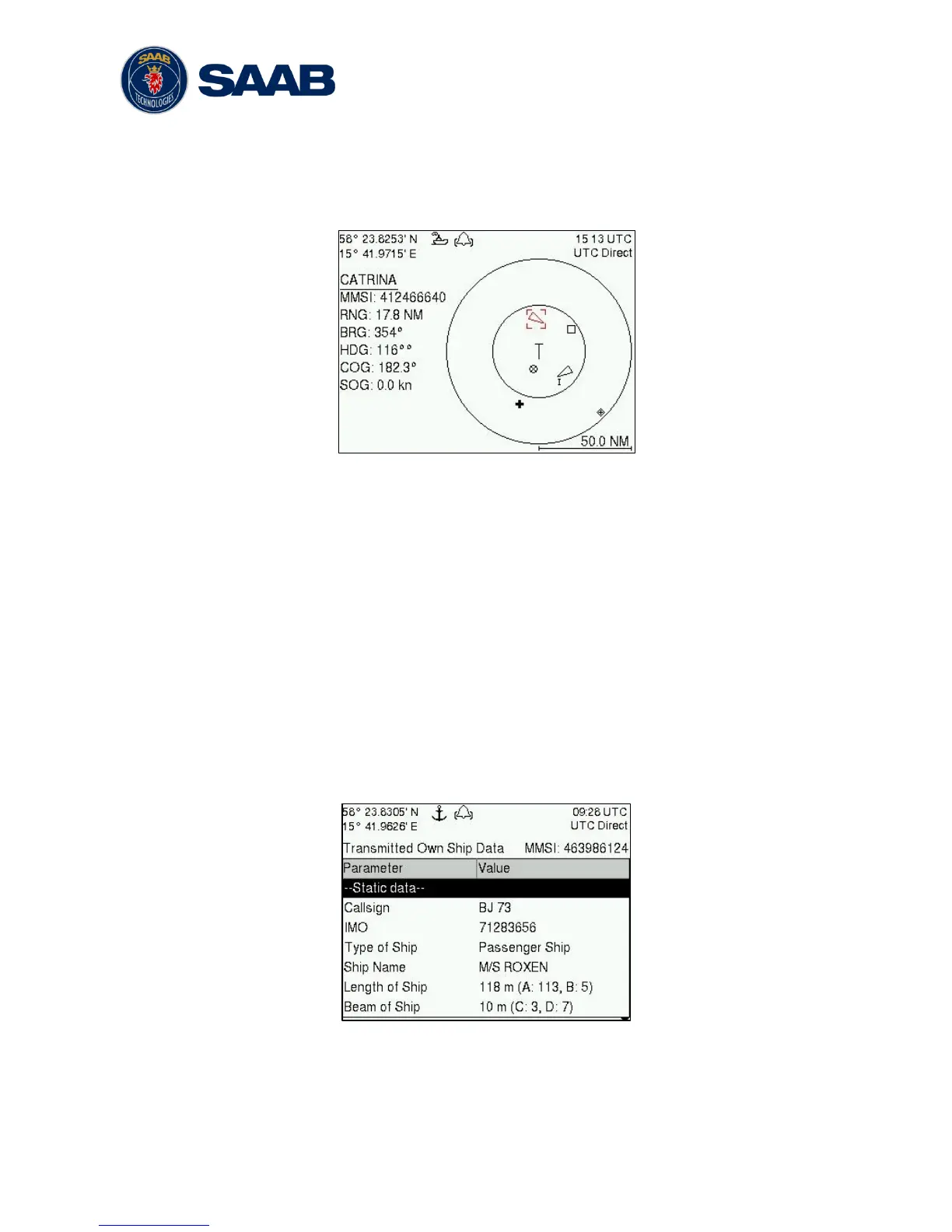
The location of targets relative to your own ship is visualized in the Plot view. The view is
accessed from the Main Menu view. Use the ARROW KEYPAD < > to select any of the
targets on the display or ∧ ∨ to Zoom In and Zoom Out.
Figure 15 – Target Plot
For extended information about a target select it using the < > key and press ENTER.
The own ship target is displayed as a ‘T’ shaped symbol. Class B targets are indicated by
a ‘B’ appended to the target icon and Inland targets are indicated by either an ‘I’ or by a
blue sign symbol appended to the target (not shown in the figure above).
The OPT button can be used in the Plot view to send a safety related message (SRM) to
the selected target. For more information about AIS messages, refer to section 4.12.
4.10 View Transmitted Own Ship Information
The information transmitted by the R5 SOLID on the VHF link is viewed in the Transmitted
Own Ship Data view. This view is accessed from Main Menu
Status view and includes
the static, dynamic and voyage related data actually sent by the R5 SOLID. The view
reflects the contents of the last transmitted AIS message, thus there may be some delay
from the time the parameters are changed until they are displayed in the Transmitted Own
Ship Data view.
Figure 16 – Transmitted Own Ship Data



 To Next Page