© Safe Fleet | 2020 | All rights reserved | Part #: 700-1213 R1
DH4C Installation Guide
p. 20
DH4C Administration
ICON NAME FUNCTION
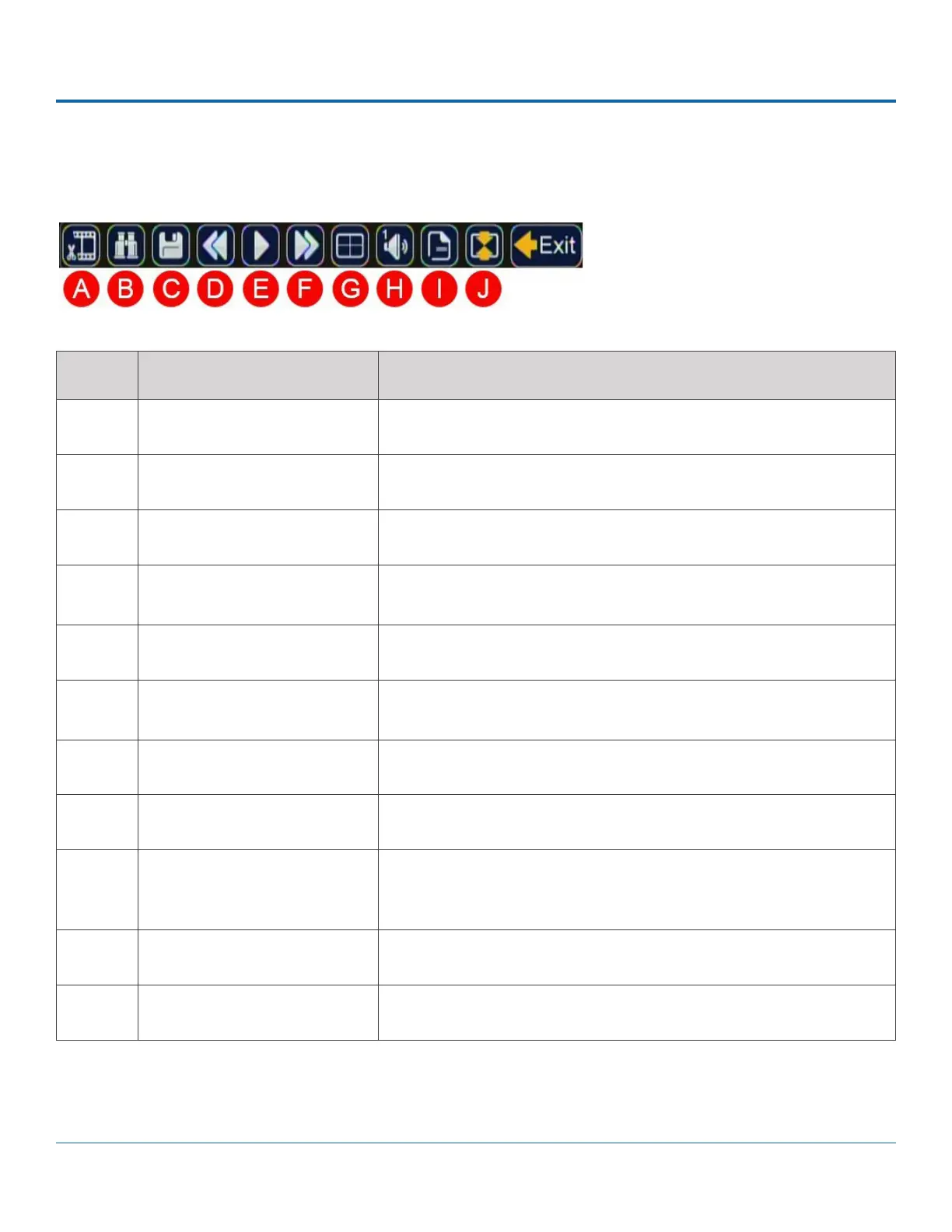
A Start of clip/End of clip Sets the start of clip and the end of clip points for archiving.
B Search Searches by Date, Time, Alarm, Signals, or System Event.
C Archive Displays the Archive window to save a video clip to USB memory device.
D Fast Rewind Reverses playback. With playback paused, each click reverses the video
by one frame.
E Play/Pause Starts/pauses playback.
F Fast Forward Fast forwards playback. With playback paused, each click advances the
video by one frame.
G Individual Camera/Multi-view Displays a single camera feed (1, 2, 3, or 4), or multi-view (all 4 cameras).
H Audio Cycles through Audio for channel 1, 2, 3, 4, 5, or 6.
I Metadata Text Overlay Turns on text overlay: temperature, system voltage, GPS data (if recorded),
speed, date, and time. For more information, see Metadata Details in
DH4C Conguration: Title/Display Menu.
J Show/Hide Playback Tool Bar Shows/hides the playback tool bar.
Exit Closes the On-Screen Display
Playback Toolbar
The image below shows the Playback Toolbar. The corresponding features are explained in the following table.



 To Next Page