06-2017
CAP. 5
19 / 24
OPERA
Operation of the machine
EN
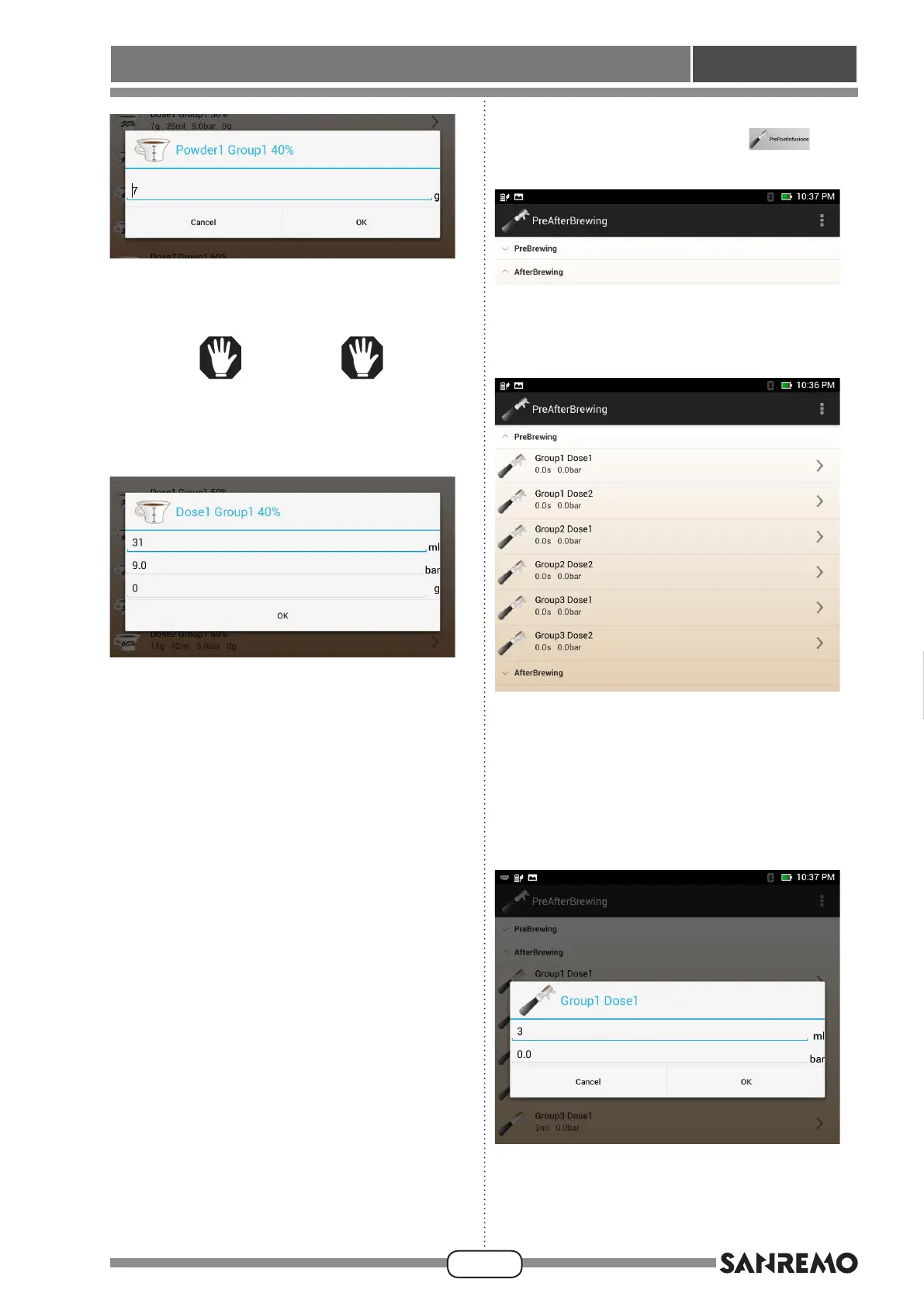
• Use the keyboard to set the grams of coffee powder
thatwillbeputonthelter,thenpress“OKtoconrm
the selection and move to the next screen.
WARNING
When “g” parameter grams are pro-
grammed the priority is given to the scale
use. Priority is given to scale use.
• Use the keyboard to set the water “ml” that will be
dispensed by the machine and the desired dispens-
ing pressure.
Press“OK”toconrmandreturntothemain“Doses”
screen.
• Operate in the same way for all types of dispensing
and all units on the machine.
Pre- and Post-infusion
• Press the “Pre- and Post-infusion”
button
to display the following screen:
• Pressthe“Pre-infusion”eldtodisplaythefollowing
screen:
• This screen shows the values set for each type of
dispensing (one or two coffees) and for each unit in
the machine.
Press the “>” arrow on the right of the screen, near
the dispensing type to be edited, e.g. “ Dose 1 Unit
1” to set data to pre-infuse one coffee dispensed
from unit 1 and to display the following screen:








 To Next Page