PY Manual Copyright © 2006 SANYO DENKI AMERICA, Inc.
72
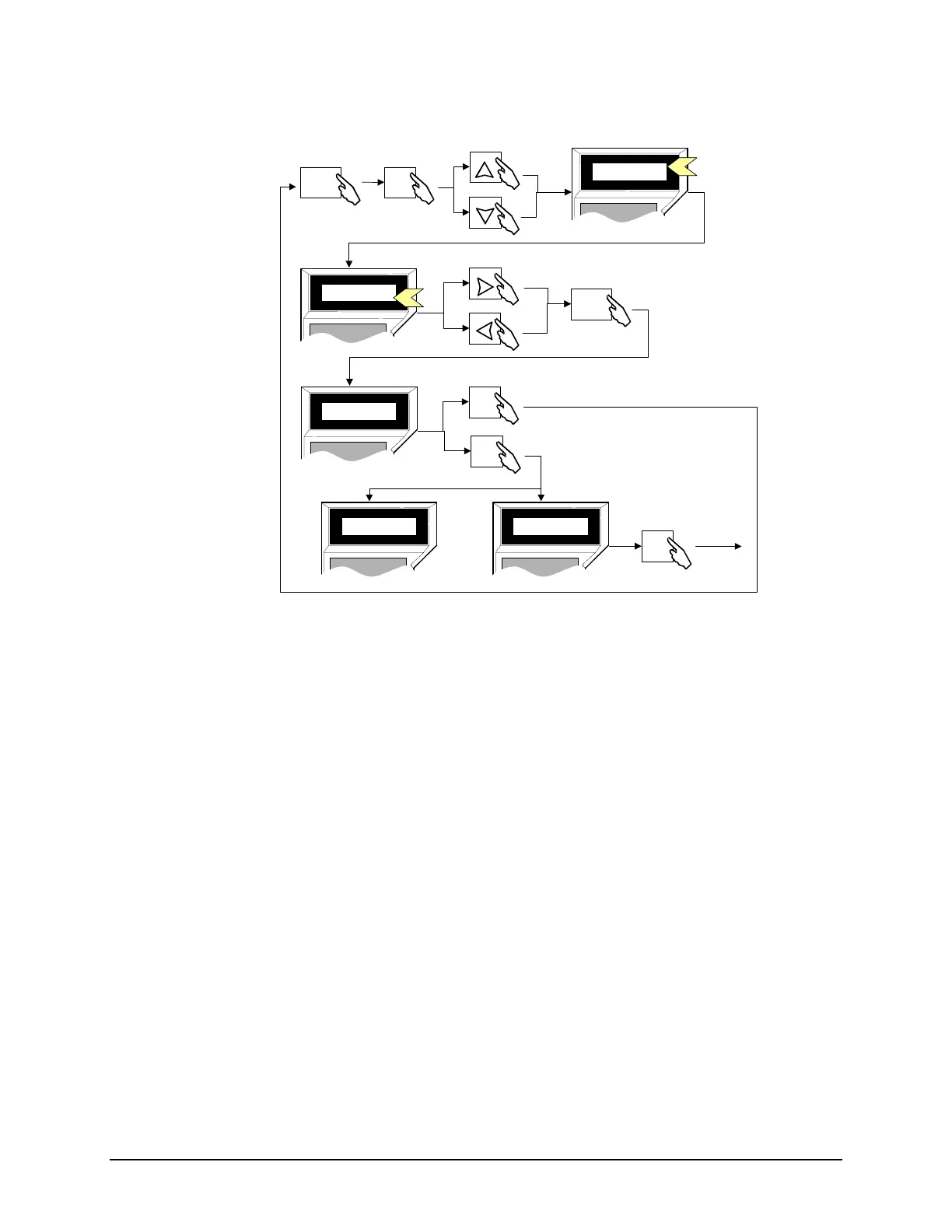
5. Enter test mode, press [ON / Mode] and then press
7.
6. On page 1, choose the desired level of performance: high, medium, or low. For the
longest mechanical life, and quietest operation, choose the lowest performance
setting that will still meet the application requirements. High performance settings
require rigid mechanical systems and cause the highest stresses and strains to the
mechanical components.
7. To abort auto-tuning, press
0. To start auto-tuning, press 3.
8. At the conclusion of auto-tuning, the proper parameter values are automatically
stored into nonvolatile memory.
9. If an error occurs during auto-tuning, the word ERROR appears on the Remote
Operator. Mechanical problems are the most common cause of an error during auto-
tuning (drivetrain backlash or compliance).
Operations after Auto-Tuning with the Remote Operator
Upon exiting the Test Mode, an OVF (Deviation Over) alarm occurs. However, this
alarm is not entered into the alarm history.
Next
Inc.
Dec.
Before
MODE
ON
3
C
2
0
WR
SANYO DENKI
REMOTE OPERATOR
*Test 1
Tune Complete
SANYO DENKI
REMOTE OPERATOR
*Test 1
Tune Error
SANYO DENKI
REMOTE OPERATOR
*Test 1
Tune Rdy Y=3,N=0
SANYO DENKI
REMOTE OPERATOR
*Test 1
Tune Set Lo
SANYO DENKI
REMOTE OPERATOR
*Test 1
Tune Set Lo
0
Enter Tuning, Page 7
Set Rigidity
Save Setting
Start Auto-Tuning
bort
Enter Test Mode
Successful
Completion
Error
Disable
Artisan Technology Group - Quality Instrumentation ... Guaranteed | (888) 88-SOURCE | www.artisantg.com



 To Next Page